Validate a NestJS request without trusting TypeScript types
Validate runtime JSON with NestJS DTO classes and ValidationPipe, choosing explicit coercion and unknown-field behavior instead of trusting TypeScript types.

A TypeScript annotation does not validate a JSON request at runtime. For a developer building a first NestJS endpoint, use a concrete DTO class with validation rules and a configured ValidationPipe. Then decide whether the endpoint rejects values of the wrong type or deliberately converts them. Those are different contracts, even when both end with a TypeScript number inside the handler.
The NestJS validation guide documents the pipe and its integration with class-validator and class-transformer. The example below assumes those packages are installed in a NestJS application. It describes an illustrative order endpoint, not a verified configuration of Minh’s production services.
A type disappears before the request arrives
Consider a handler that accepts an interface containing quantity: number. TypeScript can check calls within compiled application code, but an HTTP client does not participate in that compilation. It can send {"quantity":"two"}, {"quantity":null} or a nested object. The parser produces JavaScript values from the bytes it received.
Interfaces also do not exist as runtime constructors. A validation mechanism that relies on class metadata needs a class it can inspect. Import the DTO as a runtime value where the framework needs that metadata; a type-only import cannot supply a constructor after compilation.
A simple DTO can require a nonempty SKU and a bounded integer quantity:
import { IsInt, IsString, Length, Max, Min } from 'class-validator';

export class CreateOrderDto {
  @IsString()
  @Length(1, 80)
  sku!: string;

  @IsInt()
  @Min(1)
  @Max(100)
  quantity!: number;
}
The quantity limit is an example policy, not a universal order limit. The string length bound also does not establish that the SKU exists. Those are separate questions for later domain logic.
Choose unknown-field behavior explicitly
A pipe can strip properties that have no validation decorators when whitelist is enabled. With forbidNonWhitelisted, it can reject such properties instead. For a public write API, rejection often makes client mistakes easier to discover than silently discarding fields.
import { ValidationPipe } from '@nestjs/common';

app.useGlobalPipes(new ValidationPipe({
  whitelist: true,
  forbidNonWhitelisted: true,
  transform: false
}));
This configuration intentionally does not enable general request-value transformation. A JSON number such as 2 and a JSON string such as "2" remain different inputs under the DTO’s integer rule. Verify this behavior with the actual versions in your project, particularly if another global transform option or custom pipe is already configured.
Whitelisting follows validation metadata, not every property declared in the class. If a legitimate field has no validation decorator, it can be treated as non-whitelisted. Review the DTO and pipe together rather than assuming class declarations alone define the accepted request language.
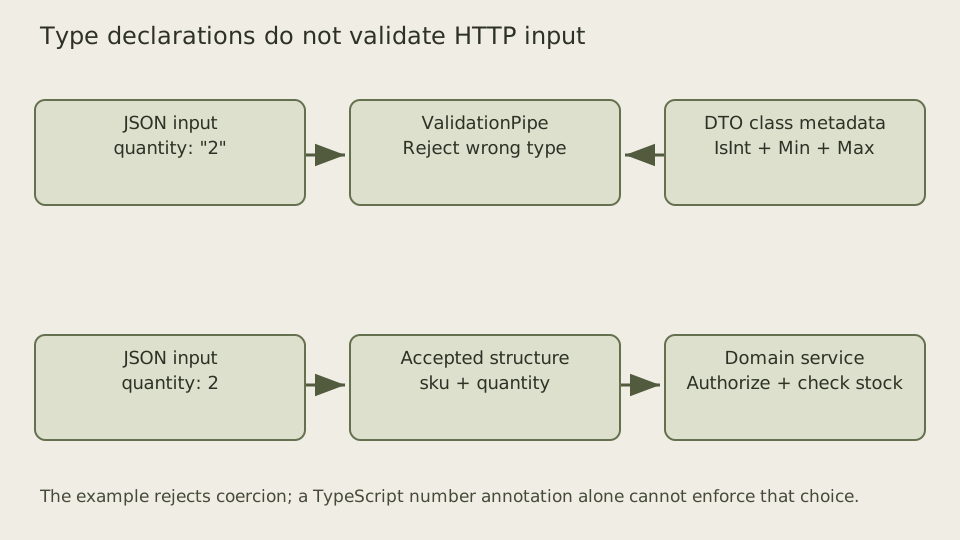
The pipe protects the handler’s structural assumptions. The business operation still needs authorization and durable state checks.
Inspect the value returned by the configured pipe
A small fixture can call the same pipe directly with the concrete DTO constructor. This tests the validation boundary without claiming that an HTTP controller, authentication guard or database service has been deployed. Compile the DTO with the decorator and metadata settings used by your Nest application, and load reflect-metadata before the decorated class is evaluated.
const pipe = new ValidationPipe({
  whitelist: true,
  forbidNonWhitelisted: true,
  transform: false
});
const output = await pipe.transform(
  { sku: 'sku-1', quantity: 2 },
  { type: 'body', metatype: CreateOrderDto }
);
console.log(output.quantity, output instanceof CreateOrderDto);
// With the tested configuration: 2 false
With Nest common 11.1.6, class-validator 0.14.2 and class-transformer 0.5.1, the accepted value was a plain object containing a numeric quantity. It was not an instance of CreateOrderDto. The DTO describes the accepted structure, but transform=false does not promise a DTO instance to the handler. Avoid putting business methods on a request class and calling them merely because the handler’s annotation names that class.
The fixture accepted quantities 1 and 100 and rejected zero, 101, fractions, null, a missing quantity and a numeric string. An extra role field was rejected under forbidNonWhitelisted. These are the rules of this example configuration, not every possible ValidationPipe setup. The test inspected values and the exception status, rather than depending on the library’s exact English error wording.
The whitespace-only SKU string also passed these structural decorators. Length checks do not establish that a value names a real catalogue item, and this DTO does not trim strings. If the product forbids whitespace-only names, choose that rule explicitly and test it. If it preserves spaces as meaningful identifiers, silently trimming would be a different bug. The later SKU lookup must still decide whether a structurally valid identifier exists and is available to the caller.
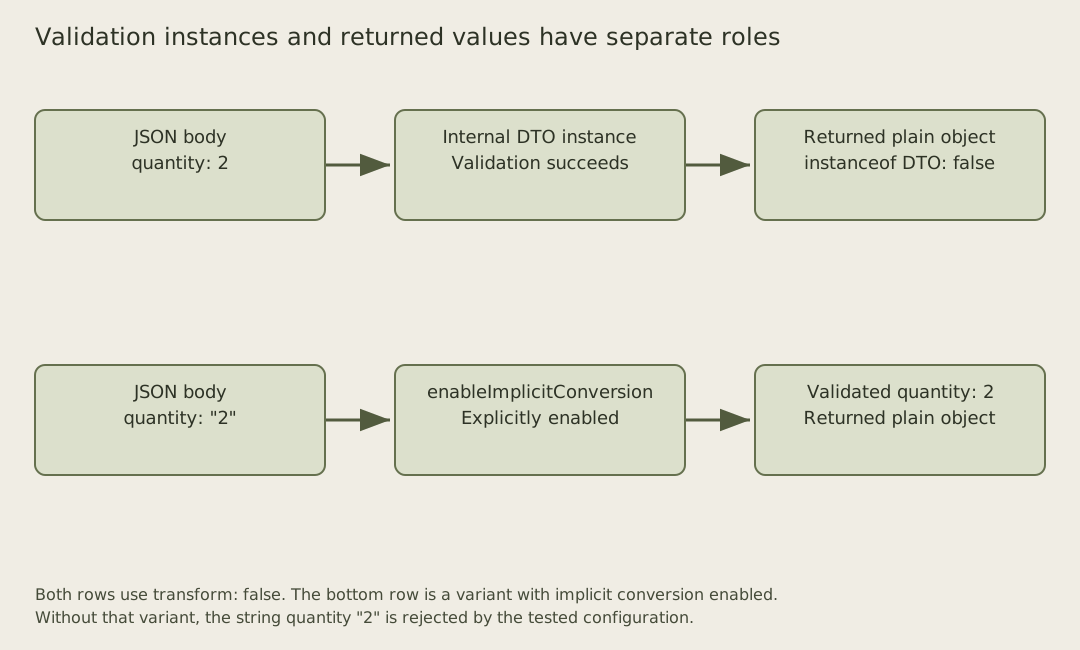
The versioned ValidationPipe implementation constructs an instance for validation even when the returned-value transformation flag is false. In this configuration it then converts the validated instance back to a plain object. Consequently transform=false is not a blanket guarantee that no conversion can occur anywhere inside the pipeline. An explicit type-transform decorator or enableImplicitConversion option can change the values examined by validators.
In a separate controlled variant, enabling implicit conversion accepted the string quantity “2” as the number 2, even with the returned-value flag false. Simply changing transform to true without enabling implicit conversion still rejected that numeric string for this body DTO. The class-transformer documentation describes implicit conversion as a separate option that is disabled by default. Inspect both settings and the DTO decorators when diagnosing a surprising accepted request.
Conversion is a product decision
Query parameters and path parameters arrive as strings. An endpoint can intentionally parse a page number into an integer, but it should define how it treats whitespace, signs, decimals and out-of-range values. A parser accepting "2.5" and truncating it to 2 has changed the client’s request.
For JSON bodies, clients can already send true JSON numbers and booleans. Automatically converting every string can hide a client bug. JavaScript truthiness is particularly unsuitable for interpreting a textual boolean: a nonempty string containing "false" is truthy. Use a narrowly specified parser when textual boolean input is part of the contract.
If transformation is enabled, test the transformed value that reaches the handler as well as the HTTP response. A response-only test can pass while the handler receives a surprising type. Conversion should have one documented owner so a pipe, controller and service do not each reinterpret the same field differently.
Nested objects need their own metadata
A DTO with items: OrderItemDto[] does not automatically validate every nested item merely because the property has that TypeScript type. Nested validation requires the relevant decorators and runtime transformation metadata. The NestJS guide describes these class-based constraints and the limitations of generics and interfaces at runtime.
Keep the first example small enough to inspect before introducing nested arrays. When you add them, test an invalid child, an unexpected child property, an empty array and an oversized array. Limit request bytes before spending time constructing and validating a very large object graph.
JSON Schema’s object reference is a useful comparison for thinking about required properties and additional properties. A DTO library and a JSON Schema document are different implementations of a request contract; do not assume their defaults agree without checking.
An asynchronous custom validator can query external state, but that introduces a different failure boundary from checking an integer. A timed-out lookup is not proof that a request value is invalid. Keep volatile business checks in a service operation with a documented timeout and error policy, especially when the final decision must be enforced in a transaction.
Return errors the client can use
Validation failures should identify stable fields or codes without exposing internal class names and stack traces unnecessarily. If the application centralizes Problem Details responses, map the pipe’s exceptions into that public format. Keep the actual failure information while avoiding a client dependency on one library’s English wording.
Test a valid body, a string quantity, zero, a fraction and an unexpected role property. Assert that invalid requests do not call the order-creation service. Then test valid structure with an unknown SKU and confirm that the domain layer rejects it through the documented business-error path.
Runtime validation makes the boundary honest: the handler receives only values that passed the configured structural rules. It does not prove that the caller may buy the item or that inventory remains available when the transaction commits.