Ask for help with a reproducible API question
Turn a vague API failure into a reproducible help request, separating HTTP 404, rejected fetch calls, JSON-read errors and conclusions the evidence cannot support.

My preference is for a help request that makes the next useful reply easy: show what you expected, what you observed and which part of your understanding needs checking. That does not require a perfect investigation. A new engineer should be able to ask early, especially when access, time or unfamiliar tooling limits what they can verify.
The useful habit is to separate observations from explanations. “The API is broken” is an explanation with almost no evidence attached. “This GET returned 404, but my error handler did not run” contains two observations that someone can help connect. The difference matters because a response status, a rejected request and a failed body read occur at different boundaries.
Start with one reproducible contrast
Imagine an item panel that stays blank. You expect a notebook record, and suspect that the service is unavailable. Before rewriting the panel, compare the actual request with a known local route. Keep the request method, origin and fixture version visible. “It worked on my machine” is much less useful than identifying exactly which request worked.
The following fixture makes the distinction concrete. It has one valid item route, a deliberate invalid-JSON route and a route that closes the connection without a response. Every other path returns a small JSON error with status 404. It uses invented data and listens only on the local loopback address.
Save this as server.py. Beside it, create probe.html containing <!doctype html><meta charset="utf-8"><title>Request probe</title>. Run python3 server.py from that directory, open http://127.0.0.1:8765/ and use that page’s browser console for the JavaScript below. An optional numeric command-line argument selects a different port if needed. Stop the server with Ctrl+C when finished.
from http.server import BaseHTTPRequestHandler, HTTPServer
from pathlib import Path
import json
import sys

class Handler(BaseHTTPRequestHandler):
    def do_GET(self):
        path = self.path.split('?', 1)[0]
        if path == '/':
            payload = Path('probe.html').read_bytes()
            status, kind = 200, 'text/html; charset=utf-8'
        elif path == '/api/items/42':
            payload = json.dumps({'id': 42, 'name': 'Notebook'}).encode()
            status, kind = 200, 'application/json'
        elif path == '/api/broken-json':
            payload = b'{'
            status, kind = 200, 'application/json'
        elif path == '/api/disconnect':
            self.close_connection = True
            self.connection.close()
            return
        else:
            payload = json.dumps({'error': 'route-not-found'}).encode()
            status, kind = 404, 'application/json'
        self.send_response(status)
        self.send_header('Content-Type', kind)
        self.send_header('Content-Length', str(len(payload)))
        self.send_header('Cache-Control', 'no-store')
        self.end_headers()
        self.wfile.write(payload)

port = int(sys.argv[1]) if len(sys.argv) > 1 else 8765
HTTPServer(('127.0.0.1', port), Handler).serve_forever()
The probe deliberately records HTTP status before reading JSON. It also reads the small, known error body to demonstrate that a 404 response can contain valid JSON. This diagnostic choice is not a recommendation to process every error response as application data.
async function inspect(path) {
  let response;
  try {
    response = await fetch(path);
  } catch (error) {
    return { path, fetch: 'rejected', status: null, ok: null,
             body: 'not-read', error: error.name };
  }
  const result = { path, fetch: 'fulfilled',
                   status: response.status, ok: response.ok };
  try {
    return { ...result, body: 'parsed', value: await response.json() };
  } catch (error) {
    return { ...result, body: 'read-rejected', error: error.name };
  }
}
const paths = ['/api/items/42', '/api/widgets/42',
               '/api/broken-json', '/api/disconnect'];
const results = [];
for (const path of paths) results.push(await inspect(path));
console.table(results);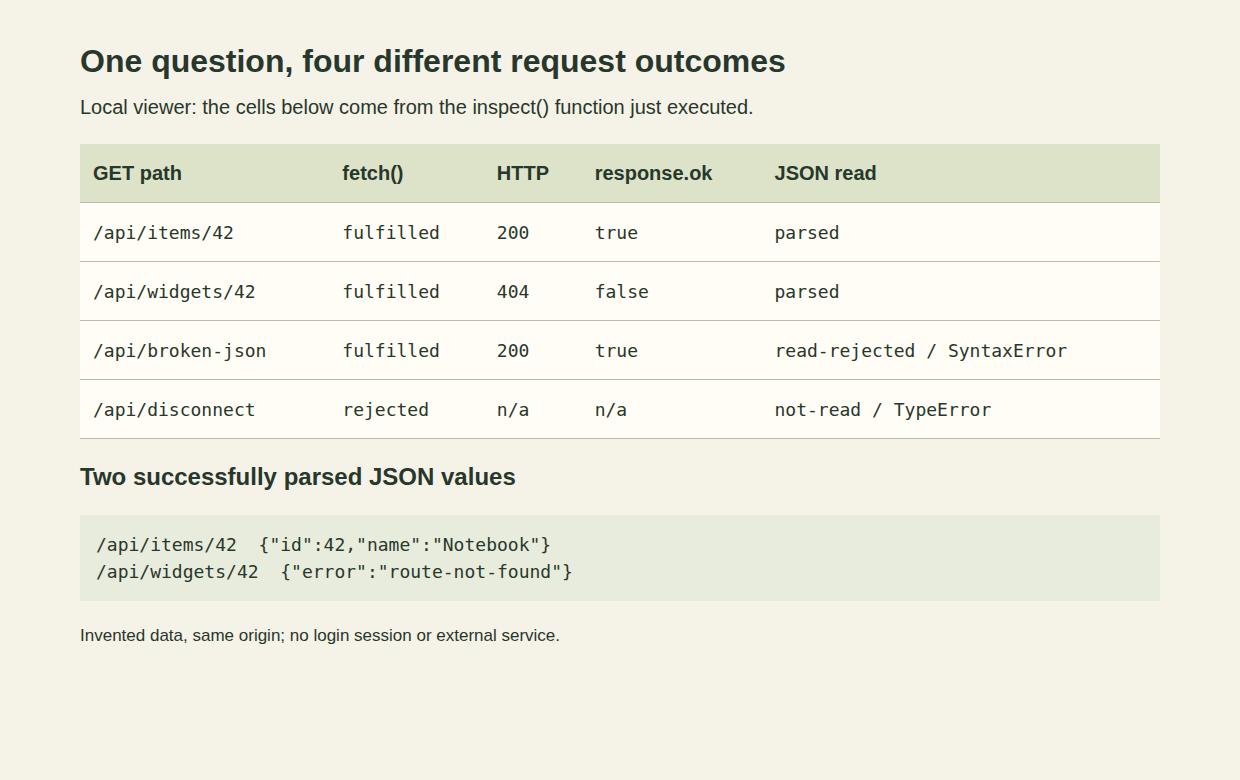
Actual browser capture of a local viewer rendering the probe’s returned objects. The data is invented; the requests and body reads were executed. The viewer presents parsed values, not a production application or a network timing measurement.
The successful route returns the notebook object. The wrong route still fulfills fetch(), reports 404 and supplies a parseable error object. The malformed route fulfills fetch() with status 200 but rejects the later json() read with SyntaxError. The disconnected route rejects fetch() and produces no Response object for this script to inspect.
MDN’s Using the Fetch API documents these separate steps: fetch() can fulfill when response status and headers arrive, HTTP error status does not by itself reject that promise, and reading JSON is another asynchronous operation. response.ok covers the 200 through 299 status range. It does not promise that a body parses or matches the application’s data schema.
Keep the failure boundary in the question
For the original 404 observation, “Why did catch not run?” can be a useful question if it names the promise being observed. A catch attached to fetch() does not automatically treat HTTP 404 as a rejected request. An application may explicitly throw when response.ok is false. A later body read can also reject independently, as the third row demonstrates.
Our probe labels that last outcome read-rejected, rather than pretending every failure while reading a body is a JSON syntax error. In this controlled malformed-body case, the error is SyntaxError. Other body-reading failures need their own evidence. Likewise, a general TypeError from fetch() does not identify which network or browser policy caused the rejection. The fixture’s deliberate connection close is known because we control its implementation.
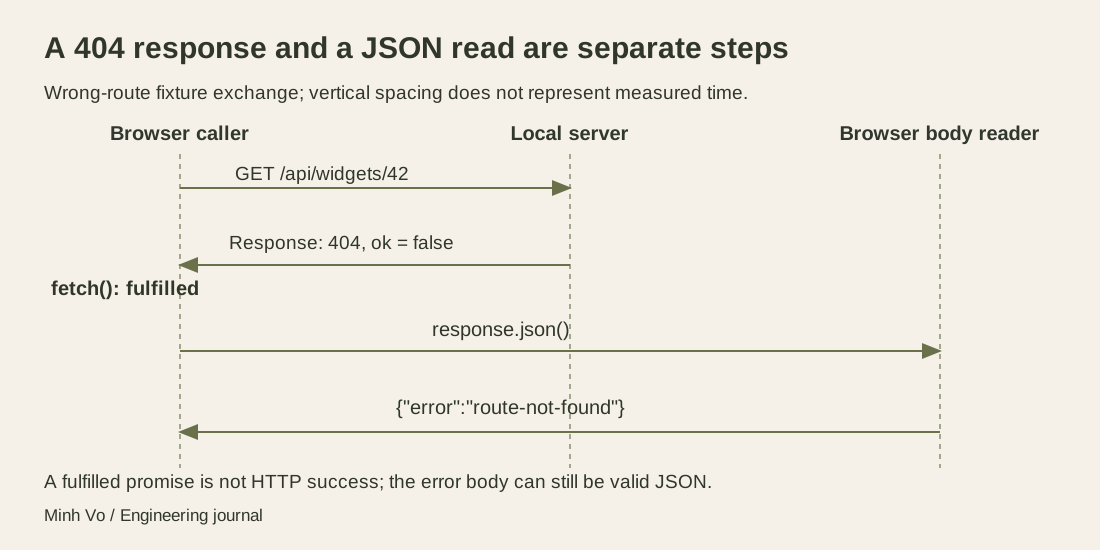
The exchange follows this fixture’s 404 route. It does not show a failed connection, and it makes no timing claim about how quickly the body arrives.
A useful report preserves the method and path, numerical status, relevant error type, minimal calling code and expected result. Include the environment details that could change the answer: whether the page and API share an origin, which service or proxy received the request, and which fixture or application version you ran. Add more context when requested; a large unrelated dependency list can conceal the important contrast.
Write a question someone can answer
Julia Evans’s How to get useful answers to your questions, published in October 2021, recommends stating your current understanding and using specific questions to check it. She also discusses asking follow-up questions when an explanation misses the point. I like this approach because it gives the other person a claim to confirm or correct without treating them as an infallible authority.
For this example, the request might be:
In the local item fixture, I expected a notebook object. GET
/api/widgets/42returns HTTP 404 with{"error":"route-not-found"}, while GET/api/items/42returns 200 with the item. Both calls fulfillfetch(). My current understanding is that the original caller uses the wrong route and that HTTP status needs an explicit check. Is that interpretation right, and where should this client classify a non-OK response before using its body?
That is already close to a solution, which is useful. If the evidence settles your original question while you write it down, fix the bounded issue and ask for review where appropriate. You do not need to manufacture a mystery just to demonstrate that you asked for help.
In a real service, the same 404 could reflect routing, resource state or a deliberate access policy. The local fixture establishes none of those external causes. Keep that distinction in the report: “This test reproduces the missing status check” is stronger than “This proves production has the same bug.”
Decide what the evidence supports
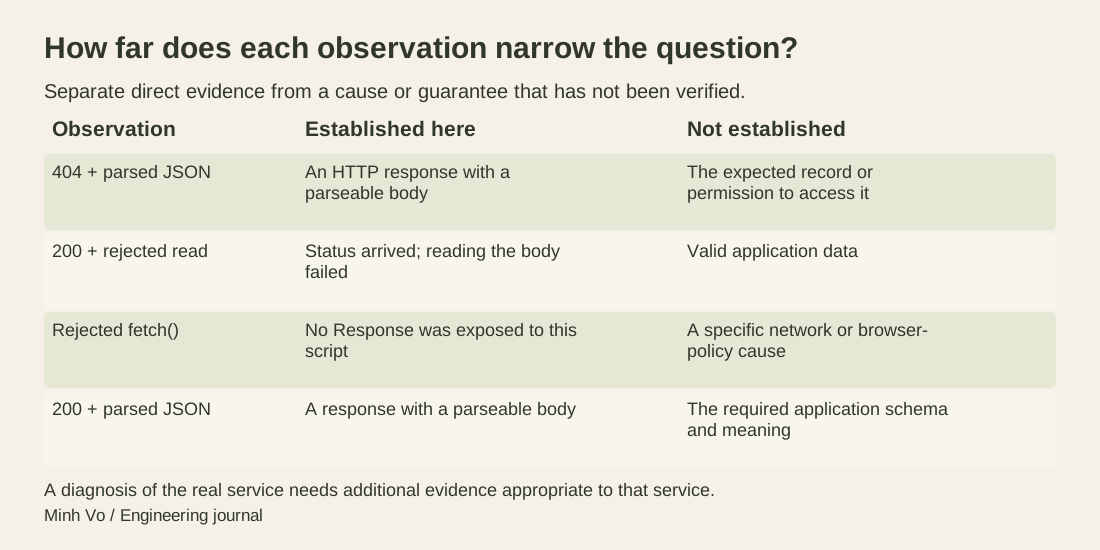
Each row narrows a question. None replaces checking the intended route, access policy or application schema.
Google’s clear-sentences guidance favors precise subjects, verbs and factual information over vague modifiers. Apply that to the report: write “the request returned 404” instead of “the API behaved strangely.” Give actual observations rather than inventing impressive quantities. The source’s advice to prefer numerical evidence does not justify a latency claim when you have not measured latency.
Choose a small reproduction that preserves the boundary under discussion. Changing the URL, authentication, request body and server version at once can remove the symptom without identifying which change mattered. A successful direct request also does not establish that the original browser call uses the same origin, credentials or proxy path. Keep the controlled comparison narrow, and name differences you cannot remove.
Do not paste session cookies, authorization headers or private response bodies into a public question. Use an approved channel for necessary sensitive detail and substitute invented data where it preserves the failure. A screenshot can help orient a reviewer, but copyable text is still needed for paths, errors and reproduction steps. If you cannot access a required log, say so instead of implying you checked it.
Use the answer to update the shared understanding
When someone replies “check CORS,” avoid either accepting it blindly or rejecting it defensively. Ask what observation would distinguish a browser policy rejection from the fulfilled 404 response in this example. If an explanation uses unfamiliar terms, ask about the term before trying another unrelated fix. A focused follow-up often saves more time than a wider search.
After a correction, rerun the failing request and a relevant neighboring case. Here, correcting the item path should not hide the malformed-body case or convert every error into an empty item. Record the changed behavior and remaining limits so the next reader knows which question was answered. A successful fixture run establishes local behavior; it is not evidence of a deployed fix.
For practice, remove the four result rows from the report and keep only “the panel is blank.” Write three observations you would gather first, then restore the actual results and revise your question. Finish by swapping the malformed-body and disconnected cases. Explain why their different failure boundaries should lead to different next checks, even though neither supplies a usable item. The goal is a question that carries enough evidence to move the conversation forward.