Build terminal confidence through inspection
Build Linux terminal confidence by inspecting a service process, listening socket and relevant filesystem before changing configuration.

Terminal confidence comes from knowing which question a command answers and what the output leaves uncertain. For an application developer learning Linux operations, I would begin with inspection: identify the process, find its listening socket and check the filesystem involved. Changing configuration becomes easier once you can describe the current state.
Consider a hypothetical local service that should respond on port 8080 but does not. The browser’s error establishes a symptom. It does not tell you whether the process stopped, bound another address or failed before opening the socket.
Ask one question at a time
Start with the process you expect to be running. A process listing can show whether a matching process exists and which command launched it. The ps manual documents its selection and display options. Read the relevant options rather than assuming a command copied from another operating system has the same behavior.
A command such as ps -ef provides a broad Linux process listing. It can contain sensitive command arguments, so avoid posting the whole output publicly. For the exercise, identify the service process and record only the fields needed to explain what you found.
A running process is not proof of a healthy application. It may be waiting, repeatedly failing internally or serving a different port. That is why the next question concerns the socket rather than another variation of the same process search.
Check where the service listens
The ss manual describes socket inspection. On Linux, ss -ltn asks for listening TCP sockets with numeric addresses and ports. Compare the result with the application’s expected address and port.
| Observation | What it supports | Next question |
|---|---|---|
| No matching process | The expected process is absent from this view | Did startup fail or use another launch mechanism? |
| Process exists, no expected socket | Process existence has not established listening | What do startup logs and configuration show? |
| Socket uses another port | The process may be reachable elsewhere | Which configuration source selected that port? |
| Socket listens only on loopback | Access is limited to that host boundary | Is the caller in the same network namespace? |
Containers add a boundary: a process and socket inside one namespace may not appear where you first look from another. Port publication and application binding are separate decisions. A service can listen inside a container without being reachable through the host’s expected port.
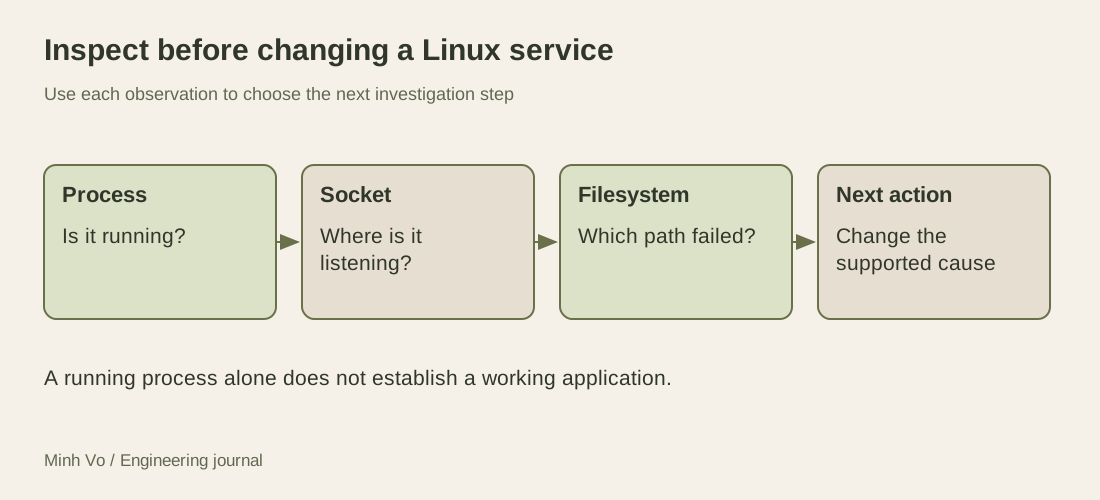
The diagram is an investigation order, not a rule that every outage has one of three causes. It helps keep observations distinct while the system is still unfamiliar.
Inspect the resource named by the error
If startup logs report a write failure, identify the actual path involved. Checking free space on an unrelated filesystem may produce a reassuring number without answering the problem. The df manual explains filesystem space reporting; df -h . reports the filesystem containing the current directory in human-readable units.
Space is only one possible cause of a write failure. Permissions, a read-only mount, an invalid path or another limit may be involved. Preserve the exact error and choose the next check from it. A generic cleanup command is a poor response to an error you have not interpreted.
The same habit applies to configuration. If the application uses the wrong port, locate the configuration source that actually reached the process. An environment file in the repository may not be the source used by a service manager or container runtime. Inspect the launch path before editing several files in the hope that one controls the result.
Make the first change reversible
Once the evidence points to a specific configuration value, record the previous value and the reason for the change. Restart only the process that needs it, using the environment’s normal mechanism. Then repeat the original reachability check and inspect the relevant socket again.
A successful restart does not prove that the underlying issue is understood. If the symptom disappears but the explanation remains uncertain, say so in the learning note. The next recurrence may require a different observation rather than another restart.
For a practice session, create a harmless mismatch such as configuring the local service to listen on another unused port. Predict what the process and socket checks should show, then inspect the results. Keep the exercise local and restore the original configuration afterward.
Keep a short evidence trail
Write the symptom, command, relevant observation and next action in a small notebook. Avoid copying pages of output that you cannot interpret. A useful line might say that the service process exists, but the expected TCP listener is absent, so the next check is startup configuration and logs.
The limitation of this workflow is that it starts with a narrow Linux service problem. DNS, TLS, application routing and remote infrastructure introduce other questions. The transferable skill is the same: choose an observation that can change the next action, and let that evidence justify the command that modifies the system.
Rehearse the observation sequence with a one-request server
A small disposable fixture makes the distinctions easier to see. Run this Python program in one terminal on your own machine. It binds only the IPv4 loopback address, asks the operating system for an unused port and prints its process ID and port as two numbers. It handles one request, then closes. It serves no files and uses no application data.
import os
from http.server import BaseHTTPRequestHandler, HTTPServer

class Handler(BaseHTTPRequestHandler):
    def do_GET(self):
        payload = b"fixture ready\n" if self.path == "/health" else b"not found\n"
        self.send_response(200 if self.path == "/health" else 404)
        self.send_header("Content-Length", str(len(payload)))
        self.end_headers()
        self.wfile.write(payload)

    def log_message(self, *args):
        pass

with HTTPServer(("127.0.0.1", 0), Handler) as server:
    server.timeout = 120
    print(os.getpid(), server.server_port, flush=True)
    server.handle_request()
In another terminal, run the following block and enter the two printed numbers when read waits for input. Inspect the process and socket before issuing the request, because this fixture exits after that request. The commands assume Linux with ps, ss and curl available.
read -r service_pid service_port
ps -p "$service_pid" -o pid=,comm=
ss -ltn "sport = :$service_port"
curl --noproxy '*' --max-time 3 "http://127.0.0.1:$service_port/health"
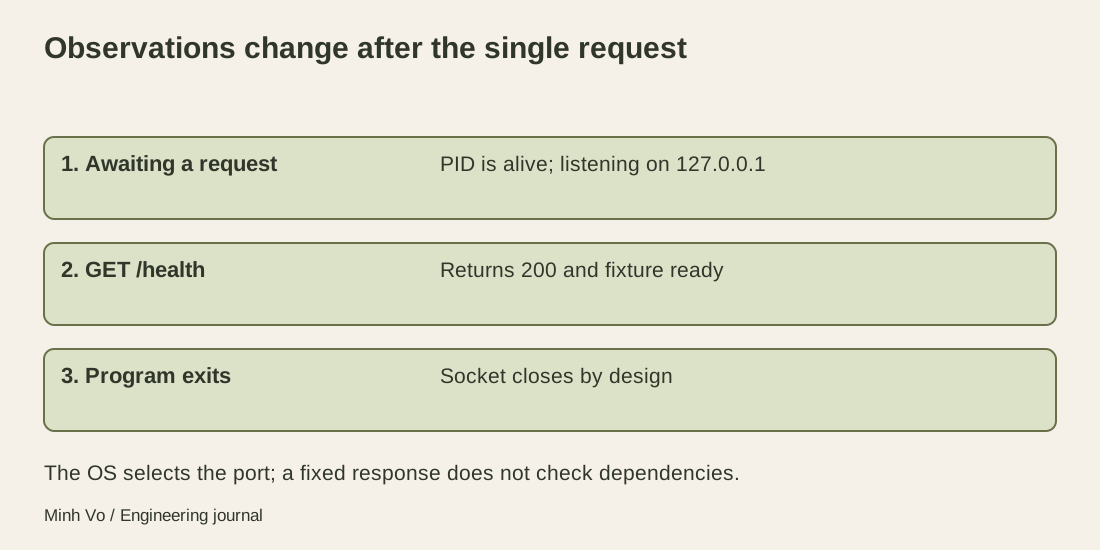
Before curl runs, expect a process entry and a listening socket at 127.0.0.1 on the printed port. The request should return fixture ready. After the fixture exits, its listener disappears by design. An absent socket at that later moment is not evidence that startup failed. Write the observation time or sequence next to each result.
The numeric listener listing does not itself prove which process owns the socket. A process-aware inspection, where permissions allow it, can supply that association. Here the fixture prints its own identity and binds its own dynamically selected port; the controlled setup gives the exercise context that a busy shared host would not automatically provide.
Keep each result at the right level
The successful request establishes this fixture’s HTTP path. Its health response is hardcoded, so it says nothing about a database, queue or remote dependency. In a real application, read what the health route checks before treating its name as a promise. Likewise, a listening TCP socket cannot prove that a particular HTTP route works.
If the request fails, compare the exact host, port and protocol before changing the program. An IPv4 listener at 127.0.0.1 is not the same address as an IPv6 listener at ::1. A proxy can also alter the path of a command-line request; the fixture’s curl command explicitly bypasses proxies for this local check. None of these observations requires exposing the service on every interface.
The MIT Missing Semester debugging and profiling lesson introduces logs, debuggers and system-call tracing as different ways to inspect behavior. That is a useful progression when simpler observations stop answering the question. Choose a deeper tool because a named uncertainty remains, and read its effect and permission requirements before attaching it to an unfamiliar process. Collecting more output without a hypothesis can make a small service problem harder to explain.