Read Terraform replacements and unknown values together
Inspect a real local plan where one new identity causes a dependent replacement and an in-place update, then verify the resulting identities.
A plan saying “two to add, one to change, two to destroy” can describe changes to three existing resource instances. Two are replaced and one is updated. The counts summarize actions; they do not explain why an identity changes or which dependent values are still unknown. Read the resource changes and their inputs before judging the plan from its last line.
This article is for a developer who can read a small Terraform resource block and wants to review plans more carefully. The example was checked with Terraform 1.16.1 on Linux. It uses only built-in terraform_data resources in a fresh local working directory, with no external provider or provisioner. These resources make the lifecycle visible without creating a service or measuring availability.
Construct two different consumers of one identity
The source resource stores revision one and also uses that revision as triggers_replace. According to the built-in resource reference, changing triggers_replace requests replacement. The consumer uses the source’s generated ID as its own replacement trigger. The observer merely stores that ID as ordinary input.
Both downstream resources depend on the source through explicit value references. Their reactions differ because the values flow into arguments with different lifecycle behavior. An unknown value is not itself a universal instruction to replace the receiving resource.
Run the following blocks in the same Bash session. The initial block creates a new temporary directory and applies a plan containing three local resources. The annotation field is deliberately null so that a later plan contains both a known null and an unknown value in the same input object.
tf_plan_lab=$(mktemp -d)
cd "$tf_plan_lab"
cat > main.tf <<'HCL'
terraform {
  required_version = ">= 1.4.0, < 2.0.0"
}

resource "terraform_data" "source" {
  input            = 1
  triggers_replace = 1
}

resource "terraform_data" "consumer" {
  input = {
    source_id  = terraform_data.source.id
    annotation = null
  }
  triggers_replace = terraform_data.source.id
}

resource "terraform_data" "observer" {
  input = terraform_data.source.id
}
HCL
terraform init -input=false -no-color
terraform plan -input=false -no-color -out=initial.tfplan
terraform apply -input=false -no-color initial.tfplan
terraform show -json > before.json
The before snapshot contains three generated IDs. Those identities are not revision numbers, and the observer’s ID is not the source ID it stores. Keep that distinction when comparing the final state. A resource can preserve its own identity while changing a reference to another resource.
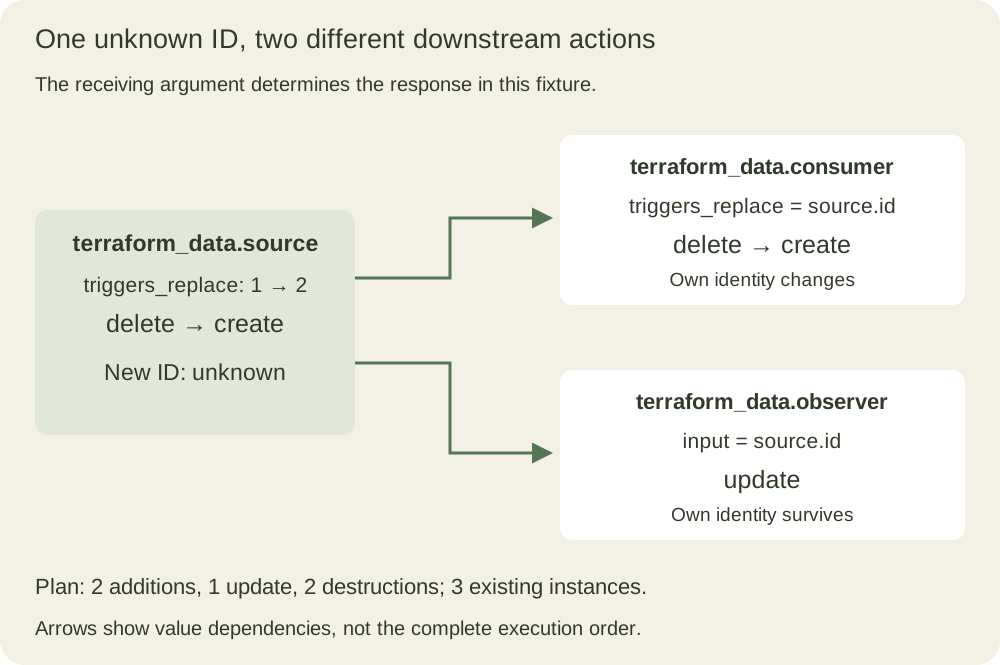
The arrows describe value dependencies, not a complete execution timeline. Provider operations and lifecycle rules determine the actual graph of work. This local example establishes no downtime or migration-safety guarantee for an external service.
Ask for a saved plan and interpret its exit code
Change both source values to revision two. The assertions make this edit specific to the fixture, preventing an unnoticed no-op text replacement. Then save the plan and capture the detailed exit status in a conditional so that a shell configured to stop on errors does not mistake the expected status two for a failed command.
python3 -I - <<'PY'
from pathlib import Path
p = Path('main.tf')
s = p.read_text()
assert s.count('input            = 1') == 1
assert s.count('triggers_replace = 1') == 1
s = s.replace('input            = 1', 'input            = 2')
s = s.replace('triggers_replace = 1', 'triggers_replace = 2')
p.write_text(s)
PY
if terraform plan -input=false -no-color -detailed-exitcode -out=next.tfplan; then
  plan_status=0
else
  plan_status=$?
fi
test "$plan_status" -eq 2
terraform show -json next.tfplan > next.json
The plan command reference defines status zero as successful with no changes, one as an error, and two as successful with changes when -detailed-exitcode is enabled. Accepting every nonzero status as “changes found” would also accept an actual planning failure. The test here expects changes specifically; it is not a generic wrapper for every workflow.
The human-readable plan shows source and consumer with -/+, meaning destroy then create for those individual replacements. Observer has ~, meaning update in place. The summary is two additions, one change and two destructions. The plan has not yet performed those proposed operations. This fixture still has its original three bindings and IDs at this point.
Read the action list before interpreting the values
The documented JSON format represents the replacement as ['delete', 'create']. A different lifecycle ordering can instead produce ['create', 'delete']; a deletion check should recognize both. Do not assume that alphabetic order in a printed resource list describes execution order.
For these changes, replace_paths identifies triggers_replace as the attribute path causing replacement. That field is useful evidence, but it is not guaranteed for every possible replacement cause. For example, the format permits replacement without an attribute path when the cause is not a changed argument. The complete action list remains the direct statement of what is planned.
python3 -I - <<'PY'
from pathlib import Path
import json
plan = json.loads(Path('next.json').read_text())
assert plan['format_version'].split('.')[0] == '1'
changes = {item['address']: item['change']
           for item in plan['resource_changes']}
for address in sorted(changes):
    print(address, changes[address]['actions'])
source = changes['terraform_data.source']
consumer = changes['terraform_data.consumer']
observer = changes['terraform_data.observer']
assert source['actions'] == ['delete', 'create']
assert consumer['actions'] == ['delete', 'create']
assert observer['actions'] == ['update']
assert source['after']['input'] == 2
assert source['after_unknown']['id'] is True
assert consumer['after']['input']['annotation'] is None
assert consumer['after_unknown']['input']['source_id'] is True
assert observer['after']['id'] == observer['before']['id']
assert observer['after_unknown']['input'] is True
print('known revision, unknown new ID, known null, stable observer ID')
PY
The parser deliberately inspects a known small plan. The format-major check prevents quietly accepting an incompatible representation, while unrecognized minor-version fields are left alone. A general review service would need broader handling of resource modes, modules, sensitive values and future compatible additions; these assertions do not implement that service.
Unknown and null answer different questions
Source’s revision two is known during planning. Its replacement ID is not. In the change representation, after contains the known parts of the future value, while after_unknown marks unknown leaves with true. Combining the two is necessary to distinguish “this value will be resolved later” from an ordinary known value.
Consumer’s annotation is explicitly null in after.input. Its source_id is marked true in after_unknown.input, because the source’s replacement has not been created. A convenience lookup that returns None for both an absent key and a present null would erase this distinction. Do not infer unknownness from that lookup alone; inspect the documented unknown mask.
Observer is the counterexample to “unknown means replacement.” Its future input is unknown, but its own ID is already known and unchanged. The built-in resource can update that ordinary input when the new source identity becomes available. Consumer receives the same unknown source identity through a replacement trigger and therefore takes a different action.
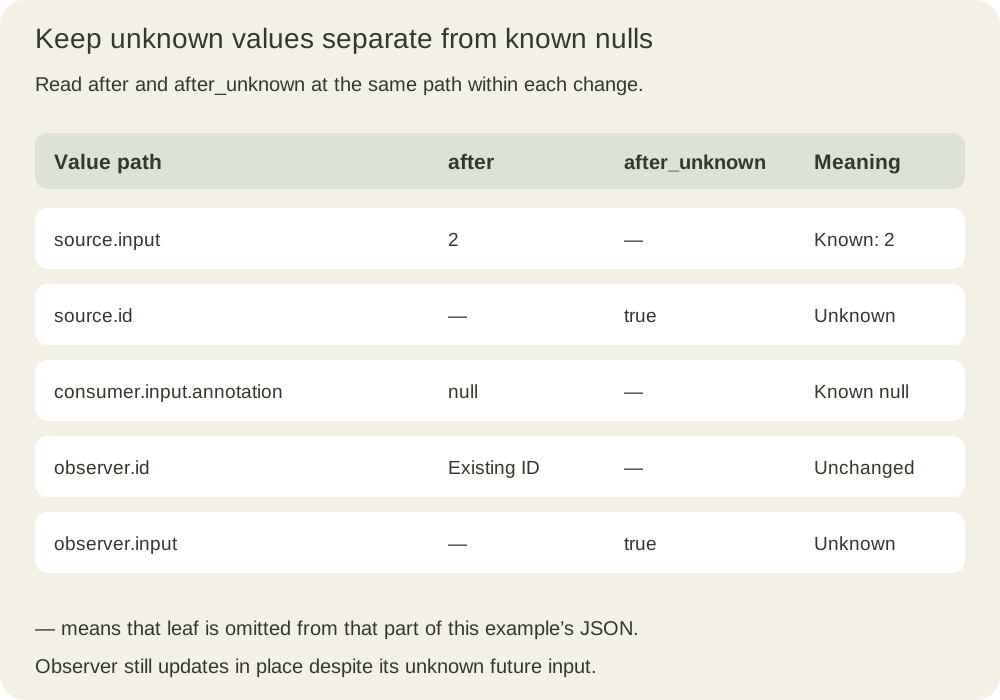
Unknown values are not inherently errors. They limit what can be established before applying. If an approval requires a value that the plan cannot yet determine, the review must acknowledge that gap or use a design that supplies the required evidence earlier. Substituting a guessed ID would not make the plan more informative.
Apply the reviewed file and check identities
Passing a saved plan to terraform apply performs that plan without another confirmation prompt, as the apply reference explains. Treat the file itself as part of the approval boundary. Running plain terraform apply would instead generate a new plan, whose changes would need their own review.
terraform apply -input=false -no-color next.tfplan
terraform show -json > after.json
python3 -I - <<'PY'
from pathlib import Path
import json
def records(filename):
    values = json.loads(Path(filename).read_text())['values']
    return {r['address']: r['values']
            for r in values['root_module']['resources']}
before, after = records('before.json'), records('after.json')
source = 'terraform_data.source'
consumer = 'terraform_data.consumer'
observer = 'terraform_data.observer'
assert before[source]['id'] != after[source]['id']
assert before[consumer]['id'] != after[consumer]['id']
assert before[observer]['id'] == after[observer]['id']
assert after[consumer]['input']['source_id'] == after[source]['id']
assert after[observer]['input'] == after[source]['id']
assert after[consumer]['input']['annotation'] is None
print('source and consumer replaced; observer identity preserved')
PY
terraform plan -input=false -no-color -detailed-exitcode
The final plan exits zero with no changes. The checks establish which identities changed and whether both references now point to the new source. They do not assert that a production consumer would reconnect correctly or that an application passed a health check. Those are separate integration contracts absent from this local fixture.
The plan is also not a reusable instruction to repeat indefinitely. In this completed local run, trying to apply the same changing plan again is rejected because the state has advanced. The following exercise confirms that observed boundary rather than treating a failed apply as permission to overwrite state.
if terraform apply -input=false -no-color next.tfplan > stale.log 2>&1; then
  printf '%s\n' 'Unexpected success applying the old plan' >&2
  exit 1
else
  stale_status=$?
fi
test "$stale_status" -eq 1
python3 -I - <<'PY'
from pathlib import Path
assert 'Saved plan is stale' in Path('stale.log').read_text()
print('old plan rejected after the state changed')
PY
Review the limitations before generalizing the result
A successful plan is not a transaction guarantee for the later apply. External permissions, quotas or APIs can fail while work is underway. Terraform does not automatically roll back a partially completed apply; the apply documentation describes recording completed changes and reporting the error. Recovery begins by inspecting the actual state and failure, not by assuming every resource stayed unchanged.
The saved plan and its JSON rendering can contain sensitive values even when terminal output hides them. Store and share them accordingly. The fixture has only dummy values. Likewise, disabling refresh or narrowing a plan with -target can omit information relevant to a full review; the plan reference describes those options as specialized tools, not shortcuts for making an inconvenient difference disappear.
For a second exercise, create another disposable copy and let consumer store the source ID only in input, removing its replacement trigger. Predict its action before running the plan. Then compare the old and new IDs after applying. This change tests whether you understand the argument contract instead of memorizing that every dependency must be replaced.
When finished with this working directory, inspect and apply its cleanup plan. All three remaining resources are local state-managed fixtures.
terraform plan -destroy -input=false -no-color -out=cleanup.tfplan
terraform apply -input=false -no-color cleanup.tfplan
terraform state list
The final list is empty. A useful plan review can now say which resources are replaced, which identity references change, which values remain unknown and what evidence the later apply still needs to provide.