A write system call is not a durability receipt
Separate Python buffers, kernel-visible file data and successful fsync, then test abrupt process termination without confusing it with power-loss recovery.

A successful ordinary write system call means the operating system accepted the reported bytes, not that those bytes will survive a power failure. For a developer saving results or acknowledging updates, that distinction determines when “saved” is an honest description. A second process reading the new value is evidence of visibility; it is not a durability test.
This lesson assumes basic files, processes and Python. We separate a language-level buffer from the kernel’s file cache, run three small child-process controls on Linux, and explain where fsync changes the contract. The experiment never interrupts the operating system or storage device. Its results must not be presented as a power-loss test.
Identify which buffer accepted the bytes
A buffered Python file object may first copy a small write into memory belonging to the process. The operating system has not necessarily received those bytes. Python’s BufferedWriter documentation describes conditions that send the buffer to its underlying raw stream, including explicit flush, filling the buffer, and closing the object.
The low-level os.write function instead invokes descriptor-based writing and returns the number of bytes transferred. For the ordinary local buffered file I/O used here, the kernel can retain dirty file pages in memory and write them back later. Another process can read the new contents from the operating system’s coherent file view while storage persistence is still unconfirmed.
The Linux write manual explicitly says a successful return does not guarantee commitment to disk. It also permits short writes: accepting three bytes of a ten-byte request is successful progress, not completion of the entire request. A caller must advance by the returned count and continue with the remaining suffix, or handle an error.
These are separate boundaries. A Python buffer flush moves bytes to the raw file stream. An ordinary write hands them to the kernel under the file’s I/O mode. A synchronization operation asks the storage stack to establish the stronger persistence guarantee. A device can have its own volatile cache, so “the disk received a command” is not the final boundary either.
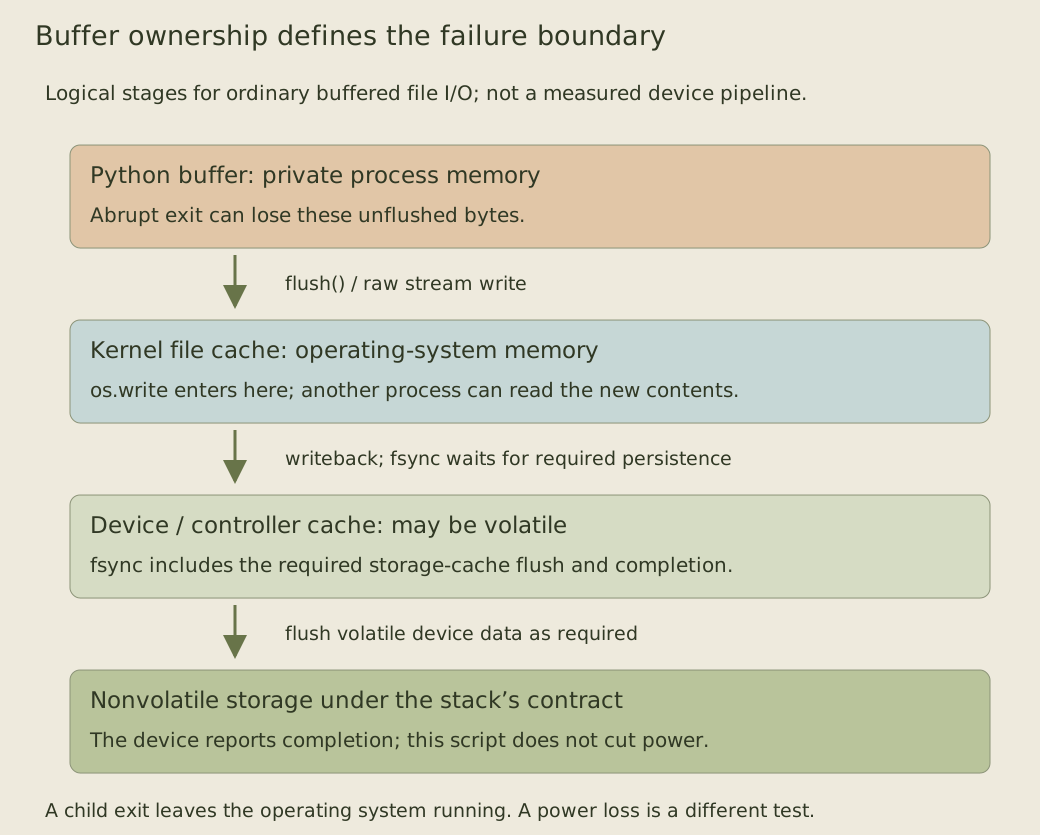
The diagram describes logical responsibility, not a claim that every write pauses in every box. Writeback may already have completed by the time an application inspects the file. The point is what the completed call guarantees, not a way to infer the current physical location of each byte.
End the process without ending the operating system
The child below writes ten known bytes. In buffered mode, the small payload fits inside an explicitly sized Python buffer. In written mode, a loop hands every byte to os.write. In synced mode, the same loop is followed by os.fsync. Every child then calls os._exit, which deliberately bypasses Python cleanup and buffer flushing.
from pathlib import Path
import os
import subprocess
import sys
import tempfile

child = r'''
import os
import sys

mode, name = sys.argv[1:]
payload = b"answer=42\n"
if mode == "buffered":
    stream = open(name, "wb", buffering=8192)
    assert stream.write(payload) == len(payload)
    os._exit(0)  # Deliberately bypass Python buffer flushing and cleanup.

fd = os.open(name, os.O_WRONLY | os.O_TRUNC)
remaining = memoryview(payload)
while remaining:
    written = os.write(fd, remaining)
    if written <= 0:
        raise OSError("write made no progress")
    remaining = remaining[written:]
if mode == "synced":
    os.fsync(fd)
os._exit(0)
'''

with tempfile.TemporaryDirectory() as directory:
    observed = {}
    for mode in ("buffered", "written", "synced"):
        name = Path(directory) / mode
        name.touch()
        subprocess.run([sys.executable, "-c", child, mode, str(name)],
                       check=True)
        observed[mode] = name.read_bytes()
    assert observed == {
        "buffered": b"",
        "written": b"answer=42\n",
        "synced": b"answer=42\n",
    }
print({mode: len(data) for mode, data in observed.items()})
In the observed CPython/Linux run, the parent reads zero bytes after the buffered child, and ten bytes after each of the other two children. subprocess.run waits for each child to finish, so the parent does not race a still-running writer. The small files and names are synthetic, created inside a temporary directory; no application data is involved.
The first result demonstrates why losing the process can lose its unflushed language-level buffer. The second demonstrates that process termination does not erase bytes already accepted by the kernel. The third confirms that the synchronization call returned successfully before that child exited. Identical readback in the last two cases cannot distinguish their power-failure behavior.
Python documents _exit as bypassing cleanup and flushing. Here it is a controlled abrupt termination mechanism, not advice for ordinary application shutdown. The code does not crash the machine, cut power, inspect a drive’s cache or demonstrate recovery after reboot. Those are different failure domains.
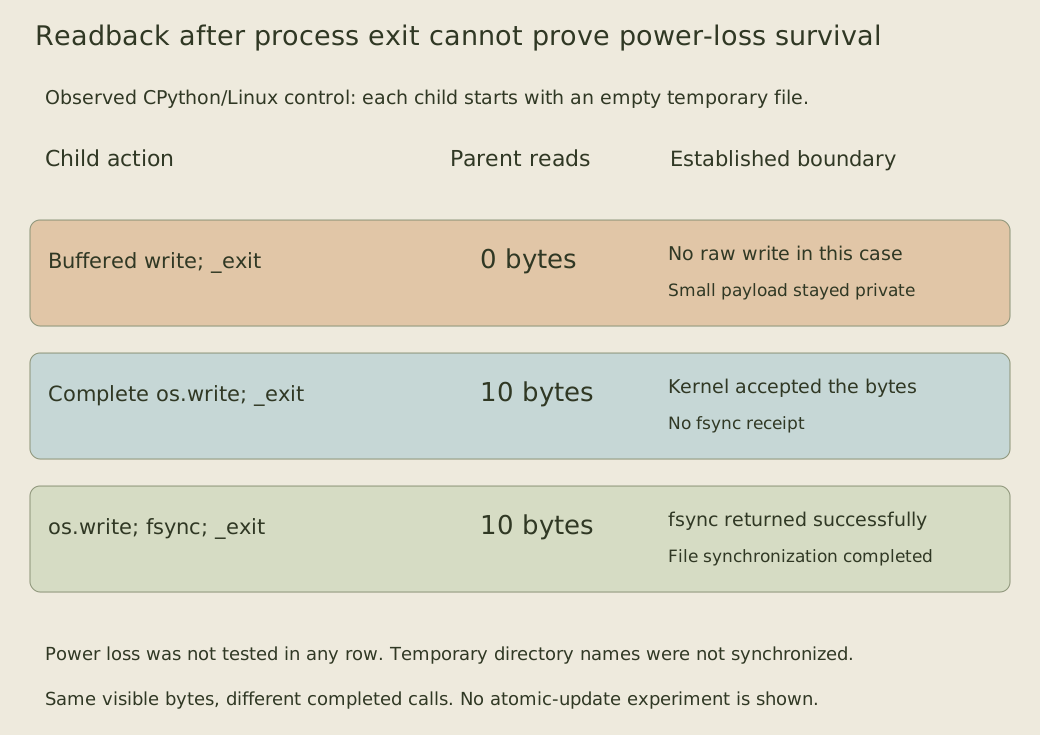
The result also does not say that every buffered write remains private until flush. A larger write or a full buffer can trigger raw writes earlier. The deliberately small payload and explicit buffer size make this particular control reproducible; an application’s buffer policy remains part of its contract.
Flush the application buffer before synchronizing the file
On Linux, fsync synchronizes the file’s modified data and associated metadata, including the required device-cache flushing. It blocks until the device reports completion. Success is the relevant file synchronization receipt under the filesystem and storage stack’s guarantees, rather than a measurement performed by this Python script.
fsync cannot transfer bytes that still exist only in a Python buffer the kernel has never seen. Python’s fsync documentation therefore specifies the sequence flush() followed by os.fsync(f.fileno()) when starting from a buffered file object.
def sync_buffered(stream):
    stream.flush()
    os.fsync(stream.fileno())


with tempfile.TemporaryDirectory() as directory:
    name = Path(directory) / "existing"
    name.write_bytes(b"old-long\n")
    with open(name, "r+b") as stream:
        stream.write(b"new\n")
        stream.truncate()
        sync_buffered(stream)
    assert name.read_bytes() == b"new\n"
This example overwrites and shortens an existing temporary file. Truncating removes the old suffix; otherwise writing four bytes would leave the rest of old-long behind. Synchronizing after both operations covers the resulting file size as well as the written contents. The example is an in-place update, with one writer and no concurrency or recovery protocol.
The helper propagates failures. A caller must not turn an exception from flush or synchronization into a successful “durably saved” acknowledgment. An earlier partial write can already have changed the file, so failure also does not mean the old contents remain intact. The application needs an explicit retry, reconciliation or recovery policy.
Separate file contents, directory names and atomic updates
A file’s contents and its directory entry are related but different persistent objects. The fsync manual notes that synchronizing a file does not necessarily synchronize its entry in the containing directory. Newly creating, renaming or removing a name can require synchronizing the relevant directory too. Our temporary-file demonstrations do not implement a durable file-creation or replacement protocol.
Persistence also differs from atomicity. The in-place update may pass through an empty, partial or mixed state before its final synchronization succeeds. A crash during that interval is not guaranteed to leave either the complete old value or the complete new value. Calling fsync at the end does not retroactively make the preceding sequence an indivisible transaction.
SQLite’s atomic-commit explanation makes its storage assumptions explicit and places synchronization at specific journal and database boundaries. Those operations work as part of a recovery design. Merely adding a final fsync to arbitrary multi-step application changes does not reproduce the database’s protocol. This lesson establishes the persistence boundary; it does not implement journaling.
fdatasync is a related option when unnecessary metadata need not be synchronized. It still synchronizes metadata required to retrieve the data correctly, such as a changed file size. Describing it as “data only, never metadata” would be wrong. Choosing between it and fsync requires knowing which metadata the application promises to preserve.
Define the acknowledgment and the failure test together
A useful save contract identifies the completed boundary. “Accepted into our process buffer,” “visible through the filesystem,” and “file synchronization succeeded” describe different results. If a service promises persistence before replying, its success path must wait for the required synchronization and preserve errors instead of reporting success after the first write call.
Synchronizing every small update can add latency and limit throughput. Grouping several updates under one synchronization can amortize the work, but a durability acknowledgment for each member must respect that shared completion boundary. An acknowledgment sent before the group is synchronized makes a different promise. The experiment contains no timing measurements from which to choose a batching interval.
The guarantee also relies on the actual filesystem, operating system, controller and device honoring their contracts. SQLite’s document discusses historical incomplete-flush problems; those reports are not a claim about every current Linux system. Testing process termination alone cannot validate the complete storage stack against power loss.
As an exercise, add an explicit stream.flush() immediately before the buffered child’s exit and predict the parent’s readback. Then modify the raw loop to request at most three bytes per iteration and verify that all ten bytes still arrive. Finally force a write error after the first three bytes and inspect the partial result without reporting success. Keep those process-level observations separate from any future controlled storage-failure test.