A web developer's first mobile lifecycle lesson
Trace a mobile draft across background transitions, process loss and delayed save callbacks, with a clear boundary between UI state and committed content.

Give a mobile draft a lifetime beyond the screen that edits it. For a web developer moving into mobile work, the useful first question is what survives when the app stops receiving execution time or its process disappears. A text field that still looks correct after switching apps has passed only one case: the original process may simply have stayed alive.
My progression from frontend into broader full-stack work also included mobile. I recommend this exercise early because it connects familiar interface state to a different responsibility: reconstructing user work after the process that displayed it has gone.
This lesson uses a hypothetical field-note editor. The user expects an explicitly saved draft to return after ordinary process recreation. The exercise covers local recovery, not server synchronization, device loss or uninstalling the app. You need only a basic understanding of component state and asynchronous work to trace it.
Separate the screen, process and stored draft
The screen owns presentation details such as focus, cursor position and an open menu. The process holds the running component tree, in-memory objects and pending callbacks. The draft itself can live in persistent local storage with an identifier and revision. These lifetimes overlap while the app runs, but they are not interchangeable.
Android’s process lifecycle documentation says the system may kill a cached process as resources are needed, and onDestroy() is not guaranteed in that case. A cleanup handler is therefore an unreliable place for the only copy of a user’s work to become persistent. Background execution also has restrictions; starting an ordinary timer does not reserve future execution time.
The practical design is to persist meaningful draft changes while the app is active, according to a stated save policy. A background transition can offer another opportunity to request a save. It cannot serve as proof that the operation ran to completion. The distinction matters even if switching away and back appears to work every time on your development phone.
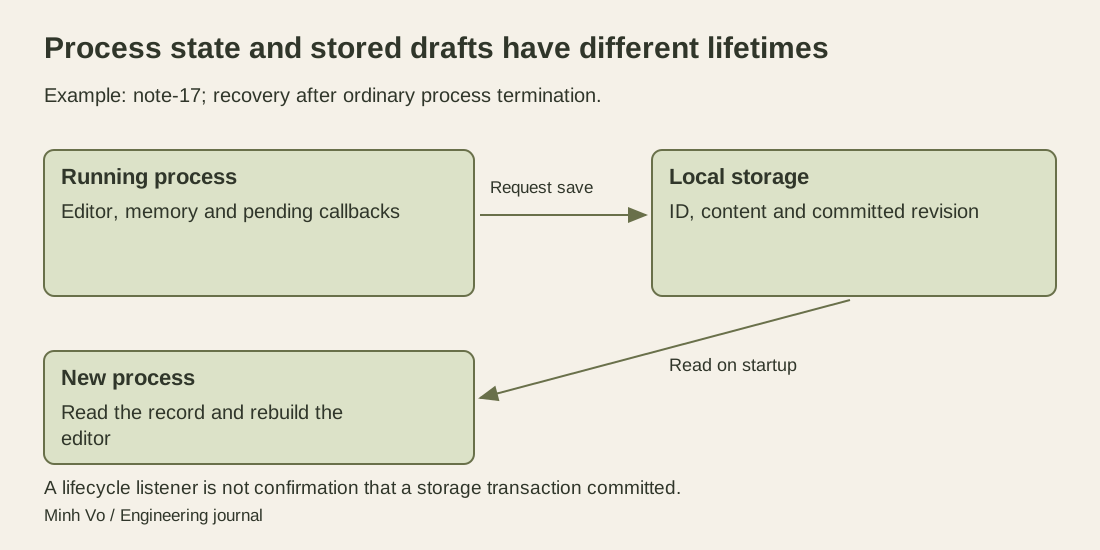
The arrow back to the editor is a read and reconstruction step. Keeping a draft identifier is useful only if the corresponding content can still be recovered under the product’s storage policy.
Use AppState for behavior, not as a save receipt
React Native AppState reports whether the app is active or in the background; iOS also has an inactive state during transitions and interruptions. On Android, moving into another activity can count as background, including a temporary system activity such as a credential picker. These signals help decide whether to pause a visual update or refresh data when the user returns.
The API also distinguishes Android focus and blur events. Pulling down the notification drawer can emit blur without changing AppState. Treating every loss of interaction as a background transition would conflate different events. Likewise, the documented legacy architecture can initially report currentState as null while retrieving it from the native side. “Not known yet” should remain distinct from “background”.
Choose the event that matches the behavior. Pausing an animation, refreshing a stale view and committing a draft have different requirements. A state-change notification tells you about lifecycle state; it does not report that a database transaction committed or that a remote service accepted the document. Subscribe and clean up the listener using the lifecycle of its owning component, while keeping draft ownership in the appropriate application layer.
Trace the last edit across a restart
Suppose draft note-17 has committed revision 7 with the text “Call supplier”. The editor changes it to revision 8, “Call supplier on Friday”. The following cases assume atomic commits of the whole local draft record, with completed commits surviving ordinary process termination. A write exposes either the complete old record or the complete new record, never a partial record. Storage failure, corruption and device power-loss guarantees require checking the selected storage implementation separately.
| Event before process termination | What a new process may recover |
|---|---|
| Revision 8 exists only in editor memory | Revision 7 |
| A revision-8 write was requested, but its outcome is unknown | Revision 7 or revision 8; read to determine which |
| Revision 8 committed and the UI received confirmation | Revision 8 |
| Revision 8 committed, but the process ended before the UI callback | Revision 8 |
The last row is easy to miss. A callback is how the interface learns about a write; it is not what makes the write persistent. Conversely, requesting a write is not equivalent to a committed write. On restart, inspect the stored record rather than reconstructing certainty from whichever spinner or status label was last visible.
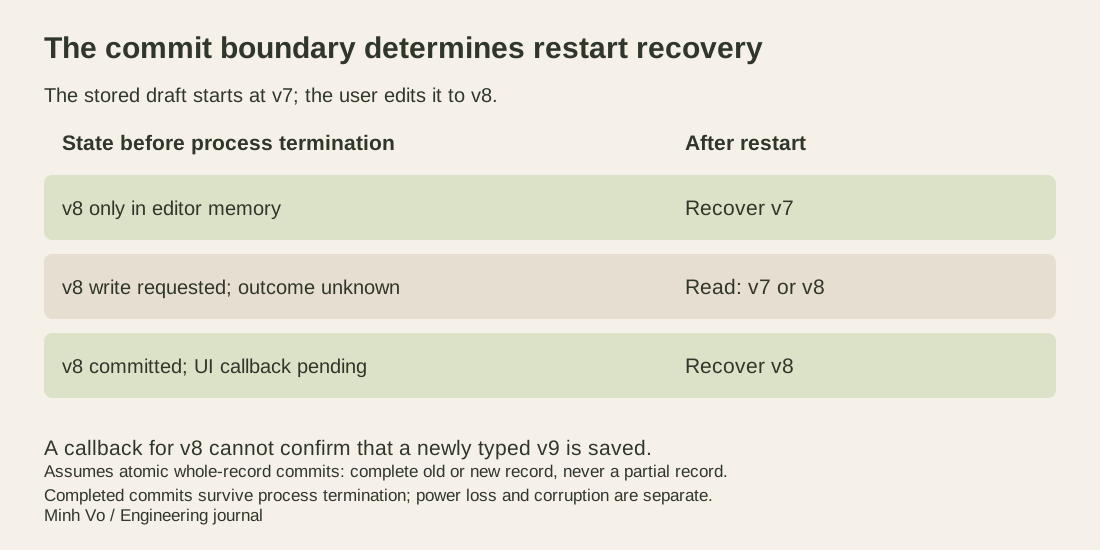
Now let the user type revision 9 while revision 8 is still being saved. A completion for revision 8 must not label revision 9 as saved. Associate completion with the revision it covers, and compare it with the editor’s current revision. The storage path also needs an ordering rule: serializing writes or enforcing an appropriate revision condition prevents an older write from replacing a newer one. Updating only the label cannot repair incorrectly ordered storage.
Choose the save policy the product can explain
Writing every keystroke can create unnecessary storage work. Debouncing reduces that work but introduces a deliberate interval in which a new edit exists only in memory. If the process ends during that interval, the last completed draft can return without the newest text. Make that tradeoff explicit instead of describing an arbitrary debounce interval as guaranteed autosave.
A small editor might show “Saving on this device” until its local write completes, then “Saved on this device”. A separate action can submit the note to a server. If local storage rejects the write, keep the current text visible and give the user a way to retry or copy it. The word “saved” should describe the completed operation the application actually knows about.
Large attachments need their own completion state. A saved text record that refers to a file still being copied does not establish that the attachment will be available after restart. For the first exercise, limit the draft to text. Add attachment persistence as a separate acceptance case when the product needs it.
Keep saved UI state and durable content distinct
Android’s guide to saving UI state distinguishes ViewModel state, saved state and persistent storage. A ViewModel can survive a configuration change but does not by itself survive system-initiated process death. Saved-state mechanisms can help recreate small UI state after that process loss; they are not a replacement for long-term storage of application data.
For a native Android editor, a small draft identifier or selection can belong in the appropriate saved-state mechanism while the draft content is recovered from local storage. The guide also specifies lifecycle conditions for when saved-state data is captured. Do not treat a saved-state assignment as an unconditional immediate disk write. React Native’s AppState event is a different API and does not automatically implement those Android storage mechanisms.
Persistent app storage still has a boundary. Clearing app data or uninstalling the application can remove locally held drafts. If the product promises recovery on another device, it needs a separate transfer or synchronization design. A local restart exercise cannot establish that promise.
Test the events separately
Start with draft 7, make edit 8, and observe the stored revision after the local save completes. Then separately exercise returning from the background with the process alive, recreating a screen, and restarting after process termination. Use the chosen platform’s documented tooling to distinguish those cases. Removing an app from recent tasks, rotating a device and terminating a process are not interchangeable tests.
For the asynchronous case, use a test storage adapter that can pause before commit and after commit but before completion reaches the UI. Terminate or recreate the editor at each boundary, then read through the normal startup path. This is a proposed test plan; no mobile runtime is executed here. Record both the recovered text and the status label, including the revision-9 case, rather than accepting a successful screen render as proof.
The learning result is a small recovery contract: which edit was committed, where it lives, how a new process finds it and what the user sees while the outcome is uncertain. Once those questions have answers, foreground and background events become useful coordination signals instead of the only thing protecting the draft.