Lighthouse 100 and agent-ready: a Da Nang flower shop
How a Da Nang flower shop site reached Lighthouse 100 on desktop and mobile and a 100/100 agent-ready score: Cloudflare, images, SEO, GEO and AEO.

I built the website of Nhà Nhi, a flower shop in Da Nang, at hoatuoidanangnhanhi.com. On 4 October 2026 it scored 100 in all four classic Lighthouse categories, on both desktop and mobile, and 3 out of 3 in the newer Agentic Browsing section. It also scored 100 out of 100 and reached Level 5, “Agent-Native”, on the isitagentready.com scanner. This article explains what I changed to get there, in plain language, including the changes that went wrong.
Every technical term has a short explanation you can open. If you run a shop, read the results and the lessons. If you build sites, the middle sections have the details.
The results first
All numbers below come from one PageSpeed Insights report generated on 4 October 2026 at 1:04 AM (GMT+7), using Lighthouse 13.5.0.
What are Lighthouse and PageSpeed Insights?
Lighthouse is Google’s automatic health check for a web page. It opens the page in a controlled browser and gives scores from 0 to 100 for Performance (speed), Accessibility (can everyone use it), Best Practices (safe and clean code) and SEO (can search engines understand it). PageSpeed Insights is the free website that runs Lighthouse for you. The numbers come from a lab test, not from real visitors.
| Desktop | Mobile | |
|---|---|---|
| Performance | 100 | 100 |
| Accessibility | 100 | 100 |
| Best Practices | 100 | 100 |
| SEO | 100 | 100 |
| Agentic Browsing | 3/3 | 3/3 |
| First paint of content (FCP) | 0.3 s | 1.2 s |
| Main photo shown (LCP) | 0.4 s | 1.4 s |
| Busy time (TBT) | 0 ms | 0 ms |
| Page jumping (CLS) | 0.001 | 0 |
| Speed Index | 0.5 s | 1.5 s |
What do FCP, LCP, TBT, CLS and Speed Index mean?
FCP (First Contentful Paint) is when the first text or image appears. LCP (Largest Contentful Paint) is when the biggest thing in view, usually the main photo, is fully shown; under 2.5 seconds is considered good. TBT (Total Blocking Time) measures how long the browser was too busy to react to a tap while loading. CLS (Cumulative Layout Shift) measures how much the page jumps around while loading, like a button that moves just as you tap it; 0 is perfect. Speed Index is how quickly the visible part of the page fills in.
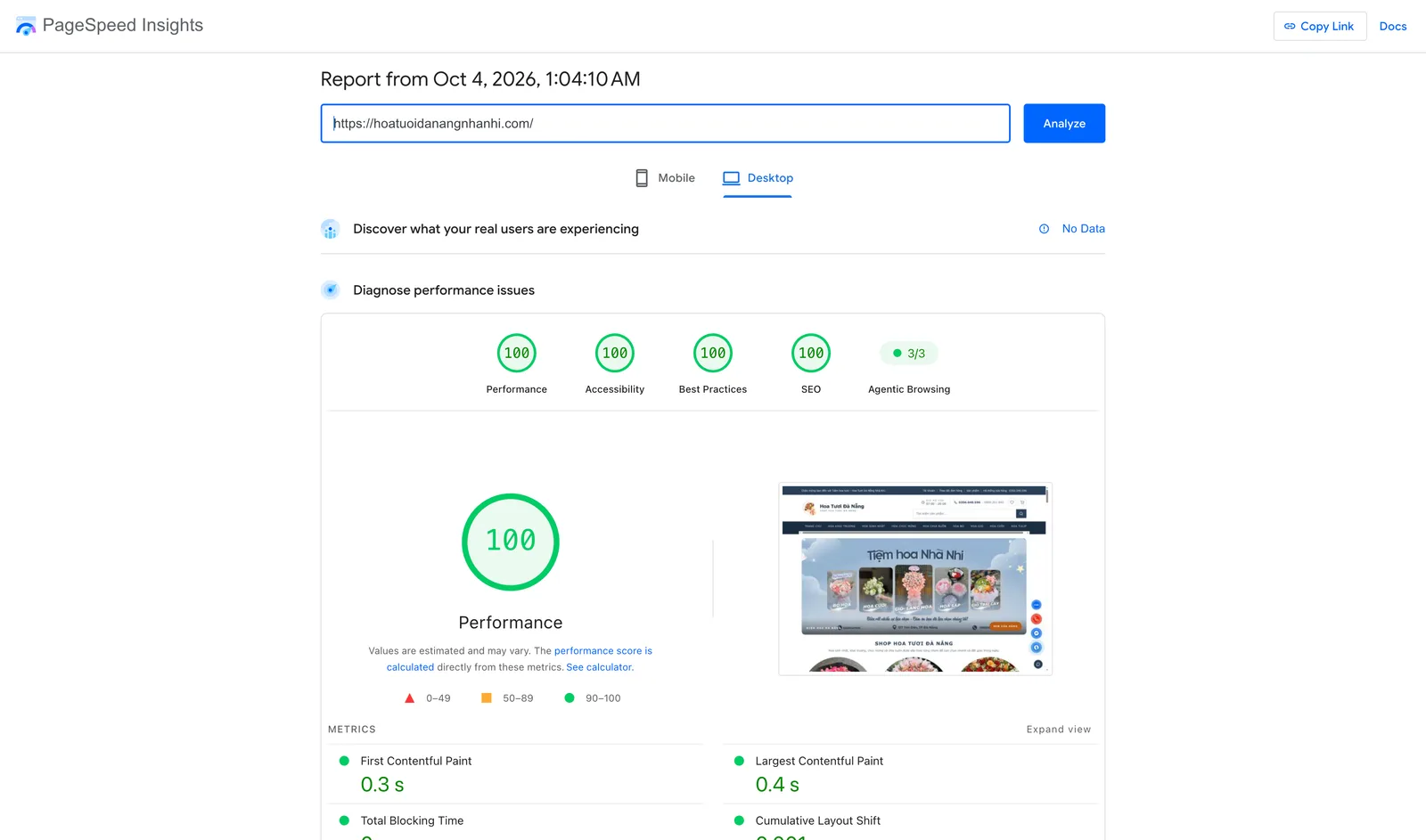
Desktop result from the PageSpeed Insights report of 4 October 2026. The score gauges sit above the speed metrics.
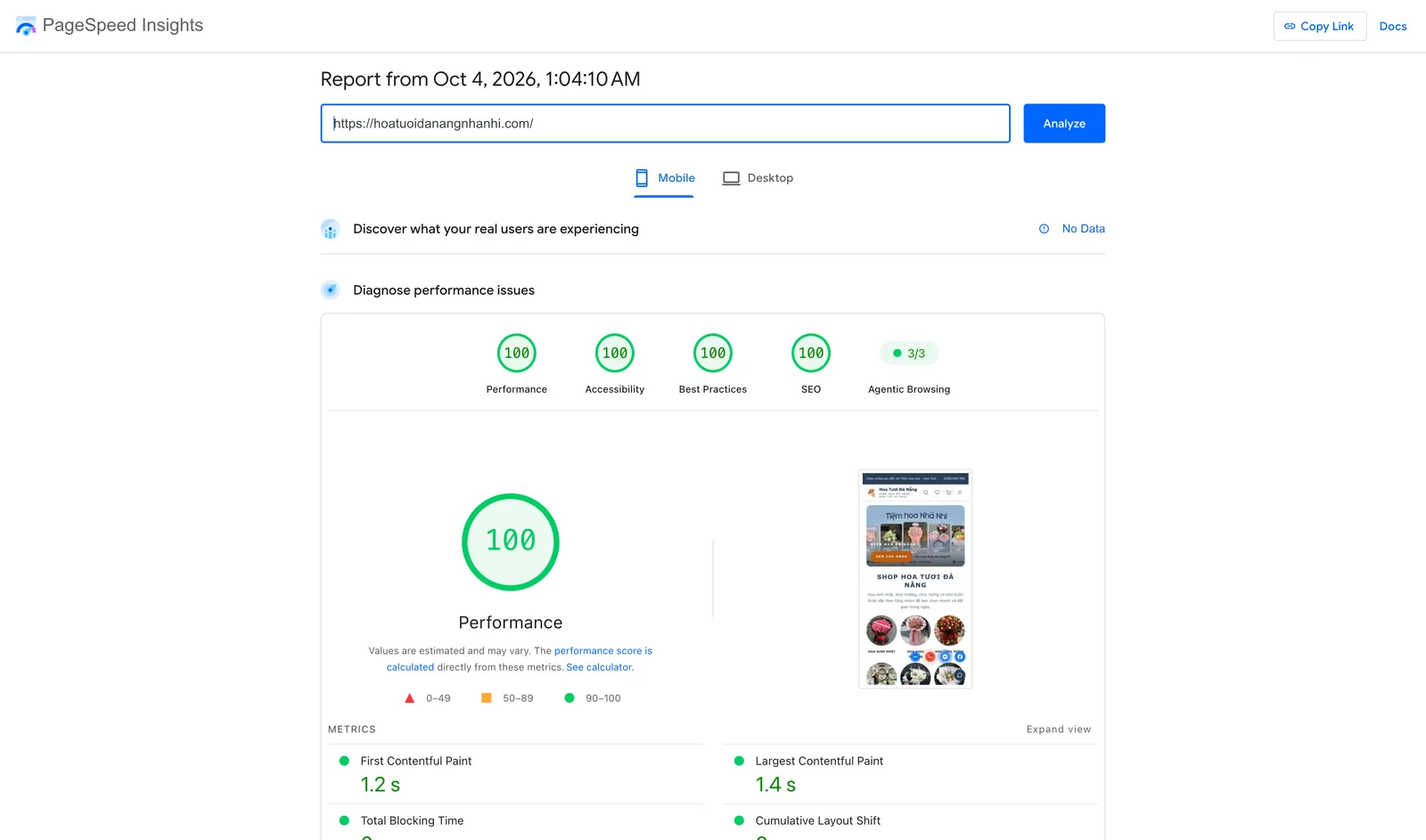
Mobile result from the same report. Mobile runs on a simulated Moto G Power phone over a slow 4G connection, so the times are longer than on desktop.
Mobile Performance can move by a point between runs, because Lighthouse simulates a mid-range phone on a slow network (see its documentation on score variability). The report also shows “No Data” for real-user measurements, so everything here is lab data.
The second result comes from Is Your Site Agent-Ready? (isitagentready.com), a scanner that checks how well a website works for AI assistants. It scored the site 100 out of 100 and placed it at Level 5, “Agent-Native”, with every scored category at 100. An earlier scan the same night gave 94, because the A2A Agent Card was missing; after I added the card, the rescan passed.
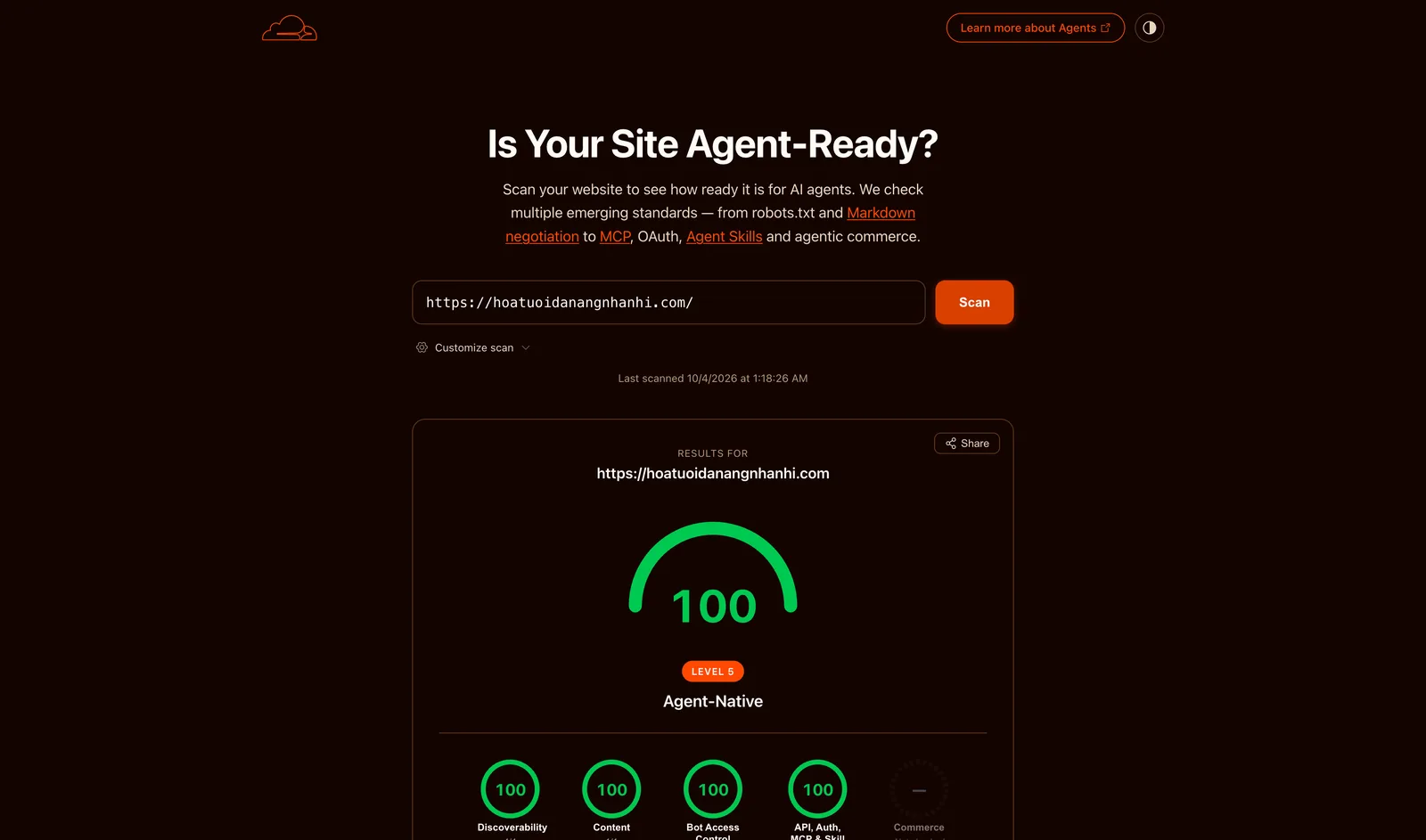
Agent-readiness rescan of 4 October 2026 at 1:18 AM. Commerce shows no score because it is optional and the scanner found no e-commerce signals on the site.
Why a flower shop needs any of this
Most customers of a flower shop in Da Nang find it on a phone, often in a hurry, often on a mobile connection. A page that takes four seconds to show its first photo loses that person to the next search result. That is the speed side.
There is a second audience now. People ask AI assistants for “hoa tươi Đà Nẵng” and expect a short answer with a shop name, hours and a way to order. If the assistant cannot read the site cleanly, it answers from somewhere else. Making a site readable for these assistants is what people call GEO (generative engine optimization) and AEO (answer engine optimization).
What are SEO, GEO and AEO?
SEO (search engine optimization) is helping Google and similar engines find and rank your pages. GEO is the same idea for AI tools that write an answer from several sources. AEO is optimizing for the short “answer box” or voice answer at the top of a result. The three overlap a lot: clear page text, correct business details and honest structured data help all of them.
Where I started
The site runs on Astro with some React, hosted on Cloudflare, with a database for the catalogue and a store for images. It has roughly 222 products, 21 categories and more than 600 blog articles, around 890 addresses in the sitemap.
What is Cloudflare, and what are a CDN and the edge?
Cloudflare is a company that sits between your website and your visitors. Its CDN (content delivery network) keeps copies of your pages in data centers around the world. “The edge” means those data centers near the visitor. A page served from a nearby copy is much faster than one fetched from the original server every time.
Early on, the picture was mixed. In August a check of nine page types found seven already at 100 in the non-speed categories, but a few issues stood out: a contact page lost points because an FAQ nested one HTML element incorrectly inside another, and a Cloudflare setting that routed Google’s tag through my own domain cost 313 KB of a 845 KB homepage.
On 3 September a new sweep tested all 891 addresses on mobile. The average score was 87, and 511 pages were under 92, the line I use as my safe “green” target. Product pages were the weakest: 211 of 222 were below it, with a median LCP of 4.95 seconds. Earlier, on 28 August, the homepage itself had scored 0 on both devices, because Lighthouse could not find a main element to time. More on that below.
How I measured
One lucky test run proves nothing, so measurement came first.
- A daily report posts a Search Console and PageSpeed summary to Telegram, in Vietnamese, and opens a note when something drops.
- A twice-weekly sweep tests every address, not just the homepage, and stores the history.
- Every fix gets a small automated test, so the same mistake cannot return unnoticed.
That loop mattered more than any single trick. It also taught me something uncomfortable: much of the “mystery” in scores came from where and when the test ran, not from the code.
Layer 1: Cloudflare
The cache that was not there
Cloudflare Pages does not cache HTML that comes out of a Worker, even when you ask it to, so the Worker has to use its own Cache API. Five requests in a row for one product page all came back as DYNAMIC, with response times between roughly 1 and 2.3 seconds. In Google Search Console, 72 addresses sat as “Discovered, currently not indexed” for over 30 days, 50 of them product pages. I suspected slow responses were part of the reason, but I never measured that effect, so treat it as a hypothesis.
What are a Worker, cache HIT and MISS, and TTFB?
A Cloudflare Worker is a small program that runs at the edge and can answer or change a request. A cache HIT means the answer came from a saved copy, which is fast. A MISS means the page had to be built again, which is slow. TTFB (Time To First Byte) is how long the server takes to start answering.
The fix was to add my own cache layer inside the Worker. It stores only successful, public pages, skips anything personal such as the account, cart and checkout, and returns a header, X-Edge-Cache, that says HIT, MISS or BYPASS so I can see what happened. Every cache call is wrapped so that if the cache fails, the page is built normally instead of the site going down.
A later problem: after a deploy, one page still served the previous version 46 minutes later. I put a build stamp into the cache key, so each new release silently ignores the old copies without needing a manual purge. Cloudflare keeps a separate cache in every data center, which also explains why PageSpeed, which tests from a cold location, often saw a 420 ms first response that my own browsers never did.
Images, per data center
Photos are resized on demand through Cloudflare’s image transformations. The first request for a new size in a data center is slow. On one banner variant the first request took 0.755 seconds in Hong Kong and 0.394 seconds in Singapore, then 0.181 and 0.127 seconds once cached. PageSpeed tends to hit the cold case, so I cached resized images with the Worker’s Cache API and normalized the request, so ?w=800&f=webp and ?f=webp&w=800 count as one entry.
Switches in the dashboard
Some of the biggest effects came from settings that live outside the code:
- Rocket Loader, a Cloudflare switch that delays scripts, rewrote script tags in a way that stopped Astro’s page navigation from working. The account page hung on “checking login” until a refresh. I turned it off.
- Early Hints lets the browser start downloading images and styles while the server is still preparing the page. It is on.
- Smart Tiered Cache lets data centers share copies with each other, so fewer visitors hit the slow original. It is on.
- Google’s tag gateway, the setting behind the 313 KB, is gone from the homepage.
Dashboard settings are easy to forget. I now keep them in a script that can be run again safely, and write down why each is set the way it is.
Layer 2: the front end
Right-sized images
Phones in Lighthouse’s test are treated as 412 pixels wide with a sharp screen, and the browser kept choosing a photo about 1,200 pixels wide. I gave each image a proper ladder of sizes, so a phone gets a small file. One homepage banner went from 47.4 KB to 21.7 KB, and about 44 product cards that each loaded 88 to 133 KB for a 206-pixel slot now load a much smaller version. Impact: a phone downloads far fewer bytes before the main photo appears.
What are srcset, sizes, WebP and AVIF?
srcset and sizes are HTML attributes that let the browser pick the smallest image file that still looks sharp in its slot. WebP and AVIF are modern image formats that look the same as JPEG or PNG at a much smaller file size. AVIF is smaller still, but slower to produce.
Later, portrait product photos taught me that pixels, not “complexity”, drive size: a tall photo had five times the pixels of the landscape banner, and the box showed only part of it. Cropping at the CDN to the displayed box and using AVIF cut one product image from 267,742 bytes to 87,578.
The score of zero
For a while the homepage scored 0 on mobile, four runs in a row. The trace showed no main element was ever recorded. The cause was a CSS line in the reviews strip: scroll-snap combined with smooth scrolling made the browser re-snap the strip as fonts and images loaded, and a browser stops recording LCP after any scroll, even one nobody sees. Nothing looked wrong to a human. I attached those behaviors with JavaScript only after the page finished loading. On the test page the score went from 0 to 83 that day, and later work took it higher. Impact: the homepage got a real score again instead of 0.
Page jumping
Layout shifts came from three places. A toolbar collapsed as you scrolled, a login form stayed hidden until the server answered, and on the product list the sidebar came first in the HTML and was moved down with CSS once content arrived. The fix in each case was to build the final layout on the server and keep the page’s HTML order in the same order people see it. A test now bans the CSS ordering trick on the storefront. Impact: the page no longer moves under a finger, and CLS on mobile is 0 in the final report.
Less JavaScript, smaller HTML
Three examples. Each page load had triggered about three Google Analytics page views on two IDs, with 461 KB of Google scripts and 155 extra requests on a product page, 53% of its bytes. I moved to a single edge-based tool, Zaraz, which sends analytics from Cloudflare’s servers instead of from the visitor’s phone, and removed the rest. The shopping cart’s 76 KB of inline code in every page became about 6 KB plus a part loaded on demand. And a Google Maps frame became a click-to-load placeholder.
There is also a rule of thumb I tested. A connection starts by sending about 14.6 KB, then doubles. A compressed HTML page under roughly 43.8 KB arrives in two round trips (a round trip is one message to the server and its reply); larger needs three, which adds about 150 ms to the first paint. So I minified every inline script at build time and set a budget of 8 KB of compressed inline script that appears on every page, which is now 7.4 KB. Impact: less to download and less for the phone to run, and TBT is 0 ms in the final report.
Layer 3: the back end
The catalogue is served from a database through Cloudflare. The changes here were small. Campaign data uses a cache time that shortens as the next change approaches. The product list is paginated on the server, which cut its HTML from 60 to 27 KB compressed. Orders are protected against double submission, and limits on repeated requests fail closed. None of this shows up as a headline score, but it keeps the fast paths honest. Impact: pages stay fast and orders stay safe as the shop grows.
Layer 4: ready for AI agents
An AI agent is a program that browses, reads and acts for a person. It cannot guess where a site keeps its information, so a well-prepared site publishes small, standard files and responses that say where things are. The Agentic Browsing section in Lighthouse and the isitagentready.com scanner both look for these.
What do robots.txt, Content Signals, MCP, WebMCP and an API catalog mean?
robots.txt is a text file telling bots which parts of a site they may visit. Content Signals are extra lines in it that say whether content may be used for search, AI answers or AI training. MCP (Model Context Protocol) is a standard way for AI assistants to call a site’s tools, and a server card is its business card. WebMCP lets an AI browser use tools that the page registers, such as search, instead of guessing at buttons. An API catalog (RFC 9727) is a machine-readable list of a site’s public data.
What are OAuth, OpenAPI and Link headers?
OAuth is the standard way for a program to prove who it is and get permission to act for someone, and “OAuth discovery” is a published page that explains how. OpenAPI is a machine-readable description of a website’s public data and the requests it accepts. A Link header is a hidden message sent with the page that points to useful resources, such as that description.
Here is what the site publishes today, all of it backed by something real:
- A
robots.txtwith a Content Signal that allows search, AI answers and AI training, plus a sitemap. - A
Linkheader on the homepage pointing to the API description and catalog. - A public API catalog, an OpenAPI description of the read-only public API, and an agent resource manifest.
- Standard sign-in discovery documents and an
auth.mdthat describes how an agent logs in. - A real MCP endpoint with four read-only tools, with its server card.
- Three Agent Skills files (order flowers, track an order, authenticate).
- An A2A Agent Card, a profile that lets one AI agent find and talk to another. The scanner reads it as a valid card, version 1.0.0, with 4 skills and 2 interfaces.
- Six WebMCP tools in the page: search products, get a product, list categories, add to cart, get the cart and track an order. Adding to the cart does not place an order.
- DNS records that tell agents where the endpoints are.
- Markdown for agents: when a bot asks for
text/markdown, the homepage returns a clean text version. This comes from a Cloudflare zone setting, Markdown for Agents, and not from my own code.
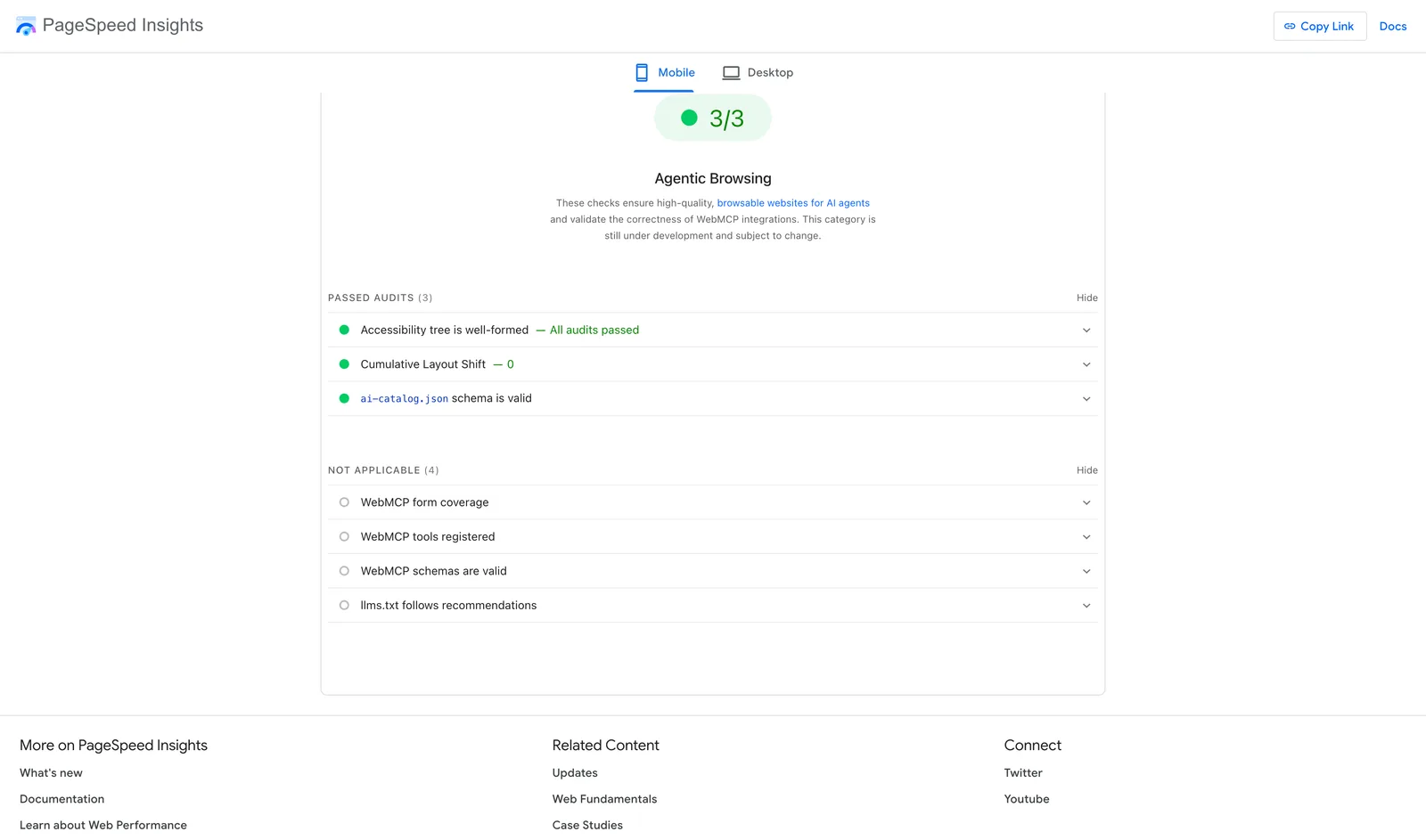
Agentic Browsing section of the mobile report. Three audits pass and four, including the WebMCP and llms.txt checks, are marked not applicable. Lighthouse labels this category as still under development and subject to change.
One detail worth knowing: Lighthouse marks its WebMCP audits “not applicable” for this run, while the agent-readiness scanner detected 6 WebMCP tools. The two tools test different things.
The rule I followed: publish only what the site really has. On 28 August my first pass at this deliberately skipped sign-in, MCP and WebMCP files because the features did not exist. Within hours a scanner made the gap visible, and each missing piece was built as a small real feature, with a test that fails if a document points at nothing. In October, Lighthouse’s new check showed 2 of 3 because my ai-catalog.json used fields its schema does not allow. I fixed the file and added a test that uses Lighthouse’s own schema, and the section reached 3 of 3.
What I did not do, on purpose or by choice:
- No
llms.txtfile. The address returns 404 today and I am not claiming it. Lighthouse lists itsllms.txtaudit as not applicable. - No payment protocols for agents. This is a flower shop that does not take card payments through an agent, so the scanner marks these checks optional and does not score them.
- No Web Bot Auth request signing, which the scanner marks as not applicable and does not score.
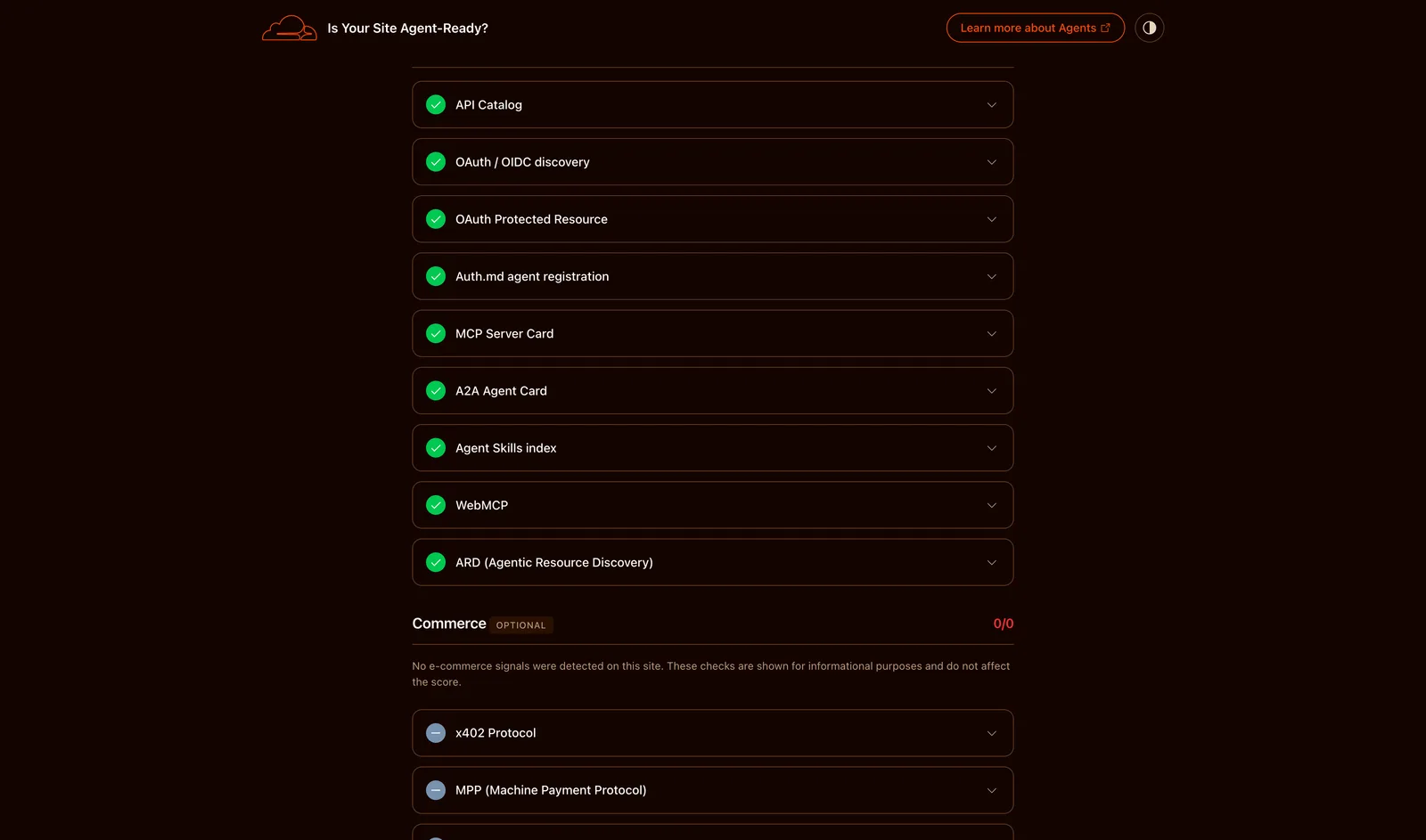
The API, Auth, MCP and Skill discovery checks from the rescan. All nine pass, including the A2A Agent Card that failed in the earlier scan.
SEO, GEO and AEO
What are structured data, a sitemap, redirects and DNS?
Structured data (JSON-LD in the schema.org format) is hidden labels in a page that tell Google “this is a product, this is its price, the shop opens 07:00 to 20:00”. It can earn rich results, which are search listings with stars, prices or FAQ dropdowns. A sitemap is a list of all your pages for Google, with the date each last changed. A redirect sends visitors from an old address to a new one: 301 means moved for good, 410 means gone for good, and 404 means not found. DNS is the internet’s address book that turns a name like hoatuoidanangnhanhi.com into a server.
Most of this work is unglamorous cleanup that helps people, Google and AI tools alike:
- Structured data that says what the page is: a florist business, products with shipping and return details, collections, blog posts and FAQ blocks. See Google’s structured data guide.
- Real “last changed” dates in the sitemap, taken from the history of each page instead of “today”.
- A backlog of 551 addresses that Search Console reported as not found was handled with redirects for pages that moved and “gone” responses for pages that were removed on purpose.
- Duplicate or templated articles were merged. Review markup that had been invented was removed, and real reviews were restored with the owner’s approval.
- One address for each page, one set of shop details everywhere: address, phone and opening hours that match Google Business Profile.
I am not claiming a traffic increase. I have no before and after search numbers I can stand behind, and at the time Search Console showed 7-day clicks down 43% on 2 September. Fast and readable is a foundation, not a ranking guarantee.
What went wrong
- Mobile 100 is not stable. Before the final round of fixes, the homepage scored 97, 98 and 90 on back-to-back runs with the same code.
- A free setting cost 16 SEO points. In May, Cloudflare added a
Content-Signalline torobots.txt, and Lighthouse’s validator flagged it as an unknown rule, dropping SEO from 100 to 84. Three months later the tools learned the line, and I now publish my own. Standards move under you. - Over-optimized images went blurry. After shrinking aggressively, article images looked soft, and some product images lost part of their width to wrong
sizesvalues. On 2 October I re-measured and chose sharper images over the smallest files. - Critical CSS turned text dark. Inlined CSS outranked the framework’s own rules and turned white text dark in the menu and footer.
- A wrong DNS record broke
www. Thewwwaddress returned an error on every path until its record was corrected. - A billing problem stopped deploys for about three weeks, from 11 to 30 September. A move to a second deploy route is under way.
Lessons
- Measure from where the measurer stands. PageSpeed hits a cold data center, so a score can swing without any code change.
- One line of CSS can zero a score. Test the real page, not what looks fine to you.
- Try to disprove your favorite theory first. Six runs showed my hero image was not the problem; HTML finishing late was.
- Dashboard switches are part of the system. Write them down and make them repeatable.
- Fix shared causes before single pages. One missing default image quality and one wrongly prioritized hidden logo mattered more than any page-level change.
- Count pixels, not intentions. Crop images to the box they fill.
- Fix the source of content, not only the server. Articles written with plain Markdown images were slow; the pipeline now handles them.
- Over-optimizing is visible. Let a person judge the trade-off between bytes and sharpness.
- Honest metadata beats a green check. Publish only what exists, and test that it does.
- Guard every fix with a test, because each regression happened once.
- 100 is a noisy target. Aim for a safe margin and say so.
What is next
On the list: collect real-user field data, since PageSpeed shows “No Data” for now, keep the scores steady as the shop and the standards change, decide whether an llms.txt file is worth publishing, and move deployment to a more resilient path. The harder goal is making 100 hold on every mobile run, not just the one in this report.
If you want a short checklist to copy: measure every page on a schedule, check whether your HTML is really cached, size images to their slots, look for scripts you do not need, give every page one clear address, and publish agent files only for features that exist.
Sources used here
The PageSpeed Insights report and the Is Your Site Agent-Ready? scan above are the numbers of record for the final scores. Project history figures come from the shop’s own issue and change records, which are private.
Sources & further reading
- PageSpeed Insights report for hoatuoidanangnhanhi.com, 4 October 2026
- Is Your Site Agent-Ready? (isitagentready.com)
- Lighthouse documentation: score variability
- web.dev: Largest Contentful Paint
- web.dev: Cumulative Layout Shift
- web.dev: Total Blocking Time
- Cloudflare: Markdown for Agents
- Cloudflare: Early Hints
- Cloudflare: Tiered Cache
- Cloudflare Workers: Cache API
- Cloudflare: Image transformations
- RFC 9727: API Catalog
- Model Context Protocol
- Google Search Central: structured data