Use a test matrix only for supported combinations
Expand a GitHub Actions matrix into actual jobs, apply include and exclude deliberately, and keep unsupported combinations out of the claim.

A test matrix runs a job across declared combinations of inputs. Use it to represent combinations the project supports, then inspect the expanded set. Adding every available runtime and operating system can consume runner time while producing a compatibility claim the project never intended to maintain.
For a developer reviewing a workflow, the first useful question is concrete: which jobs will this configuration actually create? Matrix dimensions multiply, while include and exclude rules can alter the result.
Expand the base product
Suppose a project tests two operating systems and two runtime versions. The base product contains four pairs. The following job then removes one unsupported pair and attaches metadata to another:
jobs:
  compatibility:
    runs-on: ${{ matrix.os }}
    strategy:
      fail-fast: false
      matrix:
        os: [ubuntu-24.04, windows-2022]
        runtime: [20, 22]
        exclude:
          - os: windows-2022
            runtime: 20
        include:
          - os: ubuntu-24.04
            runtime: 22
            experimental: true
    steps:
      - shell: bash
        run: |
          printf 'os=%s runtime=%s\n' \
            '${{ matrix.os }}' '${{ matrix.runtime }}'
This is a job fragment for a workflow. Its matrix values are fixed by the workflow author, and the step merely prints them. It does not install those runtime versions or test an application. A real compatibility job must configure the selected runtime and run the project checks.
The expected pairs are Ubuntu with runtime twenty, Ubuntu with runtime twenty-two, and Windows with runtime twenty-two. The include entry adds the experimental field to the matching Ubuntu pair; it does not add a fourth job in this example.
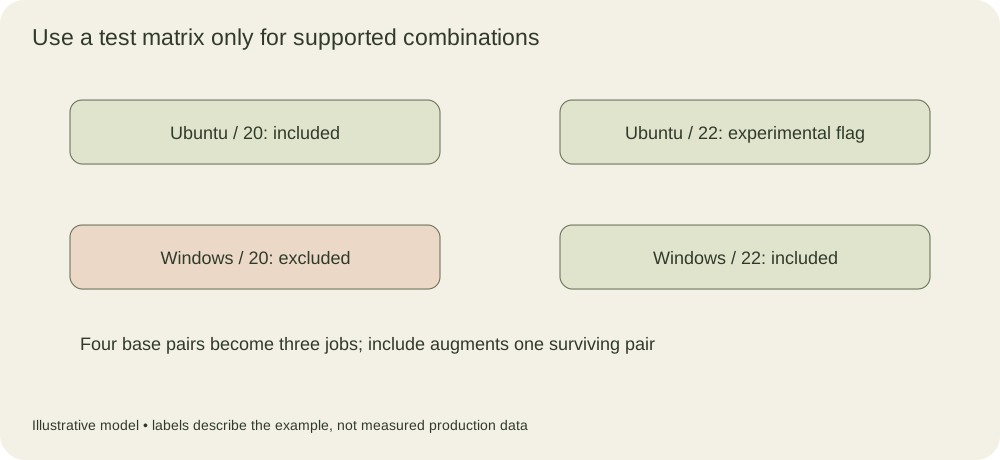
The differently colored pair is excluded. The experimental annotation adds metadata to an existing combination rather than introducing another operating-system/runtime pair.
Include is not always an extra job
An include object can augment existing combinations when its values can be added without overwriting the original matrix values. If it cannot be merged into an original combination under the documented rules, it can create another combination. That distinction makes include entries worth reviewing one by one.
The workflow-syntax documentation gives matrix include and exclude examples. Treat them as expansion rules, not as a generic merge of arbitrary YAML objects. A field added by one include entry can interact differently from a field that belonged to the original product.
For a complicated support policy, an explicit include-only list can be easier to read than several dimensions followed by many exclusions. The best representation is the one a maintainer can compare directly with the supported-platform table.
Count the cost before adding another dimension
A product of three operating systems, four runtimes and two database versions contains twenty-four combinations before filtering. If every job builds the same expensive dependency, the runner cost can grow quickly. Parallel execution reduces elapsed time only when enough runner capacity is available.
The max-parallel strategy setting limits how many matrix jobs run simultaneously. It does not reduce the total number of combinations. A small concurrency limit can protect a shared test dependency or fit a runner budget, but it also increases the time until all results are available.
Separate cheap compatibility checks from expensive integration tests when they answer different questions. For example, syntax or unit checks may cover every supported runtime, while an integration test targets the platform combinations on which the application is actually deployed. Document that scope rather than presenting the smaller integration set as complete coverage of every dimension.
Failure policy changes what evidence survives
Matrix fail-fast behavior can cancel remaining jobs after an eligible failure. This can save work when one failure already blocks a change. It can also hide whether other platforms fail for the same reason, making an initial compatibility investigation slower.
Disabling fail-fast is useful when the purpose is to collect the full failure pattern. The teaching fragment does so explicitly. That setting does not make failed jobs successful; it changes cancellation behavior.
An experimental combination can be allowed to fail through an explicit job policy when appropriate. Merely adding a field called experimental does not implement that behavior. The workflow must use the field in the relevant condition, and the resulting status policy should match the project’s support statement.
Keep every combination identifiable
Use matrix values in job display names and test-report metadata. A result labeled only tests failed is difficult to trace when several operating systems and runtime versions run the same command. Record versions actually installed, because a matrix value passed to a setup tool is an intention until the tool completes successfully.
Artifact names should also distinguish combinations when separate outputs are required. Multiple jobs uploading to the same artifact name can collide or violate an action’s artifact rules. Include the platform, runtime and workflow identity appropriate to the consumer.
The matrix is a compact program that generates jobs. Review its expansion as data, including unsupported and experimental cases, then verify that each job really configures the combination it claims to test. A three-row support table is often the clearest companion to a matrix that will otherwise be interpreted only after a release fails on one platform.
Track original dimensions separately from added metadata
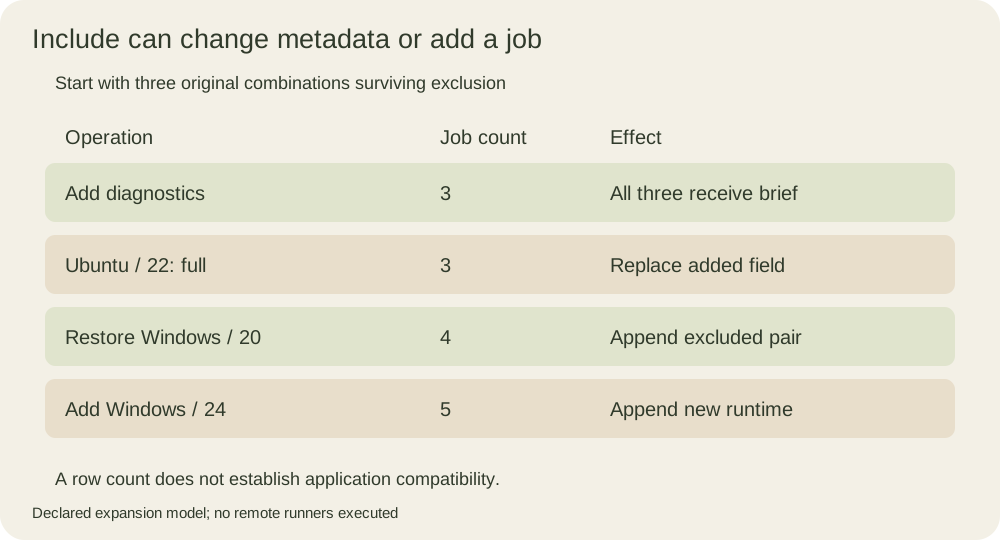
The useful distinction for an include review is whether a field was part of the original product. Keep the same two operating systems and runtimes, and keep the exclusion of Windows with runtime twenty. Now consider four include entries: add a brief diagnostic mode to every surviving combination, change that added mode to full for Ubuntu twenty-two, restore Windows twenty explicitly, and add Windows twenty-four as a new probe.
The first include can augment all three surviving jobs because the diagnostic field does not overwrite an original dimension. The second can replace that added diagnostic field on its matching Ubuntu row. It still cannot change an original runtime twenty into twenty-two. The restored Windows row and the runtime twenty-four row each become an additional combination. The final count is five, not seven, because the first two operations only change metadata.
This standalone Python model makes the accounting inspectable. It deliberately handles only the flat scalar dimensions, partial exclusions and include objects used here; it is not an implementation of GitHub expressions, nested matrix values or the runner scheduler. Original dimensions are kept separately so that updating metadata does not change which original values an include is allowed to match.
from itertools import product

axes = {'os': ['ubuntu-24.04', 'windows-2022'], 'runtime': [20, 22]}
exclude = [{'os': 'windows-2022', 'runtime': 20}]
include = [
    {'diagnostics': 'brief'},
    {'os': 'ubuntu-24.04', 'runtime': 22, 'diagnostics': 'full'},
    {'os': 'windows-2022', 'runtime': 20, 'diagnostics': 'restored'},
    {'os': 'windows-2022', 'runtime': 24, 'diagnostics': 'probe'},
]
base = [dict(zip(axes, values)) for values in product(*axes.values())]
original = [row for row in base
            if not any(all(row.get(k) == v for k, v in rule.items())
                       for rule in exclude)]
rows = [row.copy() for row in original]
for extra in include:
    matches = [i for i, row in enumerate(original)
               if all(k not in row or row[k] == v for k, v in extra.items())]
    if matches:
        for i in matches:
            rows[i].update(extra)
    else:
        rows.append(extra.copy())
print('base:', len(base), 'after exclusion:', len(original), 'final:', len(rows))
for row in rows:
    print(row['os'], row['runtime'], row['diagnostics'])
The rows are Ubuntu twenty with brief diagnostics, Ubuntu twenty-two with full diagnostics, Windows twenty-two with brief diagnostics, Windows twenty with the restored label, and Windows twenty-four with the probe label. The model prints them in construction order for inspection; this is not a prediction of the order in which runners start or finish jobs.
The syntax reference states that exclusions are processed before inclusions and that an exclusion may be a partial match. Therefore an exclude entry containing only the Windows operating system removes both original Windows runtimes. An explicit later include can still add a Windows combination back. An exclusion is an expansion rule, not a permanent ban on any future row with those values.
Newly appended rows must also supply whatever fields the job later consumes. The last two entries explicitly carry both operating system and runtime. A missing field can leave a job unable to select its runner or configure the intended tool. Review the generated data against the job’s required inputs instead of checking only that the YAML parser accepts the file.
Test the support statement alongside the row count
A count alone cannot detect the wrong five jobs. Compare the actual set of operating-system/runtime pairs with the intended support table. Then compare policy fields separately. A pair can be present while accidentally receiving an experimental or optional status, changing whether its failure blocks a change. Conversely, a probe label has no effect unless the workflow uses it.
Modify the model’s exclusion to contain only the Windows operating system. It now leaves two original rows, then restores Windows twenty and adds Windows twenty-four, giving four final jobs. Windows twenty-two is absent. Removing the restoring include instead gives four jobs under the original single-pair exclusion, but a different set. These two configurations have the same count and different compatibility evidence.
Next, delete only the new runtime twenty-four include. The restored twenty configuration still returns, so the count is four. If runtime twenty was excluded for a genuine unsupported dependency, this explicit restoration needs a support-policy decision; the fact that the expansion rules permit it does not make the application compatible. The printing job cannot answer that question.
For the five-row example, setting maximum parallelism to two leaves all five rows. If you additionally assume five equal-duration jobs, all eligible at once, two available runners and no overhead, they require three idealized scheduling waves. Real job durations, runner availability and cancellation can break that simple wave picture. Keep total generated jobs, allowed simultaneous jobs and completed evidence as separate quantities.
Finally decide whether the exercise is testing configuration expansion, runtime compatibility or release eligibility. The local model establishes the first. A configured toolchain and actual application tests establish evidence for the second. Failure, cancellation and approval policies determine how that evidence contributes to the third. Naming the question prevents a successful matrix printout from becoming an unsupported claim that the project works on every listed platform.