Choose a volume before your container writes important data
Follow named-volume data through container recreation, distinguish mounts from backups and plan explicit data removal.
A container’s writable filesystem layer belongs to that container. Removing the container removes that layer. A named Docker volume has a separate lifecycle and can retain application data when a replacement container mounts it. Choose the storage boundary before an application writes data you intend to keep.
If you are learning container operations, a tiny text fixture is enough to test the lifecycle. You do not need a database or a large dataset to distinguish removing a process wrapper from removing its persistent storage.
Trace one named volume through replacement
The following commands are intended for an isolated local Docker daemon. Use a unique volume name if the example name already exists. They write only a harmless marker and remove the example volume at the end:
volume="portfolio-volume-lab-$(date +%s)-$$"
docker volume create "$volume"
docker run --rm -v "$volume:/data" alpine:3.22 \
  sh -c 'printf "%s\n" "retained marker" > /data/marker.txt'
docker run --rm -v "$volume:/data" alpine:3.22 \
  cat /data/marker.txt
docker volume rm "$volume"
The first container writes the marker and is removed when it exits. The second container reads the marker from the same named volume. Their container filesystems are different, but their mounted storage is the same object.
The final command deliberately removes that example storage after both containers have exited. Treat volume removal as data deletion, even when the volume name looks like an implementation detail. A cleanup command that removes unused volumes can affect data whose container is temporarily absent.
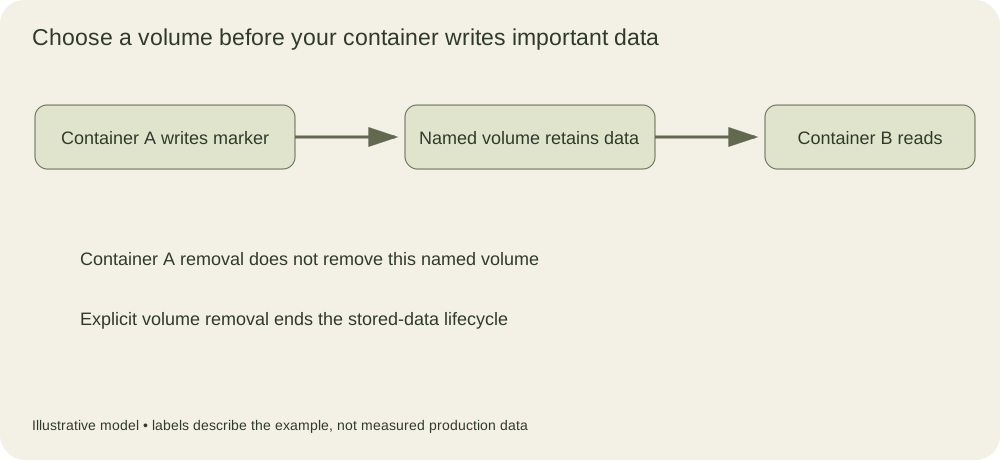
The storage persists between the two containers. The explicit removal operation ends the volume lifecycle and removes the retained marker in this local example.
A mount can hide files already in the image
Mounting storage at a path changes the filesystem view at that path. Files from the image underneath the mount can become obscured. Their apparent disappearance does not necessarily mean they were deleted from the image.
Docker also has documented behavior for populating an empty volume with content already present at the target path, with options that can alter this behavior. The volume documentation describes that contract. Do not rely on an accidental first-run copy as an undocumented schema migration mechanism.
An application should know whether a mounted directory is empty, initialized or from an older version. Initialization code that assumes every container start receives fresh storage can overwrite or conflict with retained data. Make the initialization condition explicit and test a restart with existing content.
Named volumes and bind mounts serve different needs
A bind mount exposes a particular host path in the container. It is convenient for local development because an editor and the container can see the same files. It also makes the workload depend on host directory layout, ownership and permissions.
A named volume lets Docker manage the storage location and lifecycle through its volume interface. Drivers can provide different storage implementations, so behavior such as locality and availability depends on the selected driver. A default local volume on one machine should not be assumed to appear automatically on another host.
For either mount type, the application’s numeric user and group IDs matter. A path writable by one container image may become unwritable after switching to a non-root runtime user. Diagnose the identity and directory ownership before granting broad permissions to make the error disappear.
Read-only mounts are useful when the application should consume a configuration or dataset without changing it. They constrain writes through that mount; they do not make the source data authentic or prevent another authorized writer from changing the underlying source. Integrity and update ownership are separate questions.
Persistent storage is not a backup
A volume can survive container replacement while remaining vulnerable to host failure, accidental deletion, corruption or an application bug. A backup is another recoverable copy with a defined retention and restore procedure. Keeping both the application and its only data copy on one disk does not create independent recovery.
Database files often require application-aware backup or snapshot coordination. Copying live files without the database’s consistency protocol can produce an archive that exists but cannot be restored into a valid database. Test the recovery using the database’s supported tooling and an isolated target.
A backup record should identify what was captured, when it was captured and which application version can restore it. For an encrypted volume or archive, recovery also depends on key access. Losing the key can make an otherwise intact copy unusable.
Put deletion in the operating contract
Compose and other tools have commands that stop services, remove containers or remove associated volumes under particular flags. Read the command’s exact removal scope before adding it to a cleanup script. A development reset command and a production rollout command should not share an ambiguous storage-deletion step.
For the marker fixture, successful recovery is visible when a fresh container reads the expected bytes. For a real service, add the application-level validation: expected records, schema version and a meaningful read or write operation. A mounted directory appearing in a container only proves that a mount exists. It does not establish that the retained data is the data the application needs to serve users.
Separate an image seed from retained application data
An image may contain initial files at its intended data path. Consider this harmless image fragment:
FROM alpine:3.22
RUN mkdir -p /data \
    && printf '%s\n' 'image seed' > /data/seed.txt
CMD ["cat", "/data/seed.txt"]
Without a mount at that path, the container reads the image seed. With a new empty named volume mounted there, Docker’s default population behavior copies the existing directory contents into the volume. With an already populated volume, its own contents obscure the image directory instead. These states have different causes even when the same image and mount destination are used.
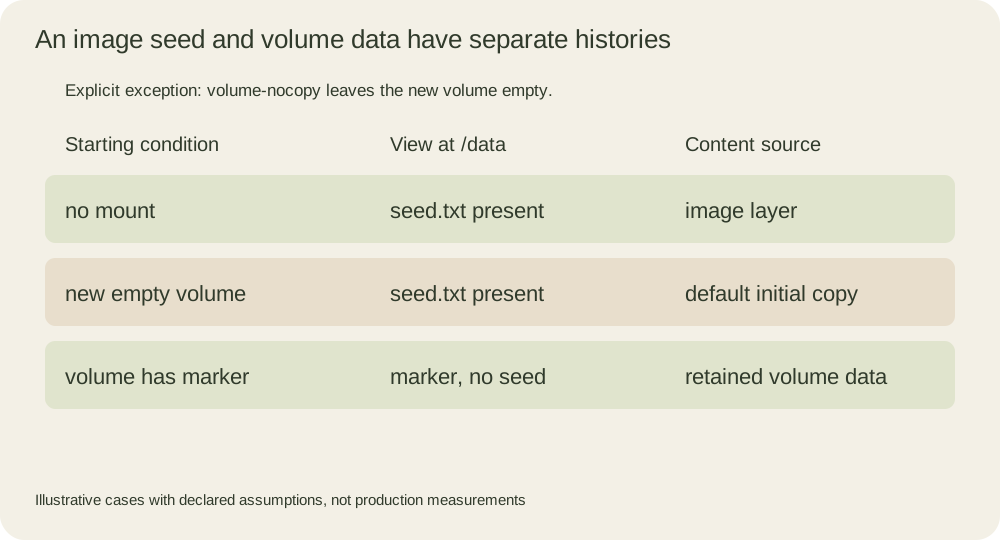
The mount does not merge every old application file with every new image seed. If version two of the image contains a different default, a retained nonempty volume is not automatically rewritten to match it. An application upgrade therefore needs a deliberate initialization or migration policy. A new image tag alone does not identify the schema of existing stored data.
For an isolated exercise, build the fragment with a temporary image tag and compare three uniquely named volumes. Leave the first empty and mount it normally; verify that it acquires the seed. Leave the second empty but use a --mount volume specification with volume-nocopy; verify that the seed was not populated. Prepopulate the third with a different marker before mounting it at the data path; verify its marker remains and the image seed is hidden. Each volume must be a distinct object, or the first test will change the starting condition of the next one.
The documented population option controls this initial copy behavior. It does not perform a backup or a schema migration. Record the volume identity and whether it was empty before the test, and remove only those fixture volumes after their containers exit. Running the original image without a mount again should still show the seed, which demonstrates that the hidden image file was not deleted by mounting different storage above it.
When deciding how to initialize a real service, prefer an explicit version marker and an idempotent initialization path over guessing from a container’s age. A container created seconds ago can mount years of retained data. Test both a genuinely empty volume and a populated volume from the previous supported application version; those are the two states the next rollout must handle.