Linux directory permissions explain a misleading permission denied
Diagnose Linux permission denied by checking search permission on every parent directory and distinguishing access from directory listing.

Reading a file on Linux requires more than read permission on that file. The process must also have search permission, represented by the execute bit, on each directory used to reach it. A readable report.txt can therefore produce Permission denied because a parent directory blocks traversal.
This distinction is useful when a service account cannot open a configuration file that looks readable in ls -l. Directory permissions describe operations on directory entries. Their meanings differ from the same letters on a regular file.
Read the path one component at a time
Suppose a service opens /srv/reports/daily/report.txt. Path lookup begins at the root directory and searches through srv, reports and daily before it reaches the file. A missing search permission at any of those directories stops lookup, even if the final file permits reading by everyone.
The kernel chooses the applicable owner, group or other permission class using the process credentials. Supplementary groups can matter. Access control lists and security mechanisms such as SELinux or AppArmor can add rules beyond the simple mode bits, so a mode-bit explanation is a starting point rather than a complete authorization model.
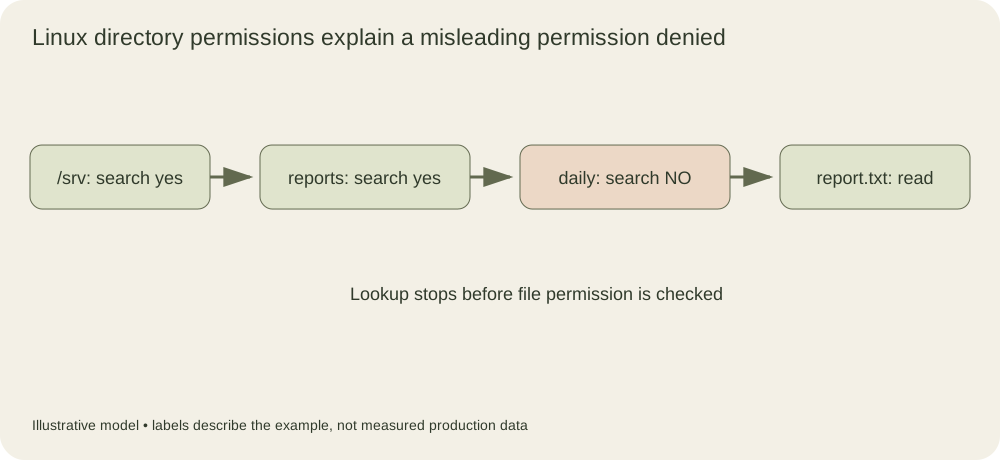
The blocked daily directory prevents the lookup from reaching the readable file. The file’s read bit cannot grant permission to traverse an earlier path component.
Build a disposable directory fixture
Run this example as an ordinary user in a shell that you control. It modifies only a newly created temporary directory. A privileged user may bypass ordinary discretionary permission checks, so root is a poor account for demonstrating this behavior.
lab=$(mktemp -d)
mkdir "$lab/daily"
printf '%s\n' 'example report' > "$lab/daily/report.txt"
chmod 644 "$lab/daily/report.txt"
chmod 600 "$lab/daily"
cat "$lab/daily/report.txt"
chmod 700 "$lab/daily"
cat "$lab/daily/report.txt"
The first cat should fail for the directory owner because the directory lacks the owner’s execute bit. The second succeeds after search permission is restored. The file did not change. If your result differs, inspect your effective user, access control lists and privilege before changing the explanation.
The temporary parent directory created by mktemp -d is normally private. That is useful for a local fixture, but it means another user would also need permission to traverse the parent before testing the inner directory. Permission experiments often become confusing because the fixture itself introduces an additional blocked component.
Listing and lookup are different operations
Read permission on a directory allows reading its list of entry names. Search permission permits looking up a known entry and accessing its metadata or contents subject to the entry’s own permissions. A directory with search permission but no read permission can therefore allow access to a known filename while preventing a normal listing of all names.
Write permission on a directory controls changes to its entries. Creating or removing an entry generally also requires search permission on that directory. Deleting a file is primarily an operation on the containing directory; the file’s own write bit is not a reliable protection against removal by someone who can modify that directory. Sticky directories, such as a typical /tmp, add another ownership rule.
These distinctions explain why changing a file to mode 777 often fails to solve the actual problem. It may leave the blocked parent unchanged while giving unnecessary write and execute permissions to the file itself. Start with the denied operation and the account performing it.
Inspect the actual service identity
For a service, the shell account running the diagnostic command may differ from the account opening the file. Check the configured service user and supplementary groups, then inspect the effective process credentials. A successful manual read by an administrator does not establish that the service can read it.
A path inspection tool such as namei -l /srv/reports/daily/report.txt can display the component modes and owners when available. Also check whether a symbolic link leads to a different directory tree. Relative symlink targets are resolved relative to the directory containing the link, and the eventual target path brings its own traversal requirements.
If mode bits look correct, move to the next source of evidence. An ACL can change the effective permission calculation. A container may see a different mount or numeric user ID. A service sandbox can make a path inaccessible even when the host shell sees it. A security policy denial may appear in an audit log. Keep these as separate hypotheses so each observation tests one explanation.
Grant the operation the service needs
A read-only configuration path usually needs search permission along its parents and read permission on the final file. It does not require making the directory world writable. Group ownership or a carefully scoped ACL can grant access to a service while preserving a narrower boundary for other users.
After changing access, repeat the same operation using the same identity and path the service uses. Record the previous mode and the new mode in the change review. The Linux path resolution manual describes the lookup sequence and the search-permission check; that sequence gives a concrete order for investigating the next permission error.
Compare search-only and read-only directory access
The first fixture changes one bit, but two contrasting modes reveal why directory read and search permissions should not be described as a single kind of access. Use an ordinary user, the existing temporary directory, and a shell that continues after an expected command failure:
chmod 100 "$lab/daily"
cat "$lab/daily/report.txt"
ls -- "$lab/daily"
chmod 400 "$lab/daily"
ls -1 -- "$lab/daily"
cat "$lab/daily/report.txt"
chmod 700 "$lab/daily"
With mode one hundred, the owner has search permission but no directory read permission. Opening the known readable filename succeeds, while listing names fails. With mode four hundred, the owner can read entry names, so the simple listing can show the filename. Opening that name fails because lookup requires search permission. More elaborate listing options can attempt metadata lookups and report additional errors, so the example deliberately uses a simple name listing.
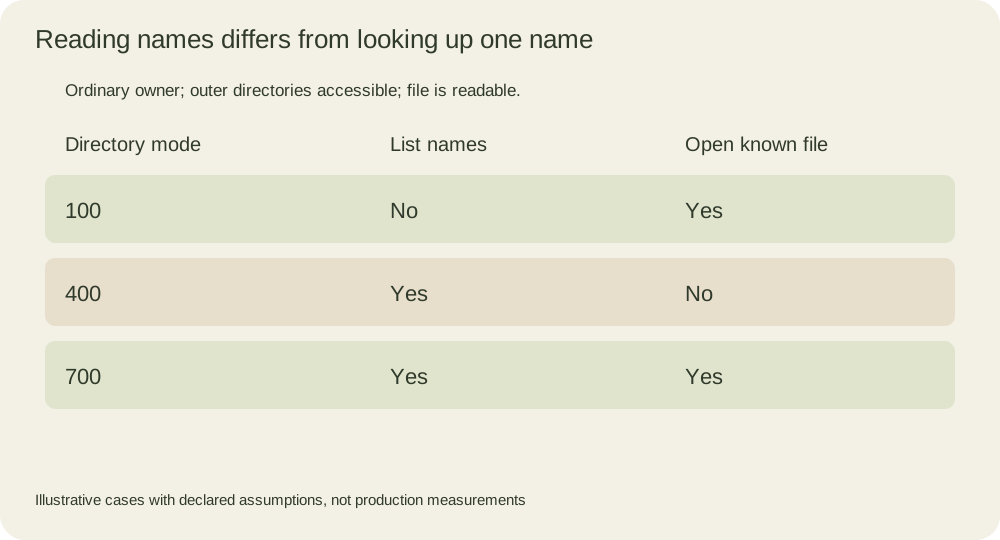
The table holds the file’s read permission constant. The changing result comes from the containing directory. It assumes ordinary discretionary permissions, an owner without bypass privileges and accessible outer directories. A service sandbox or additional security policy can impose further restrictions beyond this model.
Understand why a read-only file can still be removed
A directory contains names that refer to filesystem objects. Removing a name updates that directory; it is not a write through the file’s data descriptor. Consequently, a file mode that prohibits content writes does not by itself prohibit unlinking the directory entry. Linux’s unlink reference describes the relevant directory permissions and additional failure conditions.
A harmless local example demonstrates the distinction. It removes only a newly created marker in the temporary fixture, not the report used above:
printf '%s\n' 'disposable marker' > "$lab/daily/remove-me.txt"
chmod 400 "$lab/daily/remove-me.txt"
rm -f -- "$lab/daily/remove-me.txt"
test ! -e "$lab/daily/remove-me.txt"
The owner can remove this entry because the containing directory is writable and searchable after the previous block restored its mode. The force flag suppresses a confirmation prompt for the read-only marker; it does not grant filesystem permissions. This observation does not mean every read-only file is removable. A sticky-bit rule, immutable attribute, read-only filesystem, ACL or security policy can change the outcome. The example isolates ordinary directory permission checks so the missing dependency is visible.
The chmod reference also helps distinguish changing permissions from performing the protected operation. A file owner can normally change its mode, subject to documented restrictions; the service account attempting to read it may not own it. Repairing access as the administrator and validating access as the service are separate steps with different credentials.
Turn the error into a small access contract
Write down the exact path, effective user and groups, operation, and expected result. For example, a report reader needs to traverse the parent directories and open the known file for reading. It may not need to enumerate siblings or create new reports. A directory listing check would then be an incomplete test of the application’s actual requirement.
As a reproducible exercise, predict the result of opening a known file when only an outer directory loses search permission. Restore the inner directory first so the fixture changes one cause at a time. Then repeat after restoring the outer permission. This is the same method used in a real diagnosis: identify the first failed operation, change the smallest relevant condition, and repeat the original operation under the original identity.