Shell quoting that preserves filenames with spaces
Preserve filenames through Bash expansion, inspect the argument vector, and avoid loops that break on spaces or wildcard characters.

Shell quoting preserves the boundaries between arguments. In Bash, "$file" passes one argument containing the value of file; an unquoted $file can undergo word splitting and filename expansion. That distinction explains why a command that works for report.txt fails when the file is called quarterly report.txt.
This example is for a developer writing a small maintenance script. It uses disposable local files and prints argument boundaries, so the result is visible without deleting or uploading anything. The rules below are Bash rules. Other shells share many of them, but their array syntax and expansion details can differ.
Inspect what the command receives
A shell command is not handed to most programs as one string to interpret again. Bash prepares an argument vector. A tiny function can show each argument on a separate numbered line:
show_args() {
  local i=0
  for arg in "$@"; do
    printf 'argv[%d]=<%s>\n' "$i" "$arg"
    i=$((i + 1))
  done
}
file='quarterly report.txt'
show_args "$file"
show_args $file
The quoted call supplies one argument. With the usual value of IFS, the unquoted call supplies quarterly and report.txt separately. The program receiving those arguments cannot recover the intended filename reliably. It has no record that a space originally came from a variable.
Quotes placed inside a variable do not become shell syntax during ordinary expansion. Setting file='"quarterly report.txt"' stores quote characters in the value. Expanding that value without quotes still fails to preserve the intended boundary. Write the quotes in the command that performs the expansion.
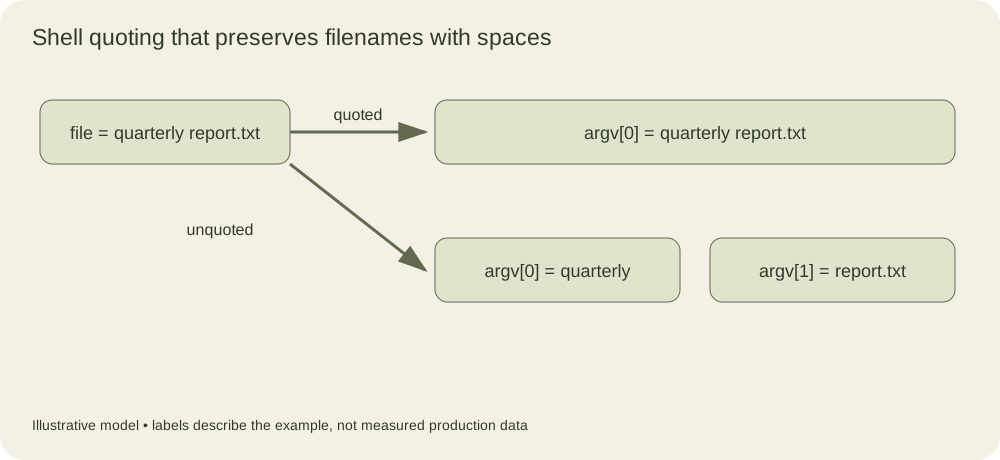
The upper lane preserves one argument. The lower lane shows word splitting after an unquoted expansion. The brackets in the figure represent argument boundaries, not characters in the filename.
Wildcards create a second failure mode
Whitespace is only part of the problem. An unquoted variable containing *.log can expand to matching paths in the current directory. This makes the behavior depend on files that happen to be present when the script runs.
work=$(mktemp -d)
(
  cd "$work" || exit 1
  touch -- 'one.log' 'two.log'
  pattern='*.log'
  show_args "$pattern"
  show_args $pattern
)
The first call passes a literal pattern. The second asks Bash to perform filename expansion. Neither behavior is intrinsically wrong. A search command may need a literal wildcard expression, while a shell loop may deliberately use a glob. The important question is which component owns the matching operation.
For example, find "$work" -name '*.log' passes the pattern to find. Removing those single quotes allows the shell to expand the pattern before find starts. The resulting command can have different arguments and may fail in ways that seem unrelated to quoting.
Iterate over paths without serializing them
A common broken loop starts with for file in $(ls ...). Command substitution produces text, removes trailing newlines, and then lets the unquoted result undergo splitting and expansion. A filename containing a newline makes a line-oriented representation ambiguous even when spaces are handled.
For a single directory, use a deliberate glob and quote the loop variable when using it:
(
  shopt -s nullglob
  for file in "$work"/*.log; do
    printf 'Would inspect: %q\n' "$file"
  done
)
Here the quoted directory prefix and the unquoted *.log have different jobs. The prefix stays intact, while the wildcard selects matching directory entries. Each match becomes its own loop value. nullglob makes an unmatched pattern disappear, so an empty directory does not produce a fake filename ending in an asterisk. The subshell limits that shell-option change to this block.
For recursive traversal, find ... -print0 paired with a null-aware reader preserves every valid filename byte except the null byte, which cannot occur in a Linux filename. If the operation can be expressed directly with find -exec, that also avoids parsing a printed listing. Choose the simpler form for the actual operation.
Options are a separate boundary
Quoting does not stop a filename such as -n from looking like an option to the receiving program. Where the command supports it, -- marks the end of options:
printf '%s\n' "$file"
touch -- "$work/-n"
The fixed printf format is another boundary. Passing untrusted text as the format string gives percent sequences special meaning. Keeping the format constant and placing data in a separate argument avoids that confusion.
When forwarding a function’s arguments, use "$@" to preserve the original elements. "$*" joins them into one argument using the first character of IFS. That difference matters for a wrapper around a compiler or deployment tool: the wrapper should preserve the caller’s argument vector unless joining is part of its documented interface.
Arrays are useful when a script constructs a command from several optional arguments. Each array element is already one argument. Expanding "${args[@]}" preserves those elements; concatenating everything into a string and invoking eval asks the shell to interpret data as code again. Ordinary maintenance scripts rarely need that additional parsing step.
The Bash manual documents quoting, shell expansions and arrays separately because each changes a different stage of command preparation. When reviewing a script, follow a path value from where it is read to the final command. Check splitting, wildcard expansion and option parsing at that final boundary. A filename with a space, an asterisk and a leading hyphen makes a more useful local test fixture than another copy of report.txt.
Preserve empty values and optional arguments deliberately
An empty variable exposes another part of the contract. A quoted empty expansion supplies one empty argument; an unquoted empty expansion normally disappears. An application may distinguish a missing configuration value from an explicitly empty one, so neither form is an interchangeable spelling of the other. Inspect the count as well as the printed characters when debugging this case.
The following helper uses Bash’s %q conversion to make spaces and embedded newlines visible. This is a Bash diagnostic representation, not a portable interchange format for another program. The array holds four elements, including an empty element and a filename containing a newline.
show_escaped() {
  printf 'count=%d\n' "$#"
  for argument in "$@"; do
    printf '<%q>\n' "$argument"
  done
}
inputs=('quarterly report.txt' '' '*.log' $'two\nlines.txt')
show_escaped "${inputs[@]}"
empty=''
show_escaped "$empty"
show_escaped $empty
The calls report counts of four, one and zero. No glob expansion occurs in the array expansion because each element is preserved by the surrounding double quotes. The newline remains part of one element; displaying it on two terminal lines with a plain string conversion would not mean that the command received two arguments.
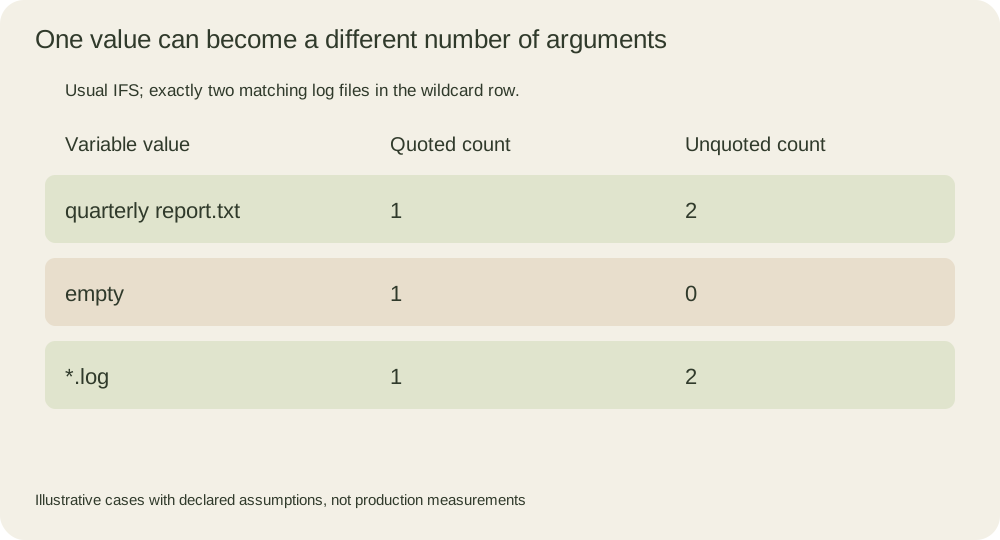
The table assumes ordinary field splitting and exactly two matching log files for the wildcard row. Its empty row is especially useful for testing wrappers: preserving an empty argument can be correct, while inventing an empty argument for an option that should be absent can be wrong.
Build optional arguments as optional array elements. For example, start with args=(inspect), append a verbose flag only when requested, then append -- and the filename if the target command supports that separator. This keeps the program’s option grammar separate from the shell’s expansion rules. Do not store the whole assembled command in a text string merely to make it resemble an interactive command line.
Trace the next parser, not just the shell
Quoting prevents certain shell transformations. It does not promise that a receiving tool will treat an argument as a literal filename. A regular-expression option interprets pattern syntax; a remote-shell interface may pass text to another shell; a program may parse a response file named by an argument. Each additional parser needs its own documented boundary.
The ShellCheck SC2086 explanation is useful supplementary guidance because it connects unquoted expansion to word splitting and globbing, including intentional exceptions. The Missing Semester shell-tools lesson provides a broader educational treatment of shell scripting. These explain the review approach; the Bash manual defines the behavior used here. Reading the course notes does not imply reproducing every exercise or watching the accompanying lecture.
As a final exercise, pass the four-element array through a wrapper that first uses "$*" and then "$@". Predict the count before running it. Explain why the second version preserves the caller’s request and why the first version cannot reconstruct the original boundaries after joining. That explanation is more transferable than memorizing a rule to add quotes wherever a script fails.