Parse CSV records that contain newlines
A postal-address export demonstrates why line counts are not row counts. A worked analytical example with explicit assumptions and checked results.
A CSV record can contain a newline inside a quoted field. Counting physical lines or splitting on line breaks therefore does not reliably count records. Use a CSV parser that understands quoting, then validate the number and meaning of fields in each parsed record.
If you import addresses, comments, or descriptions, this is an ordinary input shape. A two-line postal address is still one field belonging to one customer record. Treating its second line as another record shifts columns and can create confusing errors far from the original boundary.
Read two addresses from four physical lines
This synthetic file has a header and two address records. The first address contains an embedded line break. The second contains both a comma and quotation marks.
import csv
import io

payload = (
    'id,address\r\n'
    '1,"12 River Road\r\nUnit 3"\r\n'
    '2,"5 Hill St, ""East"""\r\n'
)

rows = list(csv.reader(io.StringIO(payload, newline=""), strict=True))
assert rows == [
    ["id", "address"],
    ["1", "12 River Road\r\nUnit 3"],
    ["2", '5 Hill St, "East"'],
]
print("physical lines:", len(payload.splitlines()))
print("data records:", len(rows) - 1)
The result is four physical lines and two data records. The parser keeps the address newline inside the first field value. It converts the doubled quote characters in the second address into literal quotes.
RFC 4180 describes quoting fields that contain commas, line breaks, or double quotes, and escaping a quote inside a quoted field with another quote. CSV files in practice can use other dialects, so confirm the producer’s delimiter and quoting convention rather than assuming every file follows one variant.
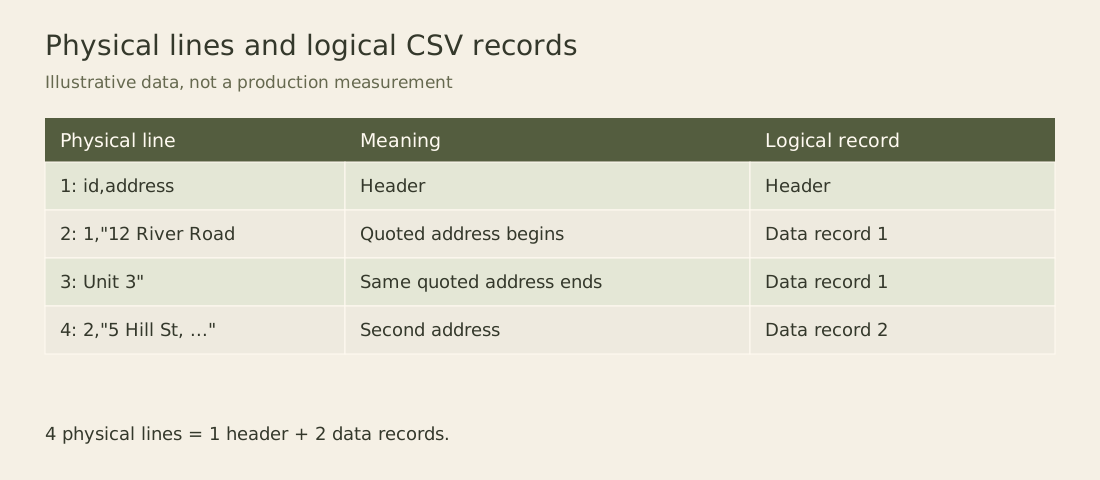
The open quote before the first address is the reason its newline does not end the record. The parser needs state across that line boundary.
Preserve newline handling at the file boundary
For a real file in Python, open it with the intended encoding and newline="", then pass the file object to the CSV reader. This lets the CSV module handle newline conventions itself. The StringIO object above uses the same newline setting so the fixture preserves the embedded carriage-return and line-feed pair.
The Python CSV reference documents this file-opening convention. The delimiter, quote character, and escape behavior are parser settings that should be captured with the import configuration. Guessing a dialect from a short sample can be useful during exploration, but confirm the result before processing a recurring feed automatically.
Decoding bytes into text is a separate step. A UTF-8 file with a byte-order mark may need the appropriate decoding choice so the first header does not acquire an invisible character. A file encoded in a legacy character set needs that encoding identified; a CSV parser cannot recover text that was decoded incorrectly before it arrived.
Keep the original bytes or an approved source snapshot when import reproducibility matters. A text editor can normalize line endings on save, changing the byte representation without changing the apparent addresses. A raw file hash identifies the actual input, while parsed record identities describe its logical content.
Validate the schema after parsing
A successful parse does not guarantee a valid table. A record can have too many fields, too few fields, an unexpected header, or duplicate column names. Validate those properties before mapping values into the target schema.
header, *data_rows = rows
if header != ["id", "address"]:
    raise ValueError("unexpected header")
for record_number, row in enumerate(data_rows, 1):
    if len(row) != len(header):
        raise ValueError(f"record {record_number}: wrong field count")
Here the reported record number counts data records, excluding the header. It is intentionally different from a physical line number. For a multiline file, an error message should say which one it reports. A reader trying to repair “row three” otherwise has to guess whether it means the third spreadsheet record or the third text line.
Strict parser mode helps identify malformed quoting, but schema and domain checks remain necessary. An address field containing an empty string can be syntactically valid while violating a required-address rule. Keep those errors separate so an operator knows whether to fix the file format or the source value.
Write a round trip through the same grammar
Use a CSV writer when exporting parsed records. It can quote the fields that require quoting and escape embedded quotes consistently. Manually wrapping every value in quotes fails when a value itself contains a quote unless the escaping rule is also applied.
A useful test writes the parsed rows to an in-memory CSV stream and parses that output again. Compare field values after the round trip. Do not require byte-for-byte equality unless your application promises one canonical serialization, because multiple legal quoting choices can describe the same values.
Spreadsheet behavior is another boundary. A syntactically valid text field may be interpreted as a formula when opened by a spreadsheet application. If the export is intended for spreadsheet use, apply the product’s documented handling for untrusted formula-like values. CSV quoting controls field boundaries; it does not instruct a spreadsheet to treat every field as plain text.
Split large inputs only at valid record boundaries
Parallel ingestion cannot safely cut an arbitrary byte range at the next newline when quoted fields may span lines. A worker starting inside a quoted address does not know the quote state established earlier. Use a parser-aware splitter, a format with independently readable blocks, or an ingestion system whose CSV reader handles record boundaries across partitions.
For an initial import check, keep the two-address fixture and add an empty quoted field, an escaped quote, and a malformed closing quote. These cases test the format rules directly. A file containing only short unquoted names can make a line-based parser appear reliable until a real address arrives with the first embedded newline.
Report both logical records and consumed physical lines
Python exposes the reader’s physical line count as line_num. It is not the number of records returned. A diagnostic importer can preserve both coordinates while keeping syntax errors separate from record-level schema failures. The following second fixture deliberately includes a multiline address, a row with an extra field, an empty address and an unterminated quote.
broken_payload = (
    'id,address\r\n'
    '1,"12 River Road\r\nUnit 3"\r\n'
    '2,5 Hill St,East\r\n'
    '3,\r\n'
    '4,"unfinished\r\n'
)

def inspect_addresses(text):
    reader = csv.reader(io.StringIO(text, newline=""), strict=True)
    if next(reader, None) != ["id", "address"]:
        raise ValueError("unexpected header")
    outcomes = []
    record_number = 0
    while True:
        starts_on = reader.line_num + 1
        try:
            row = next(reader)
        except StopIteration:
            return outcomes, None
        except csv.Error as error:
            return outcomes, {
                "candidate_record": record_number + 1,
                "starts_on": starts_on,
                "ends_on": reader.line_num,
                "error": str(error),
            }
        record_number += 1
        if len(row) != 2:
            state = "wrong-field-count"
        elif not row[1]:
            state = "missing-address"
        else:
            state = "accepted"
        outcomes.append({
            "record": record_number, "starts_on": starts_on,
            "ends_on": reader.line_num, "state": state, "fields": row,
        })

outcomes, syntax_error = inspect_addresses(broken_payload)
for result in outcomes:
    print(result["record"], result["starts_on"],
          result["ends_on"], result["state"])
print(syntax_error)
The first logical record is accepted and spans physical lines two and three. The second occupies line four and fails the field-count check. The third occupies line five and has a missing address. The fourth candidate starts on line six, but the parser reaches the end of the file inside its quoted field. In the checked Python runtime, the error text is unexpected end of data; the diagnostic marks candidate record four and lines six through six.
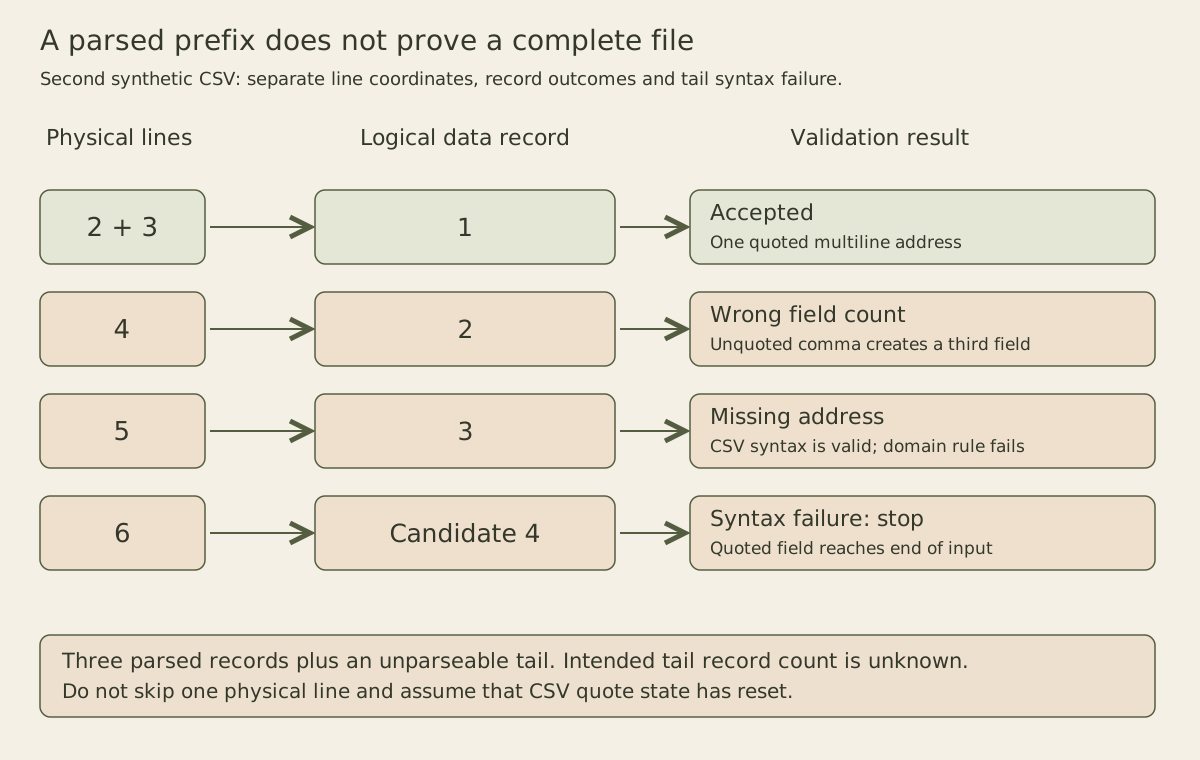
The CSV reader documentation defines the consumed-line counter. Keep the distinction in an operator-facing message: “candidate data record 4, starting on physical line 6” is more useful than an unexplained “row 4.” The exact exception wording is an implementation diagnostic, so an integration should use a stable internal error code rather than require that English message to remain unchanged across runtimes.
This helper assumes one header, no blank physical lines between records, and a fixed two-column schema. Its address rule checks only whether the field is empty. It does not validate postal deliverability, identifier uniqueness or whether a whitespace-only address is acceptable. A quoted empty value is valid CSV syntax while still failing that chosen domain rule. Stating those limits prevents a successful parse from being mistaken for a complete customer-data validation.
A syntax failure is also a batch decision
The three returned outcomes describe only the parsed prefix. They do not establish that the rest of the source contains no records. After an unmatched quote, a later newline may still belong to the same field; skipping one physical line is not a reliable way to find the next logical record. Stop this import, preserve the source identity and request a corrected file unless the producer supplies an independently trustworthy framing mechanism.
For a preview, showing the accepted prefix with an explicit incomplete-file state can help diagnose the problem. A recurring analytical batch may instead require all-or-nothing publication. In either case, retain the syntax failure outside the ordinary record-rejection count: one unparseable tail can hide an unknown number of intended records. Reporting “three rejected out of four” would overstate knowledge of the file’s logical population.
Try three changes independently on the second fixture. Close the final quoted field by appending a quote followed by CRLF. The parser now returns four outcomes and no syntax error; the final address includes the embedded CRLF. Next, restore the original fixture and quote the comma-containing address on line four. Record two becomes accepted, but the unterminated final field still prevents a complete import. Finally, write the original valid rows through csv.writer into a stream opened with newline="", then read it again. The parsed fields must match exactly even if a writer chooses different legal quoting for simpler fields. These exercises test framing, field shape and round-trip value preservation as separate properties.