A heading outline that survives a visual redesign
Build a useful heading hierarchy for an article, keep typography in CSS, and verify the complete outline after layouts and components are composed.

A heading level describes where a section sits in a document. It does not describe how large the text should look. If you keep those decisions separate, a visual redesign can change typography without turning an article’s outline into an accidental sequence of font sizes.
For a developer building a journal, the useful test is to read only the headings. They should explain the page’s organization well enough for a reader to find a section. Someone navigating by headings through a screen reader depends on that structure directly; a sighted reader scanning the page benefits from the same clear grouping.
Outline the article before styling it
Suppose an article explains how a browser loads an image. Its page title is the main heading. The major stages are second-level headings, and a detailed subsection about candidate selection sits inside the resource-selection stage.
<main>
  <article aria-labelledby="article-title">
    <h1 id="article-title">How the browser chooses an image</h1>
    <p>An introduction to the loading example.</p>
    <h2>Discover the image</h2>
    <p>The parser encounters the image element.</p>
    <h2>Select a resource</h2>
    <h3>Estimate the displayed width</h3>
    <p>The sizes attribute describes the intended slot.</p>
    <h3>Compare candidate densities</h3>
    <p>The browser evaluates the available resources.</p>
    <h2>Decode and display</h2>
    <p>The chosen resource becomes visible.</p>
  </article>
</main>
The second third-level heading belongs to the same parent as the first. Returning to a second-level heading closes that subsection group. This is a meaningful change of scope, so skipping back from a deeper heading to a shallower one is ordinary document structure.
Skipping forward from a second-level heading to a fourth-level heading suggests an absent intermediate section. The WAI headings tutorial recommends avoiding such skipped ranks where possible. The purpose is to keep the hierarchy understandable, not to satisfy a mechanical preference for consecutive numbers in every possible page region.
Do not rely on an automatic outline that resets heading levels whenever an article or section element appears. Use explicit levels that make sense in the rendered document. A nested section containing another h1 does not reliably give readers the third-level heading that its visual position might suggest.
CSS owns the visual size
An interface may need a compact main title and a large decorative section label. Use classes to express that typography. Changing a title from h1 to h4 because the default h1 looks too large mixes presentation with structure.
.article-title {
  font-size: clamp(2rem, 4vw, 4rem);
  line-height: 1.1;
}

.section-heading {
  font-size: 1.5rem;
  margin-block-start: 2.5rem;
}
These classes can be attached to the heading elements appropriate to the document. A reusable card component might accept a heading level chosen by its parent, rather than deciding that every card must always contain an h2. That flexibility needs a sensible default and a small allowed set; accepting arbitrary tag names can make a component harder to review.
The opposite mistake is rendering every apparent heading as a styled paragraph. Visual readers may understand the grouping, while a heading-navigation command sees nothing. Native heading elements express the relationship without an additional ARIA role and level.
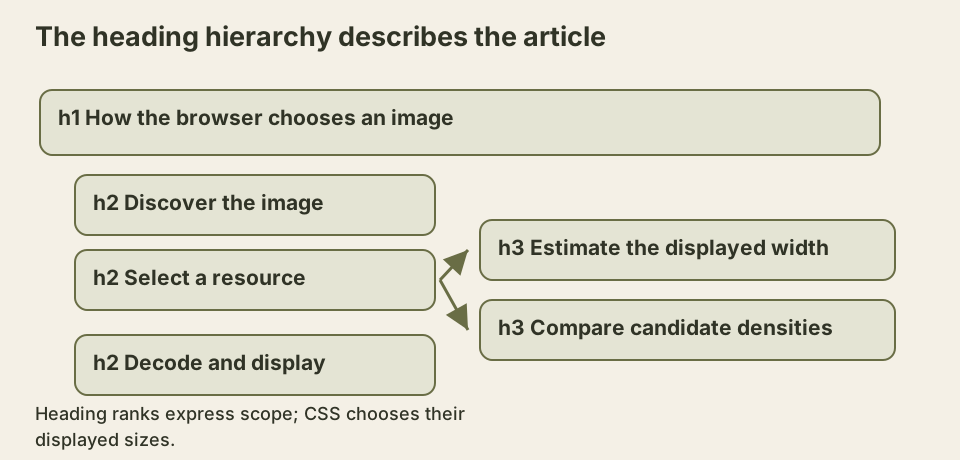
The diagram’s indentation describes parentage. It does not imply that the third-level headings must be indented visually on the published page. Typography and spacing can communicate grouping without imitating a file tree.
Keep surrounding page regions consistent
A site header, navigation, main article, and sidebar are related page regions rather than one continuous essay. Their headings need to make sense together, but a sidebar component should not acquire a different rank every time the article contains another subsection.
WAI’s tutorial explicitly discusses this exception for fixed page sections. Consistency across pages can matter more than adjusting those ranks to follow the content area’s last heading. A “Related articles” heading in an aside remains a peer page feature even if the main article currently ends inside a deeply nested explanation.
Landmarks help distinguish those regions. A main element identifies the primary content, while navigation and complementary regions can have useful names when the page contains several of them. Do not add landmarks around every small paragraph group. Too many regions make navigation noisy in the same way that too many headings do.
Make each heading earn its place
A heading should identify the content that follows. Labels such as “Overview” or “More information” can be useful in context, but a page containing six vague labels gives readers little help. “Choose an image candidate” predicts a specific answer.
Avoid placing a heading above a single sentence that merely repeats it. Either develop a real section or let the sentence join the surrounding paragraph. Headings are navigation points, and each one has a cost for someone stepping through the outline.
A decorative quote is not automatically a heading. Nor is the name of every statistic in a dashboard. Ask whether the text introduces a section or simply labels a value. That question usually resolves the element choice more reliably than inspecting its font weight.
Verify the rendered document
Inspect the heading list after layout composition, not only inside one component. A Markdown article may receive a title from its layout, while the Markdown file also begins with the same h1. The resulting duplication is easy to miss if each file is reviewed separately.
Use browser accessibility inspection or a heading-navigation tool to list levels and names. Read the list in order, then use the keyboard to follow a table-of-contents link and check that its target remains visible below any sticky header. The outline and the scrolling behavior are different checks, and both affect finding content.
For a redesign, keep a short outline fixture beside the component examples. If changing a font scale unexpectedly changes that outline, the implementation has allowed a presentation decision to alter the document’s meaning.
Catch a title inserted twice
Consider a journal layout that takes a title from article metadata and renders it as the page’s main heading. The Markdown body then begins with the same title as another first-level heading. Each source file looks reasonable in isolation. Once composed, a reader navigating headings encounters the title twice before reaching the first section.
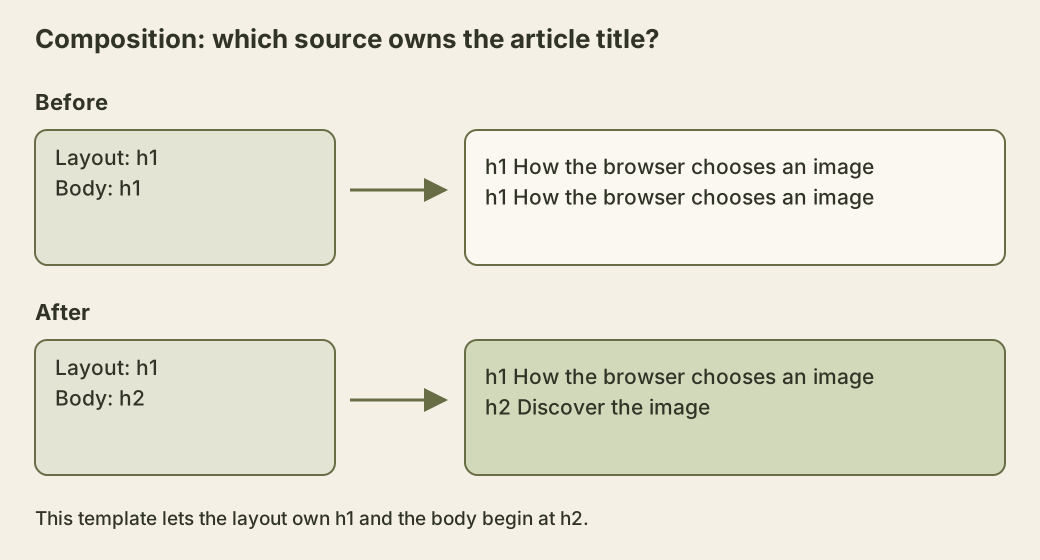
In this composition, give the layout ownership of the title and start major Markdown sections at the second level. This is a contract for this article template, not a claim that counting first-level headings alone determines accessibility. The HTML headings guidance relates heading ranks to the sections they introduce. What matters in the example is that an accidentally repeated title does not introduce a new section at all.
The same ownership question arises in reusable components. A card embedded under a “Related articles” section should fit that section’s hierarchy. When a component can appear in several contexts, document who chooses its heading rank. Keep the options small enough that a parent cannot request a nonheading tag by accident. Review the result with surrounding components present, because a component cannot infer document structure from its font size or nesting depth alone.
Make the outline observable
For the original image-loading fixture, run this browser-console script. It collects native headings in document order and reports both their rank and name. It deliberately examines the whole document, so a heading unexpectedly supplied by a surrounding layout appears in the output.
const headings = [...document.querySelectorAll('h1,h2,h3,h4,h5,h6')];
const outline = headings.map((heading) => ({
  level: Number(heading.tagName.slice(1)),
  text: heading.textContent.trim(),
}));
console.table(outline);
console.assert(
  outline.map((heading) => heading.level).join(',') === '1,2,2,3,3,2'
);
The expected sequence belongs to the small fixture above. A complete site with other correctly structured regions can have another valid sequence. Do not paste that assertion into every page test and force the site to match it. Instead, write down the intended outline for the page being built, including relevant fixed regions, and compare the rendered headings with that expectation.
This script also has limits. It does not compute accessible names, detect whether CSS hides a heading, inspect shadow trees, apply heading-level offsets, or include elements that use ARIA heading roles. Use the browser’s accessibility inspection and the assistive technologies relevant to your readers for those checks. A DOM list is a cheap way to catch accidental composition changes, not a complete accessibility audit.
To exercise the separation from styling, change the fixture’s second-level headings to a smaller font and run the script again. Its rank sequence should remain unchanged. Next, intentionally change one of those tags to a fourth-level heading and observe the different result. The first edit changes presentation; the second changes the information exposed by native heading structure. Keeping an observable distinction between the two makes redesigns easier to review.