Language tags and direction belong in the document
Set language and direction accurately, isolate user-supplied text, and test mixed English, Vietnamese and Arabic content without reversing stored strings.

Language and direction answer different questions. A language tag describes what language the text uses; direction establishes the base direction for laying it out. An English interface can contain a Vietnamese greeting and an Arabic quotation without changing the direction of every control around them.
This lesson is for someone who can write a small HTML page and wants that page to handle real multilingual content. We will separate document metadata, local direction and user-entered values, then inspect the actual form data. None of these attributes translates prose or discovers a person’s preferred language from their name.
Describe the content you actually publish
Put the main language on the html element. That covers the document title as well as the body and gives descendants a language unless they specify another one. A paragraph without its own lang attribute can therefore still have a known language. The W3C guidance on language declarations recommends this document-level declaration and local attributes around passages in another language.
Language tags follow BCP 47. Use en for English and vi for Vietnamese when those are the distinctions you know. A regional subtag is useful when it accurately describes the content; a visitor’s location is not evidence that every sentence uses that region’s language. Do not put two language codes into one lang attribute to describe a mixed paragraph. Mark the relevant spans instead.
Here is a complete small document. The Vietnamese sentence means “Hello, readers”; the Arabic quotation is the conventional “Hello, world” example. The greeting and quotation are known authored passages. The name field later in the example is deliberately treated as unknown language.
<!doctype html>
<html lang="en" dir="ltr">
  <head>
    <meta charset="utf-8">
    <meta name="viewport" content="width=device-width, initial-scale=1">
    <title>Language and direction demo</title>
  </head>
  <body>
    <h1>Engineering notes</h1>
    <p id="intro">A greeting for our readers:</p>
    <p lang="vi">Xin chào bạn đọc.</p>
    <blockquote lang="ar" dir="rtl">
      <p>مرحبا بالعالم!</p>
    </blockquote>
    <p><bdi id="member-name" lang="">اسم المستخدم</bdi>: 3 comments</p>
    <form id="direction-demo">
      <label for="message">One-line message</label>
      <input id="message" name="message" type="text"
        lang="" dir="auto" dirname="message.dir"
        value="مرحبا بالعالم">
    </form>
  </body>
</html>
The empty lang values mean that the language is unknown, rather than inheriting the surrounding English declaration. This is a deliberate boundary for this unrestricted name and message example, not a suggestion to erase language metadata from ordinary text. If your application knows a message’s language, supply the correct tag. MDN documents both language inheritance and the empty value.
Correct tags can help speech software choose pronunciation rules and support other language-sensitive processing. They cannot guarantee a voice is installed or that every assistive-technology configuration behaves identically. Inspecting the attributes is one check; listening with the screen reader and languages your audience uses is a separate check.
Keep the direction change local
Both English and Vietnamese in this example use left-to-right layout. Arabic uses a right-to-left base direction, so the blockquote declares rtl while the rest of the page stays ltr. Setting lang=“ar” alone does not set direction. Nor does text-align: right: alignment moves the line within its box, while base direction helps resolve directional runs, digits and punctuation.
The W3C structural direction guide places this information in HTML. It remains present when presentation styles change. If the entire interface is Arabic, set the appropriate language and rtl on the document itself, then mark exceptions locally. A release identifier or a URL may need its own left-to-right context even inside that interface.
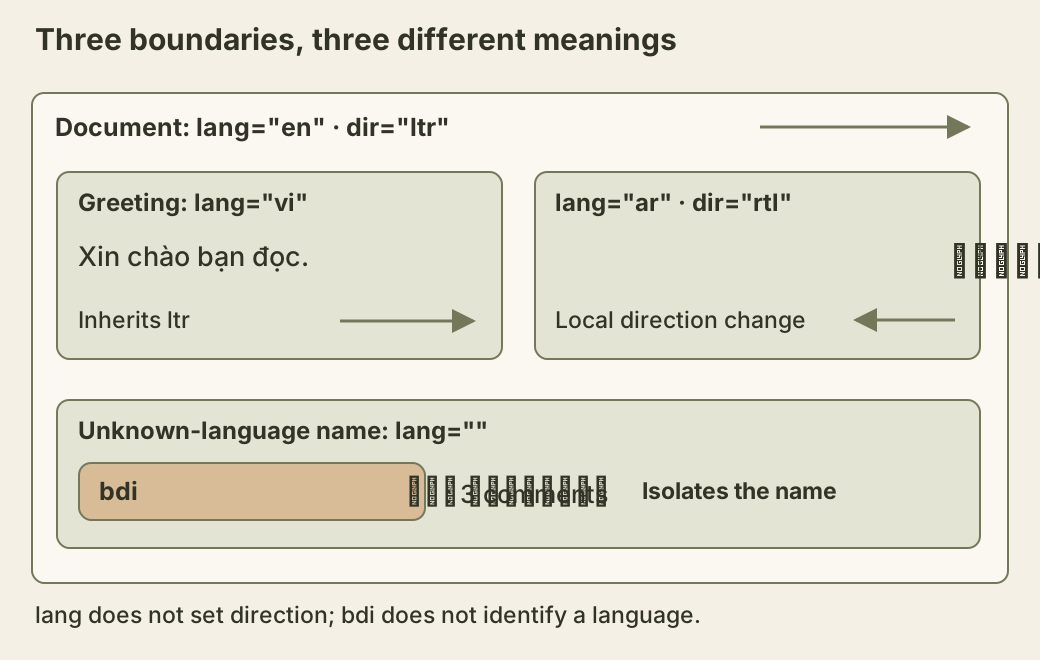
The nested boundaries carry different information. A local language change does not automatically change direction, and isolating a name does not identify its language.
Spacing can follow those boundaries too. The wrapping rule also gives long headings and names a way to fit narrow screens without changing their stored text. Add this CSS to the document’s head in a style element:
body {
  overflow-wrap: anywhere;
}
blockquote {
  margin-inline: 0;
  padding-inline-start: 1rem;
  border-inline-start: 3px solid #74785b;
}
input {
  box-sizing: border-box;
  display: block;
  max-inline-size: 100%;
  font: inherit;
}
With the example’s horizontal writing mode, the quotation gets padding and a border on the right. Change its dir to ltr and both move to the left. The padding-inline-start reference explains that this mapping also depends on writing mode. “Inline start” is not a permanent synonym for either physical side. Use physical coordinates when the design truly names a fixed physical edge, such as an annotation pointing at a particular part of an image.
Isolate an inserted name without rewriting it
A name next to a colon and count can disturb punctuation ordering if its directional runs become part of the surrounding sentence’s calculation. The bdi element gives the inserted name an isolated context. Its default direction is automatic, so the Arabic placeholder does not require changing the English paragraph to rtl.
Replace the placeholder using safe text insertion:
const memberName = document.querySelector('#member-name');
const suppliedName = 'Minh <reader>';
memberName.textContent = suppliedName;
console.log(memberName.textContent === suppliedName); // true
The angle brackets stay literal text; they do not create a reader element. The safety comes from textContent, not bdi. Isolation is a layout property, not HTML sanitization, an authorization check or a defense against every deceptive identifier. A security-sensitive username policy needs its own rules for confusable characters and invisible controls.
You also should not reverse strings to make them look right. Arabic text is stored in logical character order; the browser computes the display. JavaScript represents strings as UTF-16 code units. Reversing those units can additionally split surrogate pairs, and even reversing code points can detach combining marks from the characters they modify. Ordinary multilingual prose needs correct metadata and layout boundaries, not a mutation of its stored value.
Observe what automatic direction actually chooses
The input’s auto direction follows its content. In these simple single-line examples, the first strongly directional character determines the base direction. Digits and a colon before Arabic do not have the same effect as the Latin letters ID. Run this block in the console after loading the document:
const form = document.querySelector('#direction-demo');
const message = document.querySelector('#message');
const original = message.value;
const samples = [
  'مرحبا بالعالم',
  'Xin chào bạn đọc',
  '2026: مرحبا بالعالم',
  'ID: مرحبا بالعالم'
];
const rows = samples.map(value => {
  message.value = value;
  const data = new FormData(form);
  return {
    value: data.get('message'),
    direction: data.get('message.dir'),
    unchanged: data.get('message') === value
  };
});
message.value = original;
console.table(rows);
The directions are rtl, ltr, rtl and ltr, in that order; every unchanged value is true. The dirname attribute asks form-data construction to include an additional direction field. Here its name is message.dir. That field carries a direction, not a language tag, and the input’s value retains the original characters.
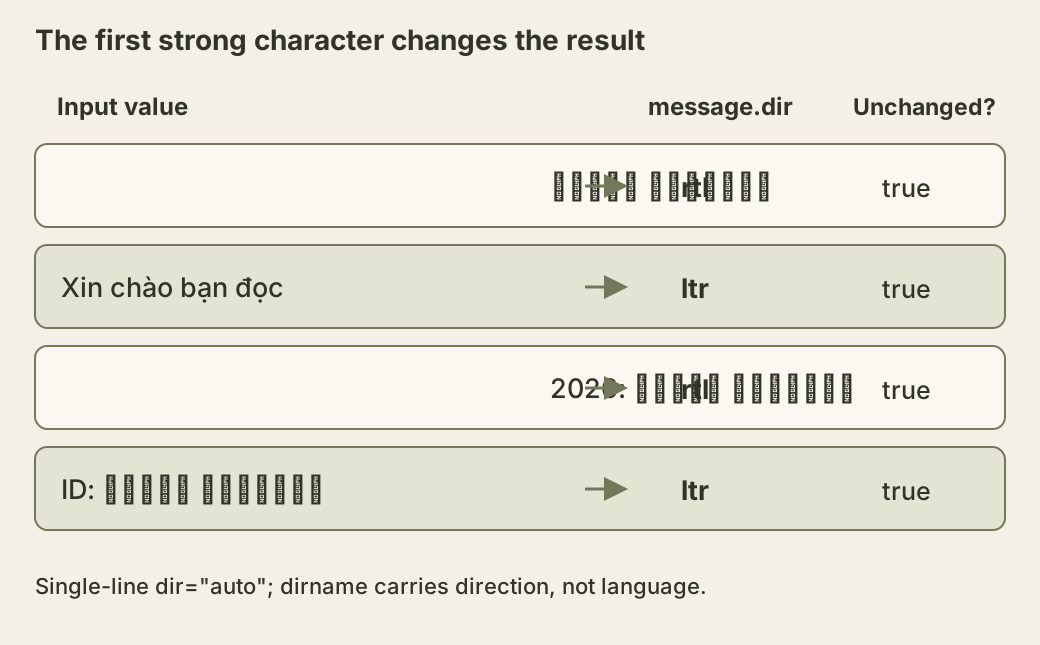
The extra field lets a server retain useful presentation metadata. It is still client-supplied input: accept only supported direction values if you use it later. This console exercise constructs data locally; it does not submit a request or implement a storage endpoint. Multiline controls introduce paragraph-level behavior that this single-line experiment does not cover.
Check what a reader can select and navigate
Try the four samples, then temporarily remove the quotation’s dir and compare punctuation and the start border. Right-aligning the text will not restore that missing semantic setting. Replace the name with both scripts and check the neighboring colon and count at a narrow viewport. Keep the name isolated even when today’s test name happens to be English.
Select and copy a mixed-direction sentence into a plain-text editor and inspect the logical sequence. Compare the original value with the selected text; visual position alone is not a reliable index into the stored string. Test actual copy and paste in supported environments rather than assuming a successful DOM inspection proves clipboard behavior everywhere.
Finally, use the keyboard through the page and repeat at enlarged text sizes. Direction and CSS layout can change where controls appear without changing their DOM order. The language metadata, readable glyphs, understandable focus progression and intact data each need to hold up on their own.