Progressive enhancement for a search form
Build a shareable GET search before adding asynchronous results, with consistent server filtering, history behavior and keyboard feedback.

A search form can work as an ordinary GET request before any JavaScript runs. Its query appears in the URL, the server returns matching content, and the browser handles navigation. JavaScript can later update results in place, but the underlying form remains a useful fallback and a shareable interface.
For a developer who knows basic forms and JavaScript, a journal archive is a useful place to apply this approach. A reader may arrive through a link, disable scripts, use a slow connection, or open a filtered page in a new tab. The search result should not depend on having completed a particular sequence of client-side events.
Make the URL express the request
<form action="/blog/" method="get" role="search">
  <label for="journal-query">Search articles</label>
  <input id="journal-query" name="q" type="search">
  <label for="journal-category">Category</label>
  <select id="journal-category" name="category">
    <option value="">All categories</option>
    <option value="frontend">Frontend</option>
    <option value="ai">AI</option>
  </select>
  <button type="submit">Search</button>
</form>
A search for “focus styles” in frontend produces query parameters representing those successful controls. The exact encoding is handled by the browser’s form submission algorithm. The MDN guide to sending form data explains the distinction between GET parameters and a POST request body.
GET is appropriate for retrieving a search result without changing server state. Do not use the same pattern for a destructive action simply because it is easy to link. Search queries may appear in browser history, logs, and copied URLs, so a public archive should not ask for secrets in its search box.
The server reads the query, validates supported filters, and returns the selected form values along with the result. On a fresh response, keeping the input filled tells the reader what the page currently represents. An empty form above filtered results makes that relationship ambiguous.
Inspect the URL before intercepting anything
With the example form on a page, enter a query and choose a category. Run the following in the browser console. It constructs a URL without sending a request, so you can compare it with the address produced by an ordinary submission.
const form = document.querySelector('form[role="search"]');
const destination = new URL(form.action);
destination.search = new URLSearchParams(new FormData(form)).toString();
console.log(destination.href);
This small serializer is scoped to the printed form: its controls have string values and the submit button has no name. The FormData constructor collects successful named controls. Disabled controls are omitted; an enabled category with an empty value still contributes category=. An enhancement that later adds a named submit button needs to account for the actual submitter. File inputs need a different request design rather than accidental conversion of a File object into a query string.
Try a query containing &, a plus sign and a space. URLSearchParams performs the encoding; concatenating the input directly into ?q= would confuse user text with parameter separators. Decode the submitted URL with the same API and check that the value round-trips. Encoding makes the URL structurally correct; it does not make reflected HTML safe.
The assignment replaces the action’s query string with the current controls. An old page=3 is therefore not carried into a new search unless it is itself a successful form control. Keep paging links separate from the search fields when a new query must restart at page one. Do not accidentally restore the stale page by merging every parameter from the current location.
A static file alone cannot filter itself on the server
Static hosting can serve the same HTML file for many query strings. If no request-time layer interprets those strings, the browser receives the same archive regardless of the requested query. A GET form is only half the implementation; the route must actually implement its contract.
An Astro site can use an on-demand route, a Worker, or another server layer to render filtered results. The architectural choice depends on the deployment. What matters to the reader is that loading the URL directly returns the correct content without relying on a later script to hide unrelated cards.
Server filtering also belongs with publication visibility. If some articles have future release times, search must use the eligible set for the current request. Sending future metadata to the browser and hiding it visually is not equivalent to keeping it unpublished.
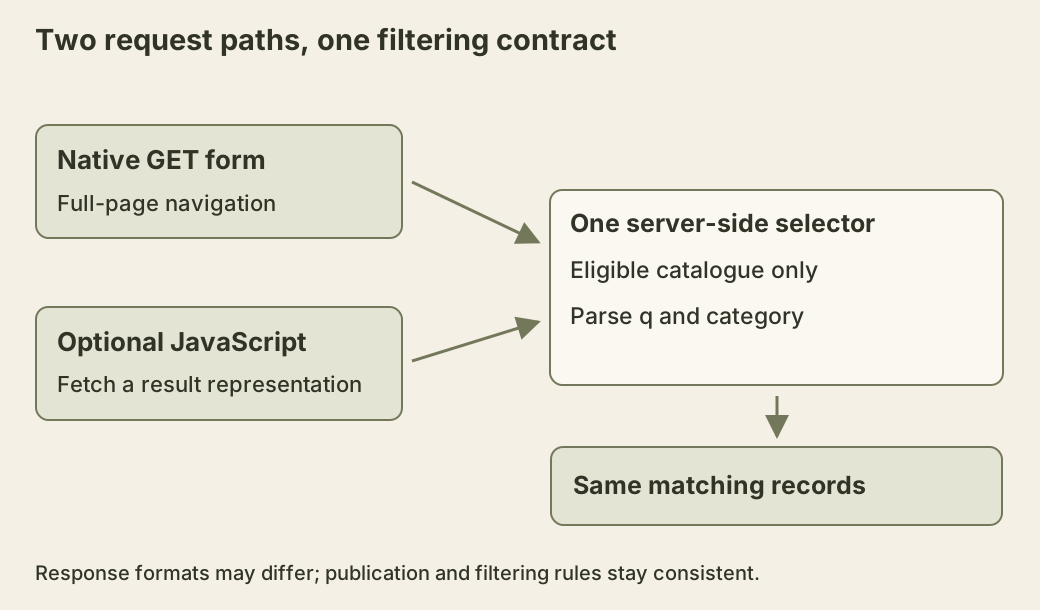
Both paths in the diagram end at the same filtering rules. Keeping two independent implementations, one in the browser and one on the server, invites differences in query parsing and eligibility.
Query text is also untrusted display content. A result heading that echoes the search must escape it or insert it as text, even though the form belongs to your own site. A copied URL can supply a value that never passed through the visible input.
Give filtering one explicit interpretation
Here is a small, pure JavaScript selection function for an already eligible catalogue. It trims the query, treats unsupported categories as “all,” and searches only titles using lowercase substring matching. The three records are fictional inputs for the exercise, not a measurement of a deployed journal.
function selectPosts(requestUrl, eligiblePosts) {
  const query = (requestUrl.searchParams.get('q') ?? '').trim();
  const requested = requestUrl.searchParams.get('category') ?? '';
  const category = ['frontend', 'ai'].includes(requested) ? requested : '';
  const needle = query.toLowerCase();
  const matches = eligiblePosts.filter(post =>
    (!category || post.category === category) &&
    post.title.toLowerCase().includes(needle)
  );
  return { query, category, matches };
}

const demo = [
  { id: 'focus', title: 'Focus styles for links', category: 'frontend' },
  { id: 'react', title: 'React state and identity', category: 'frontend' },
  { id: 'eval', title: 'Evaluating a text model', category: 'ai' }
];
const state = selectPosts(
  new URL('https://example.test/blog/?q=focus&category=frontend'), demo
);
console.log(state.matches.map(post => post.id)); // ['focus']
An HTTP route still has to call this function, escape the returned query when rendering HTML, preserve the selected category, and render the matches. The function neither starts a server nor decides which posts may be published. Supply the eligible records before filtering; do not regard the parameter name as an access-control implementation.
The normalization policy is deliberate. Another application could reject an unknown category, but it should not use one interpretation for ordinary navigation and another for asynchronous results. For repeated q parameters, get() reads the first value. Include that case in the shared contract instead of letting different parsers choose different searches.
Lowercasing is also a limited search rule. It does not perform stemming, accent removal, language-specific word analysis or ranking. An empty query matches every supplied title; the category may still narrow the set. Test those facts with the tiny catalogue before replacing the matcher with a more capable search service. Changing the algorithm should be an intentional behavior change, not a side effect of adding a client library.
Add asynchronous results around the existing form
An enhancement can intercept submission, construct the URL from the form controls, and request a result representation. It should preserve a normal navigation fallback when the enhancement cannot complete. The server might return a documented fragment or JSON containing safely rendered result data; the client should not guess which part of arbitrary HTML to execute.
Track pending requests so an older response cannot replace newer results. If a reader submits “React” and then “React state,” the first response may arrive last. Abort superseded work where possible and also check request identity before committing the result.
Keep the result heading and count meaningful. A polite status message can announce completion without moving focus away from the search field. Do not focus the first result automatically after every keystroke. That interrupts editing and makes repeated searches difficult.
Decide when requests occur. Submitting on Enter or the Search button is predictable. Search-as-you-type may be useful for a small archive, but it adds request frequency, cancellation, and announcement concerns. Debouncing reduces traffic while changing when the result appears; it does not remove the need for correct ordering.
History is part of the interface
If an asynchronous search changes the displayed result, update the URL deliberately. A new submitted search can create a history entry so Back returns to the previous query. Minor edits before submission need not create dozens of entries.
Then implement the reverse direction: when Back or Forward changes the URL, restore the corresponding form values and results. Updating history without responding to history navigation creates a page whose address and content disagree. The popstate documentation explains that calling pushState does not itself fire popstate. Render the successful new result when you commit it, and separately handle later history traversal.
Native history traversal can also restore edited form-control values from the previous document. The URL and result heading may therefore describe the submitted search while the input contains a draft edited just before navigation. Do not assume that Back always reinitializes inputs from server markup. For an enhancement, choose whether to restore committed filters or retain draft edits, and keep the applied query identifiable. The policy illustrated below restores committed filters; it is not a promise about every browser’s automatic form-state restoration.
Pagination links should include the current filters. Moving to page two while silently dropping the category is an easy regression when links are built from a page number alone. Reset the page parameter when a new search starts, since the old page may not exist in the new result set.
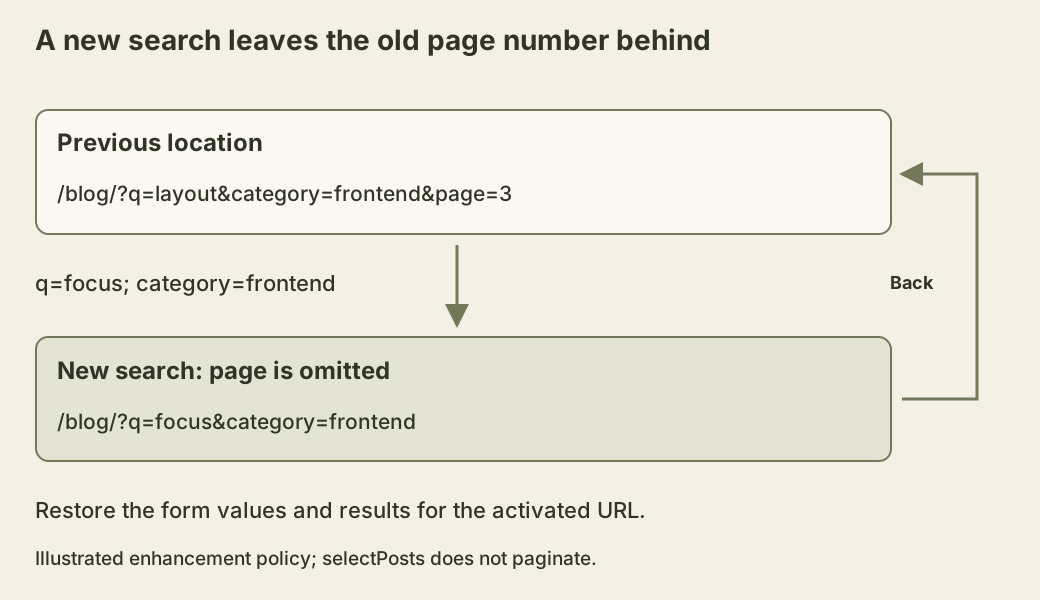
The selector above has no pagination; the diagram adds the contract a paginated route would need. It shows why the URL and rendered state need a two-way relationship. Setting an address is only half of that relationship. A failed enhancement should retain the previous coherent page or navigate to the requested URL, rather than display one query under another query’s address.
Verify the fallback before the enhancement
Disable JavaScript, submit a query, reload the result URL, and open it in a new tab. Confirm that selected values remain visible and that empty results explain the next useful action. Then enable the enhancement and repeat the journey with delayed and failed responses.
Test Back after two different searches. Check keyboard focus and announcements during loading. The enhanced path earns its complexity when it reduces waiting or preserves useful context while keeping the ordinary URL-based journey dependable.