Copying an array does not copy its objects
Update native checkboxes and nested metadata while preserving a saved baseline, then test no-op identity, shared references, structured cloning and shallow freeze.

Copying an array creates another container. It does not necessarily create another object for each entry. If two arrays hold a reference to the same todo, assigning to that todo’s done property changes the one object both arrays reach. Assigning a different object to a slot is a different operation.
If you can already read arrays, object literals and DOM event handlers, use this lesson to examine what an update preserves. We will preserve a saved todo list while updating a current list, then inspect both values and references. The example uses a dense ordinary array, unique string IDs and plain records created locally. It is not a validator for arbitrary server data, sparse arrays, proxies or class instances.
Follow the assignment, not the variable name
Run this isolated snippet in a browser console:
(() => {
  const before = [{ id: 'a', done: false }];
  const after = [...before];
  after[0].done = true;
  console.log(after === before, after[0] === before[0], before[0].done);
  after[0] = { id: 'a', done: false };
  console.log(after[0] === before[0], before[0].done);
})();
The first line prints false, true, true. The outer arrays differ, but their first entries refer to the same object. The write through after[0] therefore changes what before[0] sees. Naming a variable after, copy or snapshot does not establish ownership.
The second line prints false, true. Replacing a slot in after makes that slot refer to a new object. It does not replace the slot in before, and it does not reverse the earlier mutation of the shared object. This also explains why assigning a new number into a copied numeric array does not change the corresponding original slot: the assignment replaces that array entry rather than modifying an object reached through it.
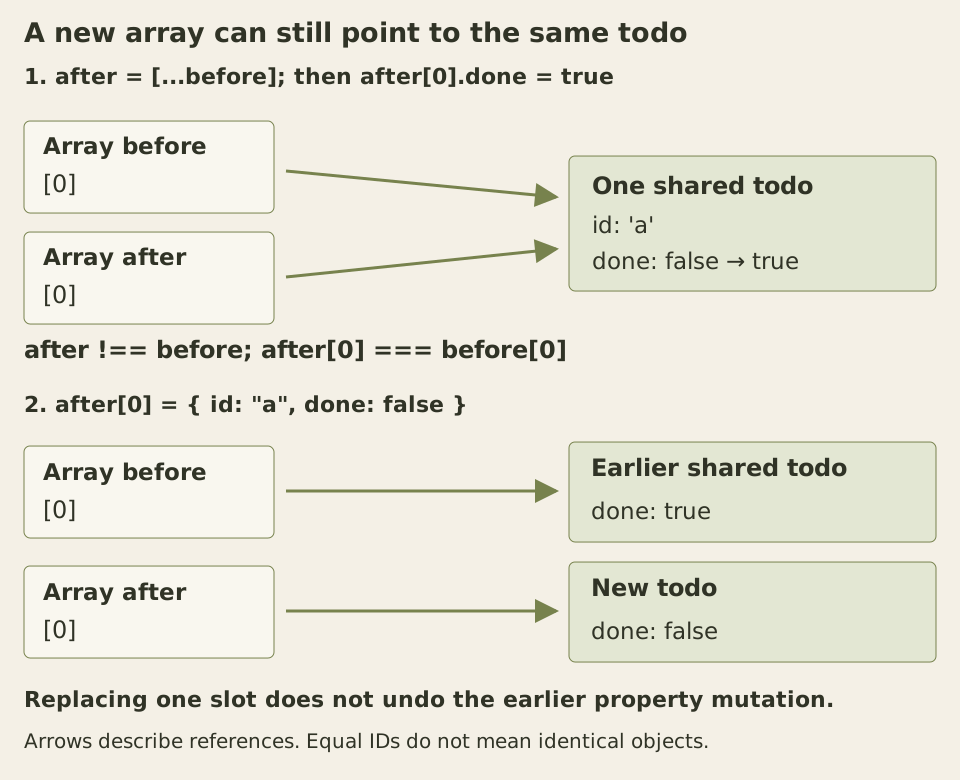
Arrows show identity, not synchronization. A replacement changes one arrow; a property assignment changes the object at the arrow’s destination.
The MDN Array reference distinguishes copied object references from copied primitive values. Its ordinary array-copy operations are shallow. Spread syntax also copies only one level; spreading a todo still shares its nested metadata.
Copy the path that changes
Here are the data factory and update helpers. Put this JavaScript before the page behavior shown later.
function makeTodos() {
  return [
    { id: 'a', done: false, meta: { priority: 'normal' } },
    { id: 'b', done: false, meta: { priority: 'normal' } },
  ];
}

function replaceTodo(rows, id, revise) {
  const index = rows.findIndex(todo => todo.id === id);
  if (index === -1) return rows;
  const updated = revise(rows[index]);
  if (updated === rows[index]) return rows;
  const next = rows.slice();
  next[index] = updated;
  return next;
}

function setDone(rows, id, done) {
  return replaceTodo(rows, id, todo =>
    todo.done === done ? todo : { ...todo, done }
  );
}

function setPriority(rows, id, priority) {
  return replaceTodo(rows, id, todo =>
    todo.meta.priority === priority
      ? todo
      : { ...todo, meta: { ...todo.meta, priority } }
  );
}
setDone creates a todo with a new Boolean and keeps its existing meta reference. setPriority creates both a new metadata object and a new todo. replaceTodo supplies a new outer array only when the callback returns a different todo. It writes into a fresh local array that has not yet been returned; the saved array is untouched.
The order of object properties matters. In { ...todo, done }, the later done replaces the copied property. Reversing those entries would let the earlier value overwrite the requested update. The nested spread follows the same rule for priority.
A missing ID returns the same array. An already-equal value also returns the same array, avoiding an identity change for this defined no-op. This is an explicit helper contract, not a property of every immutable-update implementation. A map expression can create a new array even when every returned element is unchanged.
findIndex selects the first match. With duplicate IDs this helper would update only the first matching row, which is why uniqueness is a precondition. The two setters accept the Boolean and priority strings supplied by this example; they do not validate external values. The internal revise callbacks must preserve the earlier record. A callback that mutates its input and returns it would break the contract before replaceTodo could help.
Keep a baseline while using native controls
Create a UTF-8 HTML page with a responsive viewport. Place this HTML in the body, the following CSS in a style element, and the factory/helpers plus page behavior below the HTML. The checkboxes and buttons start disabled until their behavior is installed.
<main class="copy-demo" data-same="same" data-changed="changed">
  <h1>Update a todo, inspect its references</h1>
  <label><input type="checkbox" data-id="a" disabled> First todo complete</label>
  <label><input type="checkbox" data-id="b" disabled> Second todo complete</label>
  <p>First priority: <span data-priority>normal</span></p>
  <button id="priority-high" type="button" disabled>Set first priority high</button>
  <button id="restore-baseline" type="button" disabled>Restore saved baseline</button>
  <h2>Identity compared with the saved baseline</h2>
  <dl>
    <dt>Array</dt><dd data-ref="array">same</dd>
    <dt>First todo</dt><dd data-ref="first">same</dd>
    <dt>First metadata</dt><dd data-ref="firstMeta">same</dd>
    <dt>Second todo</dt><dd data-ref="second">same</dd>
    <dt>Second metadata</dt><dd data-ref="secondMeta">same</dd>
  </dl>
  <p>Saved baseline: <span data-baseline>false, false; normal</span></p>
  <a href="#copy-notes">Read the identity notes</a>
  <h2 id="copy-notes" tabindex="-1">Equal values can have different identities</h2>
  <p>Checking and unchecking the first todo restores its value, but creates new references. Restoring the saved baseline reuses its original references.</p>
  <noscript><p>Enable JavaScript to change this example; the initial state remains readable.</p></noscript>
</main>
The strings normal, high, false and true are literal example data. The saved-baseline line reports both completion values and the first priority. The definition list compares five references with the original baseline, rather than with the immediately preceding update.
.copy-demo, .copy-demo * { box-sizing: border-box; }
.copy-demo {
  max-inline-size: 48rem;
  margin-inline: auto;
  padding: 1.5rem;
  color: #303326;
  background: #f4f0e6;
  font: 1rem/1.6 system-ui, sans-serif;
  overflow-wrap: anywhere;
}
.copy-demo label { display: block; padding-block: .5rem; }
.copy-demo input { inline-size: 1.1em; block-size: 1.1em; }
.copy-demo button {
  max-inline-size: 100%;
  margin-block: .5rem;
  padding: .5rem .75rem;
  border: 2px solid currentColor;
  color: inherit;
  background: transparent;
  font: inherit;
  overflow-wrap: anywhere;
}
.copy-demo dl { display: grid; grid-template-columns: minmax(0, 1fr); }
.copy-demo dt { font-weight: 650; }
.copy-demo dd { margin: 0 0 .75rem; }
.copy-demo a { color: inherit; text-underline-offset: .2em; }
.copy-demo :where(input, button, a, [tabindex]) { scroll-margin-block: 1rem; }
.copy-demo :where(input, button, a, [tabindex]):focus {
  outline: 3px solid #1c51a0;
  outline-offset: 2px;
}
The labels keep the checkboxes native. Space toggles the focused checkbox; the browser supplies its checked state, and the change handler produces the next data value. Buttons handle the separate priority and restore actions. Rendering changes properties and text on existing elements, so it does not replace the focused checkbox.
const root = document.querySelector('.copy-demo');
const baseline = makeTodos();
let current = baseline;
const inputs = [...root.querySelectorAll('input[data-id]')];

function render() {
  for (const input of inputs) {
    input.checked = current.find(todo => todo.id === input.dataset.id).done;
  }
  root.querySelector('[data-priority]').textContent = current[0].meta.priority;
  const same = {
    array: current === baseline,
    first: current[0] === baseline[0],
    firstMeta: current[0].meta === baseline[0].meta,
    second: current[1] === baseline[1],
    secondMeta: current[1].meta === baseline[1].meta,
  };
  for (const cell of root.querySelectorAll('[data-ref]')) {
    cell.textContent = same[cell.dataset.ref] ? root.dataset.same : root.dataset.changed;
  }
  root.querySelector('[data-baseline]').textContent =
    `${baseline[0].done}, ${baseline[1].done}; ${baseline[0].meta.priority}`;
}

for (const input of inputs) {
  input.addEventListener('change', () => {
    current = setDone(current, input.dataset.id, input.checked);
    render();
  });
}
root.querySelector('#priority-high').addEventListener('click', () => {
  current = setPriority(current, 'a', 'high');
  render();
});
root.querySelector('#restore-baseline').addEventListener('click', () => {
  current = baseline;
  render();
});
render();
for (const control of root.querySelectorAll('input, button')) control.disabled = false;
Check the first todo once. The array and first todo become different from the baseline, while the first metadata and the entire second branch remain shared. The saved-baseline line still reads false, false; normal. Check the second todo and its record changes independently.
Now set the first priority to high. Its metadata needs a new identity too. Pressing that button again returns exactly the current array because the requested priority already matches. The displayed references can still say “changed”: they compare against the saved baseline, not the value from one action ago. A stable result for the latest operation does not imply identity with every earlier version.
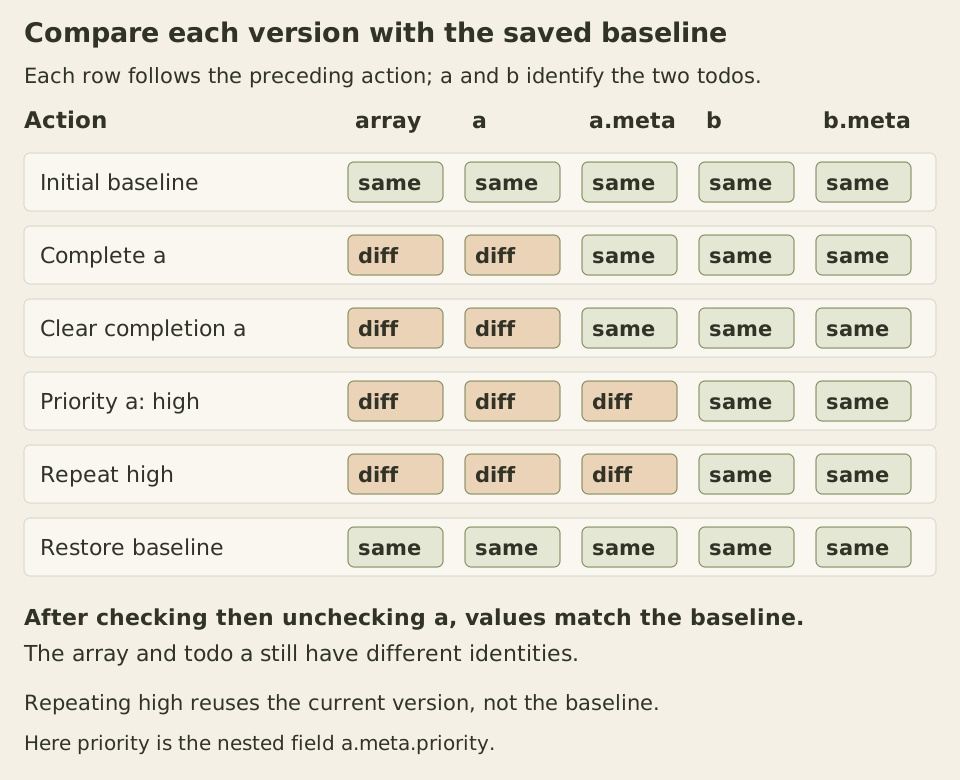
All columns use the saved baseline as their reference. Repeating the high-priority action changes nothing relative to the previous row; restoring the baseline reuses the original graph.
Equal contents do not reconstruct an old identity
Start from the baseline, check the first todo, then uncheck it before changing any priority. Its fields once again contain the original values. Nevertheless, the array and first todo differ from the baseline because each meaningful update produced a new object. JavaScript does not search earlier versions for an equal object and automatically reuse it.
The restore button deliberately assigns current = baseline. That restores the original references as well as their values, provided nobody has mutated the saved graph. This is a one-baseline demonstration, not an undo stack, conflict resolver or persistence format. Retaining many real versions also retains their reachable data; this example measures no memory cost.
React’s array-state guide motivates the same distinction: copying an outer array does not isolate existing item objects, and nested changes require copies along the changed path. Our page uses ordinary DOM APIs. It does not measure React renders, and a changed identity alone does not establish how any particular framework will schedule or skip work.
Deep cloning answers a different question
A supported deep clone can produce an independent data graph. It also replaces unchanged branches that these update helpers intentionally share. Cloning the whole list before one checkbox update can be a valid ownership choice, but it is not required to preserve this baseline and is not automatically a performance improvement.
Run this separate example:
(() => {
  const shared = { priority: 'normal' };
  const source = { left: shared, right: shared, when: new Date(0) };
  source.self = source;
  const copy = structuredClone(source);
  console.log(copy !== source, copy.left !== shared, copy.left === copy.right);
  console.log(copy.self === copy, copy.when instanceof Date, copy.when.getTime());
  try {
    structuredClone({ run() {} });
  } catch (error) {
    console.log(error.name);
  }
})();
The first output is three true values. The clone is separate from the original graph, while left and right still alias each other inside the clone. Deep cloning preserves that relationship; it does not turn every repeated reference into unrelated objects. The second output is true, true, 0: the cycle points to the clone, and the cloned Date retains its timestamp. The function-containing value throws DataCloneError.
Window.structuredClone and the structured clone algorithm document the supported graph behavior and limits. Functions and DOM nodes are not cloneable this way, and custom prototype chains and property descriptors are not reproduced as ordinary application behavior. Do not treat a clone as a universal instance copier. This example uses no transfer list and does not detach any resource.
Freezing is a guard with a scope
const prevents rebinding a variable; it does not recursively freeze its value. Even an explicit freeze protects only the object it receives:
(() => {
  'use strict';
  const row = Object.freeze({ done: false, meta: { priority: 'normal' } });
  try {
    row.done = true;
  } catch (error) {
    console.log(error.name);
  }
  row.meta.priority = 'high';
  console.log(row.done, row.meta.priority);
})();
Strict mode makes the rejected done assignment throw TypeError. The later output is false, high, because the metadata object was not frozen. Object.freeze returns the original object and applies to its immediate properties. Recursively freezing an arbitrary graph needs additional handling for cycles and supported object kinds; no general deep-freeze helper is implemented here.
For a final exercise, add setPriority(current, 'b', 'high') to a fresh baseline. Predict the references before running it: new array, unchanged first todo and first metadata, new second todo and second metadata. Then request the same priority again and verify exact array identity. Check the old values too. A correct-looking checkbox proves only the displayed value; preserving earlier versions requires checking the paths that lead to it.