Date-only values are not timestamps
Keep Gregorian birthdays separate from instants, build a localized native-date comparison and test why consecutive noons can be 23 or 25 hours apart.

A birthday field contains 2000-02-29. Someone reads it into a JavaScript Date, formats it for a person in California, and displays February 28. No one edited the birthday. The program changed what the value meant: a calendar date became midnight at a particular point on the global timeline.
If you are comfortable with strings, functions and native form controls, this lesson develops the date contracts behind them. We will keep a Gregorian calendar date separate from a release instant, build a small localized comparison, and examine the boundary where adding one day becomes a scheduling decision. All examples run in a browser; they do not require a date library.
Decide whether the value belongs on a timeline
A date-only value identifies a year, month and day in a calendar. It has no hour or time zone. An instant identifies one point on a timeline; different zones can show different calendar dates for that same point. A birthday and the moment a release became available therefore need different data contracts.
MDN’s Date reference describes a Date as an epoch-millisecond timestamp. The object’s local zone comes from its environment; the object does not store a chosen IANA zone. Parsing a supported date-only ISO form without an offset uses UTC. A date-time form without an offset instead uses local time. Omitting the time does not mean “leave the zone undecided.”
Run this in the console:
const accidentalInstant = new Date("2026-09-20");
const losAngelesDate = new Intl.DateTimeFormat("en-US", {
  calendar: "gregory",
  timeZone: "America/Los_Angeles",
  year: "numeric", month: "2-digit", day: "2-digit",
}).format(accidentalInstant);
console.log(accidentalInstant.toISOString()); // 2026-09-20T00:00:00.000Z
console.log(losAngelesDate); // 09/19/2026
The UTC midnight instant is still September 19 in Los Angeles. Adding a time suffix or slicing a different formatted string does not repair the underlying contract. Preserve YYYY-MM-DD when that string represents a calendar date. Persist an instant as a documented timestamp or an explicitly offset date-time when the event really belongs on the timeline. A named zone can be additional display or scheduling information, rather than an implicit property of the timestamp.
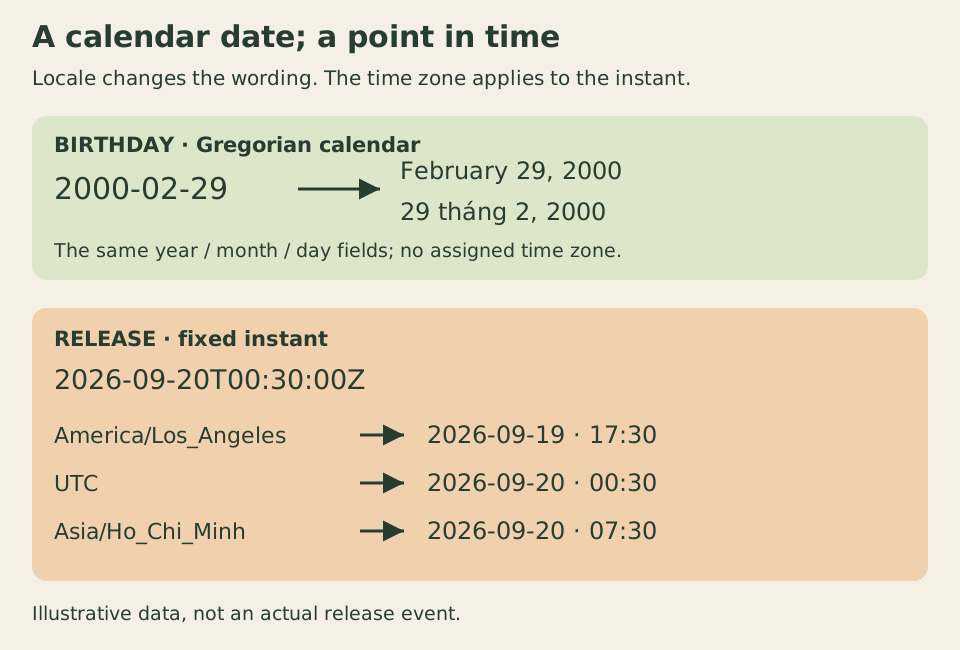
Formatting changes the birthday’s presentation. A zone changes the local clock and calendar reading of the release instant.
Validate the calendar contract before formatting
A regular expression checks the shape, not whether February has a thirtieth day. The following parser accepts exactly four-digit Gregorian years from 0001 through 9999, two-digit months and two-digit days. It rejects year zero, invalid leap days and alternative spellings. This is deliberately narrower than HTML’s date microsyntax, which permits positive years with four or more digits.
The Gregorian leap rule makes 2000 a leap year and 1900 an ordinary year. It is the arithmetic calendar contract here, including historical dates; the parser does not infer which civil calendar a place used at the time. Avoid relying on permissive parsing or constructor rollover to validate input. A normalized March date is not evidence that a submitted February date was valid.
function parseDateOnly(value) {
  if (typeof value !== "string" || !/^\d{4}-\d{2}-\d{2}$/.test(value)) {
    throw new RangeError("expected YYYY-MM-DD");
  }
  const [year, month, day] = value.split("-").map(Number);
  const leap = year % 400 === 0 || (year % 4 === 0 && year % 100 !== 0);
  const lengths = [31, leap ? 29 : 28, 31, 30, 31, 30, 31, 31, 30, 31, 30, 31];
  if (year < 1 || month < 1 || month > 12 || day < 1 || day > lengths[month - 1]) {
    throw new RangeError("invalid Gregorian date in years 0001 through 9999");
  }
  return { year, month, day };
}

function formatCalendarDate(value, locale) {
  const { year, month, day } = parseDateOnly(value);
  const proxy = new Date(0);
  proxy.setUTCFullYear(year, month - 1, day);
  return new Intl.DateTimeFormat(locale, {
    calendar: "gregory", timeZone: "UTC",
    year: "numeric", month: "long", day: "numeric",
  }).format(proxy);
}

function formatInstant(milliseconds, locale, timeZone) {
  if (!Number.isSafeInteger(milliseconds) || Number.isNaN(new Date(milliseconds).getTime())) {
    throw new RangeError("expected representable integer epoch milliseconds");
  }
  return new Intl.DateTimeFormat(locale, {
    calendar: "gregory", timeZone,
    year: "numeric", month: "long", day: "numeric",
    hour: "2-digit", minute: "2-digit", timeZoneName: "short",
  }).format(milliseconds);
}
formatCalendarDate uses a temporary Date only as an adapter for Intl.DateTimeFormat. Both its field assignment and formatting use UTC, and its calendar is explicitly Gregorian. The proxy never becomes the stored birthday. setUTCFullYear also avoids the numeric constructor and Date.UTC behavior that treats years 0 through 99 specially. Here, 0099-01-01 remains year 99.
The separate instant formatter accepts representable integer epoch milliseconds. It does not guess whether a numeric API value was seconds or milliseconds. Passing seconds to a millisecond contract can produce a valid but entirely wrong date, so validate units at the API boundary as well. Locale controls presentation, while the explicit zone controls the local reading of the instant. Intl.DateTimeFormat documents those options; punctuation and zone labels can vary with the runtime’s locale data.
Compare both meanings with native controls
Create a new HTML document. Put this markup in its body, the CSS below in a style element, and the helper functions followed by the mounting code in a script after the markup. The birthday is fictional, and the release instant is fixed example data. There is no submission or server persistence.
<section id="date-demo" aria-labelledby="demo-title" data-locale="en-US"
  data-ready="Ready. The birthday keeps its calendar date across time zones." data-stopped="Stopped. Reload to run again." data-invalid="Enter a valid complete date in years 0001 through 9999.">
  <h1 id="demo-title">Keep the birthday; move the instant</h1>
  <p>A fictional birthday and a fixed example release time have different contracts. The display locale changes formatting; the selected time zone applies only to the release.</p>
  <fieldset disabled>
    <legend>Date display controls</legend>
    <label for="birthday">Birthday (required)</label>
    <input id="birthday" type="date" value="2000-02-29" required
      min="0001-01-01" max="9999-12-31" aria-describedby="date-help date-error">
    <p id="date-help">Choose a complete Gregorian date from year 0001 through 9999.</p>
    <p id="date-error"></p>
    <label for="display-locale">Formatting locale</label>
    <select id="display-locale"><option value="en-US">English (US)</option><option value="vi-VN">Tiếng Việt</option></select>
    <label for="display-zone">Release time zone</label>
    <select id="display-zone">
      <option value="America/Los_Angeles">America/Los_Angeles</option>
      <option value="UTC">UTC</option>
      <option value="Asia/Ho_Chi_Minh">Asia/Ho_Chi_Minh</option>
      <option value="Pacific/Kiritimati">Pacific/Kiritimati</option>
    </select>
  </fieldset>
  <p>Serialized birthday: <code id="serialized-date">2000-02-29</code></p>
  <p>Birthday display: <output id="calendar-output" for="birthday display-locale"></output></p>
  <p><code>2026-09-20T00:30:00Z</code></p>
  <p>Release display: <output id="instant-output" for="display-locale display-zone"></output></p>
  <p id="demo-state">JavaScript is required for this comparison.</p>
</section>
The native date input can display a localized editing interface while exposing a normalized value. Its valueAsNumber and valueAsDate provide timestamp adapters; their existence does not turn a birthday into an event at UTC midnight. In this example, read the string value. The field also has explicit bounds because our application accepts a smaller range than the HTML date syntax.
* { box-sizing: border-box; }
body { margin: 1rem; font: 1rem/1.6 system-ui, sans-serif; }
#date-demo { max-inline-size: 40rem; overflow-wrap: anywhere; }
fieldset { min-inline-size: 0; margin: 0; }
label { display: block; margin-block-start: .75rem; }
input, select { inline-size: 100%; min-inline-size: 0; font: inherit; }
output, code { overflow-wrap: anywhere; }
:focus-visible { outline: 3px solid #315b32; outline-offset: 3px; }
function mountDateDemo() {
const root = document.querySelector("#date-demo");
const fields = root.querySelector("fieldset");
const birthday = root.querySelector("#birthday");
const locale = root.querySelector("#display-locale");
const zone = root.querySelector("#display-zone");
const error = root.querySelector("#date-error");
const release = Date.parse("2026-09-20T00:30:00Z");
locale.value = root.dataset.locale;
function render() {
root.querySelector("#instant-output").textContent = formatInstant(release, locale.value, zone.value);
root.querySelector("#serialized-date").textContent = birthday.value || "—";
try {
if (!birthday.validity.valid) throw new RangeError("invalid input");
root.querySelector("#calendar-output").textContent = formatCalendarDate(birthday.value, locale.value);
birthday.removeAttribute("aria-invalid");
error.textContent = "";
} catch {
root.querySelector("#calendar-output").textContent = "—";
birthday.setAttribute("aria-invalid", "true");
error.textContent = root.dataset.invalid;
}
}
birthday.addEventListener("input", render);
locale.addEventListener("change", render);
zone.addEventListener("change", render);
fields.disabled = false;
root.querySelector("#demo-state").textContent = root.dataset.ready;
render();
return () => {
birthday.removeEventListener("input", render);
locale.removeEventListener("change", render);
zone.removeEventListener("change", render);
fields.disabled = true;
root.querySelector("#demo-state").textContent = root.dataset.stopped;
};
}
const disposeDateDemo = mountDateDemo();Change the release zone from Los Angeles to UTC. The release moves from the local evening of September 19 to the early morning of September 20; its stored instant has not moved. The birthday string and calendar day remain unchanged. Changing the formatting locale changes words and ordering for both outputs, independently of that zone choice.
The controls begin disabled so an uninitialized comparison does not appear interactive without JavaScript. Each render updates text through textContent and retains the input elements. Invalid or empty dates produce a visible explanation associated with the input, and a valid correction clears the invalid state. The disposer removes the exact listeners and disables the comparison. It does not change or delete any stored server data because this example has none.
Native editing and select popups vary across browsers. At narrow widths with enlarged text, a closed native control can show only part of its value; the separate serialized date and formatted outputs retain the complete information. Test your supported browsers and assistive technology before treating this small comparison as a complete production form. The fixture establishes native keyboard operation in the checked browser, not every date picker’s interaction or spoken feedback.
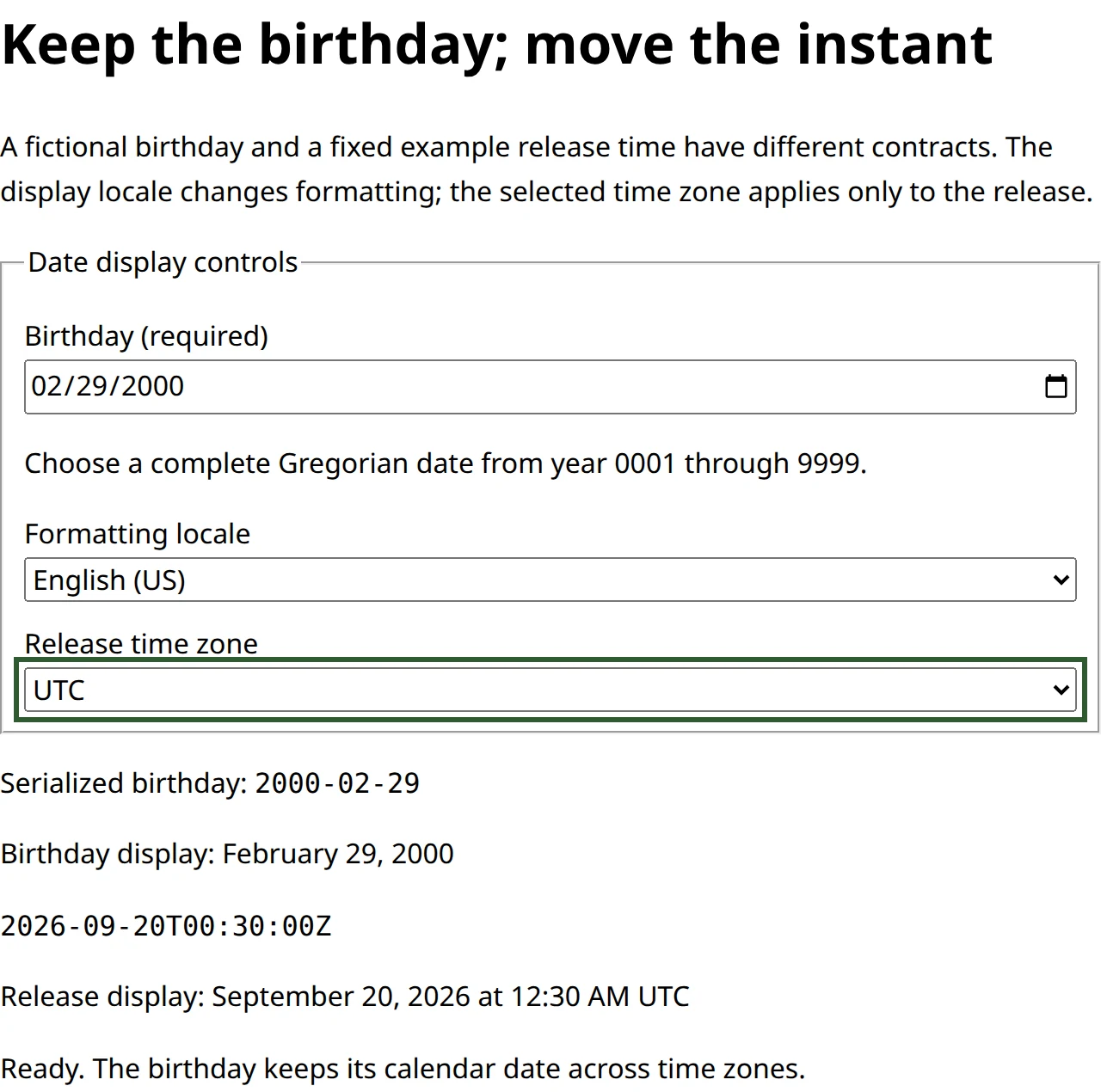
Actual Chrome capture of the unchanged example after keyboard selection of UTC. The visible input, serialized string and formatted outputs let you compare editing, storage shape and display without inferring one from another.
A calendar day is not always 86,400,000 milliseconds
The next example uses explicit offsets for Los Angeles around its 2026 daylight-saving transitions. It compares noon on consecutive calendar days. Those pairs are 23 and 25 elapsed hours apart:
const springNoons = [
  Date.parse("2026-03-07T12:00:00-08:00"),
  Date.parse("2026-03-08T12:00:00-07:00"),
];
const autumnNoons = [
  Date.parse("2026-10-31T12:00:00-07:00"),
  Date.parse("2026-11-01T12:00:00-08:00"),
];
console.log((springNoons[1] - springNoons[0]) / 3600000); // 23
console.log((autumnNoons[1] - autumnNoons[0]) / 3600000); // 25
console.log(formatInstant(springNoons[0] + 86400000, "en-US", "America/Los_Angeles"));
// March 8, 2026 at 01:00 PM PDT in this browser's locale data
Adding exactly 86,400,000 milliseconds to the first spring noon lands at 13:00 local time on the next day. The elapsed duration is correct; the wall-clock intention would be wrong if the user asked for noon tomorrow. Conversely, a local calendar operation can preserve the clock hour while changing the elapsed duration. MDN documents that setDate operates in local time and can cross such transitions.
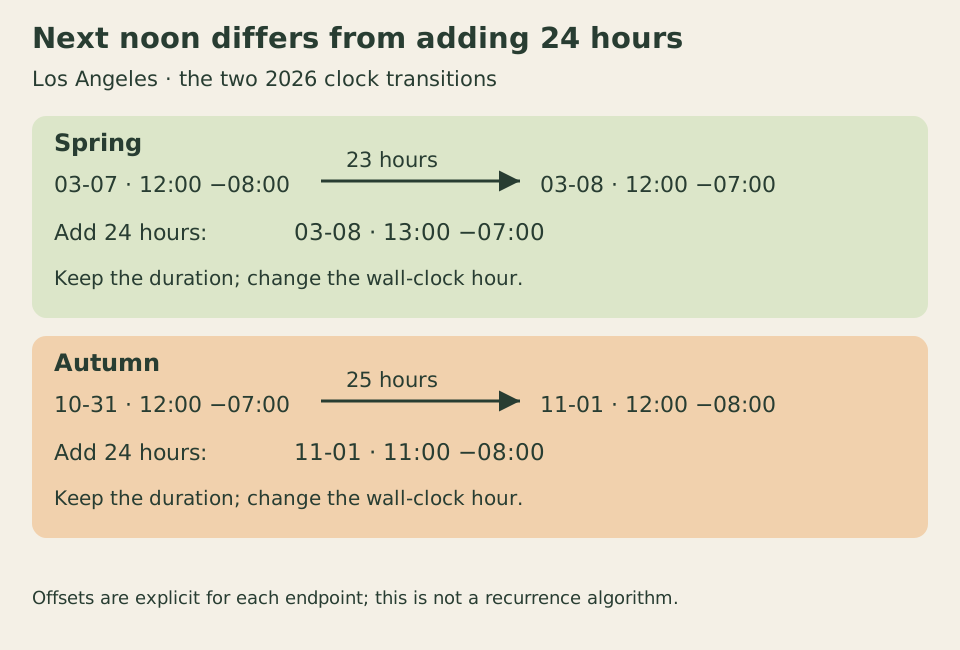
The offsets identify these particular Los Angeles examples. The diagram does not prescribe recurrence rules for other places or dates.
A recurring “09:00 every Monday” meeting therefore needs a calendar rule and a named zone, plus a policy for missing or repeated local times. A fixed elapsed timeout needs a duration. Neither is fully represented by a birthday string, and blindly adding one day’s milliseconds does not implement both. Zone rules can also change, so state which time-zone data your application uses when future scheduling matters.
For a reproducible exercise, try 1900-02-29, 2000-02-29, 0099-01-01 and 9999-12-31 with the parser. The first must fail; the others must retain their fields. Then change the browser’s host zone while keeping the formatter’s explicit options: the birthday display should keep its calendar date, while a date-time parsed without an offset can identify another instant. Finally, compare local setDate(getDate() + 1) with adding 24 hours across the two illustrated transitions. Write down whether each requirement concerns calendar fields, a local schedule or elapsed time before choosing its representation.