International number formatting without string tricks
Keep monetary units and large integers exact, preserve localized format parts, and test the difference between display, arithmetic and input parsing.

An API returns 12345. Before choosing a currency symbol, establish what that integer counts. Under a cents contract it means 123.45 dollars; under a whole-dong contract it means 12345 dong. A locale cannot resolve that ambiguity. Neither can the currency’s usual number of displayed fraction digits.
This lesson is for developers comfortable with JavaScript functions and native forms who need to display international monetary amounts. The example accepts two explicit, fictional storage contracts and three locales. It keeps the stored integer exact, shows a deliberately lossy comparison, and exposes the actual characters returned by the formatter. It does not calculate taxes, exchange currencies, or parse localized price input.
Interpret units before asking for presentation
The application accepts USD integers counting cents, with exponent two, and VND integers counting whole dong, with exponent zero. Both are decisions in this example’s API schema. Another service could store a different scale, so copying this table without checking its contract would be unsafe.
NumberFormat’s constructor options describe currency display and fraction-digit defaults. Those defaults describe presentation, not your server’s data. Reading resolvedOptions().maximumFractionDigits and using it to decode an undocumented integer confuses the two responsibilities. Here the accepted currency and exponent are validated together, and both display digit limits are then set explicitly.
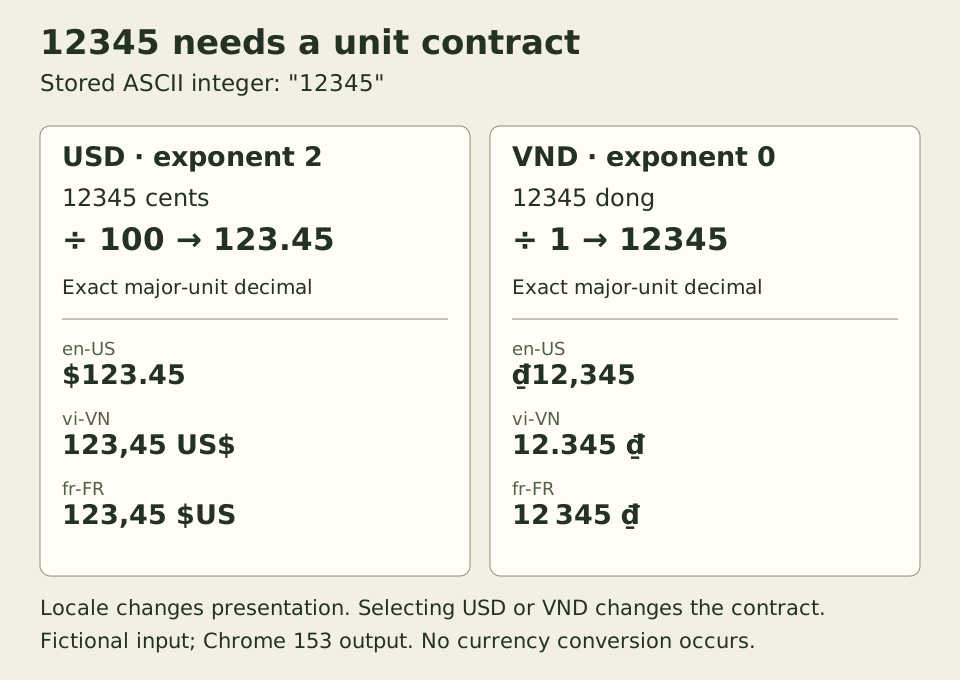
The same stored characters produce different major-unit values under the two contracts. Within either column, changing locale preserves that interpreted value. Selecting another currency in the form deliberately selects another contract; no exchange rate is involved.
Keep the integer exact across the display boundary
Save this as money.js. The accepted amount is a canonical ASCII integer string containing at most eighteen digits, optionally preceded by a minus sign. Whitespace, leading zeros, negative zero, decimal punctuation and exponent notation are rejected. The bound makes the example’s input domain explicit; allowing refunds or negative balances remains a separate product rule.
// money.js: this application's accepted storage contracts.
const EXPONENTS = Object.freeze({ USD: 2, VND: 0 });
const LOCALES = ["en-US", "vi-VN", "fr-FR"];

function majorDecimal({ amountMinor, currency, exponent }) {
  if (typeof currency !== "string" || !Object.hasOwn(EXPONENTS, currency)
      || exponent !== EXPONENTS[currency]) {
    throw new RangeError("contract");
  }
  if (typeof amountMinor !== "string"
      || !/^-?(?:0|[1-9][0-9]{0,17})$/.test(amountMinor)
      || amountMinor === "-0") {
    throw new RangeError("integer");
  }
  const integer = BigInt(amountMinor);
  const magnitude = integer < 0n ? -integer : integer;
  const digits = magnitude.toString().padStart(exponent + 1, "0");
  const decimal = exponent === 0 ? digits
    : `${digits.slice(0, -exponent)}.${digits.slice(-exponent)}`;
  return (integer < 0n ? "-" : "") + decimal;
}

function supportsExactDecimalInput() {
  const probe = new Intl.NumberFormat("en-US", {
    useGrouping: false, maximumFractionDigits: 2
  });
  return ["9007199254740993", "90071992547409.93"].every(value =>
    probe.format(value) === value
    && probe.formatToParts(value).map(part => part.value).join("") === value);
}

function formatMoney(record, locale) {
  const major = majorDecimal(record);
  if (!LOCALES.includes(locale)) throw new RangeError("locale");
  if (!supportsExactDecimalInput()) throw new Error("runtime");
  const formatter = new Intl.NumberFormat(locale, {
    style: "currency", currency: record.currency,
    minimumFractionDigits: record.exponent,
    maximumFractionDigits: record.exponent
  });
  return {
    major,
    text: formatter.format(major),
    parts: formatter.formatToParts(major),
    // Deliberately lossy control, never the authoritative display.
    numberControl: formatter.format(Number(record.amountMinor) / 10 ** record.exponent)
  };
}
BigInt preserves the integer while the code separates sign and magnitude. Padding before inserting the decimal point makes 5 cents become 0.05, while -5 becomes -0.05. No division through a binary floating-point number occurs on the authoritative path. The BigInt reference explains both integer precision and the risk of converting a large value back to Number.
The formatter receives the resulting decimal string. Modern implementations can preserve that exact decimal input, as documented by the format reference and the specification’s ToIntlMathematicalValue operation. Older implementations converted strings through Number. The small capability probe tests two relevant large inputs for both formatting methods and refuses that demonstrated loss. It is not a polyfill or a complete conformance suite; the example already requires BigInt and the other JavaScript APIs it uses.
The locale allowlist defines this interface’s scope. It does not install missing locale data. A deployment requiring those exact locales should also verify their availability in its target runtimes; Intl can otherwise fall back. The observations here come from Chrome 153 with all three requested locales available.
Preserve the formatter’s ordered parts
Save the following as ui.js. It creates text nodes through textContent, with a strong element around the currency part. It keeps every returned part in order, including literals and separators. The formatToParts reference defines these typed pieces; joining their values reproduces the corresponding formatted output.
// ui.js: loaded after money.js.
function mountMoney(root) {
  const form = root.querySelector("form");
  const fields = root.querySelector("fieldset");
  const amount = root.querySelector("#amount-minor");
  const currency = root.querySelector("#currency");
  const locale = root.querySelector("#locale");
  const display = root.querySelector("#formatted");
  const exact = root.querySelector("#major-decimal");
  const comparison = root.querySelector("#number-control");
  const error = root.querySelector("#money-error");
  function render(event) {
    event?.preventDefault();
    try {
      const result = formatMoney({
        amountMinor: amount.value, currency: currency.value,
        exponent: EXPONENTS[currency.value]
      }, locale.value);
      const nodes = result.parts.map(({ type, value }) => {
        const node = document.createElement(type === "currency" ? "strong" : "span");
        node.textContent = value;
        return node;
      });
      display.replaceChildren(...nodes);
      exact.textContent = result.major;
      comparison.textContent = result.numberControl;
      error.textContent = "";
      amount.removeAttribute("aria-invalid");
    } catch (cause) {
      display.textContent = exact.textContent = comparison.textContent = root.dataset.empty;
      error.textContent = cause.message === "integer" ? root.dataset.integerError
        : cause.message === "runtime" ? root.dataset.runtimeError : root.dataset.contractError;
      if (cause.message === "integer") {
        amount.setAttribute("aria-invalid", "true");
        amount.focus();
      } else {
        amount.removeAttribute("aria-invalid");
      }
    }
  }
  form.addEventListener("submit", render);
  fields.disabled = false;
  render();
  return () => {
    form.removeEventListener("submit", render);
    fields.disabled = true;
  };
}
const stopMoney = mountMoney(document.querySelector("#money-demo"));
The generated nodes remain inline and contribute their actual text. Moving every currency symbol to the front would erase the locale arrangement. Removing all spaces would also change the output: in the observed French VND string, grouping uses narrow no-break space U+202F, while the literal before the currency is no-break space U+00A0. They are different characters even when a screenshot makes them look similar.
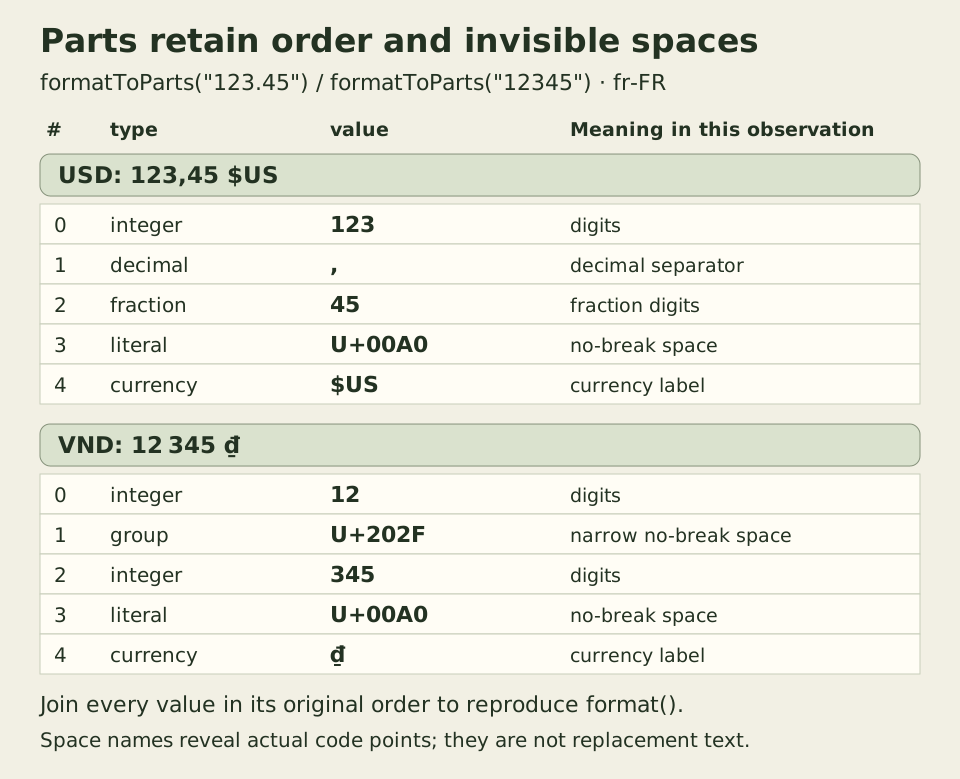
This table exposes the recorded characters; its space names are annotations, not replacements inserted by the interface. Exact symbols and spacing can vary with implementations and locale-data versions. Application tests should verify intended values and relevant structure rather than treating one screenshot’s punctuation as a universal constant.
Run the native interface
Place these files and demo.css together, then serve the directory over local HTTP. The two classic deferred scripts execute in document order. If ui.js fails to load, the fieldset remains disabled. If money.js is missing but ui.js runs, the controls are enabled, results are cleared and the interface reports its contract-error message. This minimal error handling does not distinguish a missing formatter dependency from an unsupported contract. The example has no server-rendered fallback.
<!doctype html>
<html lang="en">
<head>
  <meta charset="utf-8">
  <meta name="viewport" content="width=device-width, initial-scale=1">
  <title>An amount contract, then a locale</title>
  <link rel="stylesheet" href="demo.css">
  <script src="money.js" defer></script>
  <script src="ui.js" defer></script>
</head>
<body>
  <section id="money-demo" aria-labelledby="demo-title"
    data-empty="No formatted amount."
    data-integer-error="Use at most 18 ASCII digits with an optional minus sign. No separators, leading zeros or negative zero."
    data-runtime-error="This runtime does not preserve the exact decimal input used by this example."
    data-contract-error="Unsupported amount contract or locale.">
    <h1 id="demo-title">An amount contract, then a locale</h1>
    <p>Fictional amounts. Changing the currency selects another unit contract; it does not convert currencies.</p>
    <form novalidate>
      <fieldset disabled>
        <legend>Choose the stored amount and its display</legend>
        <label for="amount-minor">Minor-unit integer</label>
        <input id="amount-minor" name="amountMinor" type="text" inputmode="text"
          value="12345" maxlength="19" aria-describedby="amount-help money-error">
        <p id="amount-help">ASCII digits, optional minus, no grouping or decimal separator.</p>
        <label for="currency">Amount contract</label>
        <select id="currency" name="currency">
          <option value="USD">USD: integer counts cents (exponent 2)</option>
          <option value="VND">VND: integer counts dong (exponent 0)</option>
        </select>
        <label for="locale">Display locale</label>
        <select id="locale" name="locale">
          <option value="en-US">English (US)</option>
          <option value="vi-VN">Tiếng Việt</option>
          <option value="fr-FR">Français</option>
        </select>
        <button type="submit">Format this amount</button>
      </fieldset>
    </form>
    <p id="money-error" role="status"></p>
    <p>Exact major-unit decimal: <span id="major-decimal">—</span></p>
    <p>Formatted amount: <output id="formatted">—</output></p>
    <p>Number-conversion control: <span id="number-control">—</span></p>
    <p>The control may lose digits. It is shown only to expose that failure.</p>
  </section>
</body>
</html>
* { box-sizing: border-box; }
body { margin: 1rem; font: 1rem/1.6 system-ui, sans-serif; }
#money-demo { max-inline-size: 42rem; overflow-wrap: anywhere; }
fieldset { min-inline-size: 0; padding: 1rem; border: 1px solid #7b8367; }
label { display: block; margin-block-start: 1rem; }
input, select, button { font: inherit; max-inline-size: 100%; }
input, select { inline-size: 100%; }
button { margin-block-start: 1rem; white-space: normal; }
output, #major-decimal { font-weight: 700; }
#money-error { color: #8a251d; }
:focus-visible { outline: 3px solid #315b32; outline-offset: 3px; }Tab moves through the amount, contract, locale and submit button. Submit preserves successful button focus; invalid integer syntax moves focus to the described input and clears the old result so it cannot masquerade as the new amount. A runtime capability failure uses a separate message without falsely marking the integer invalid. The returned cleanup function removes the submit listener and disables the fieldset.
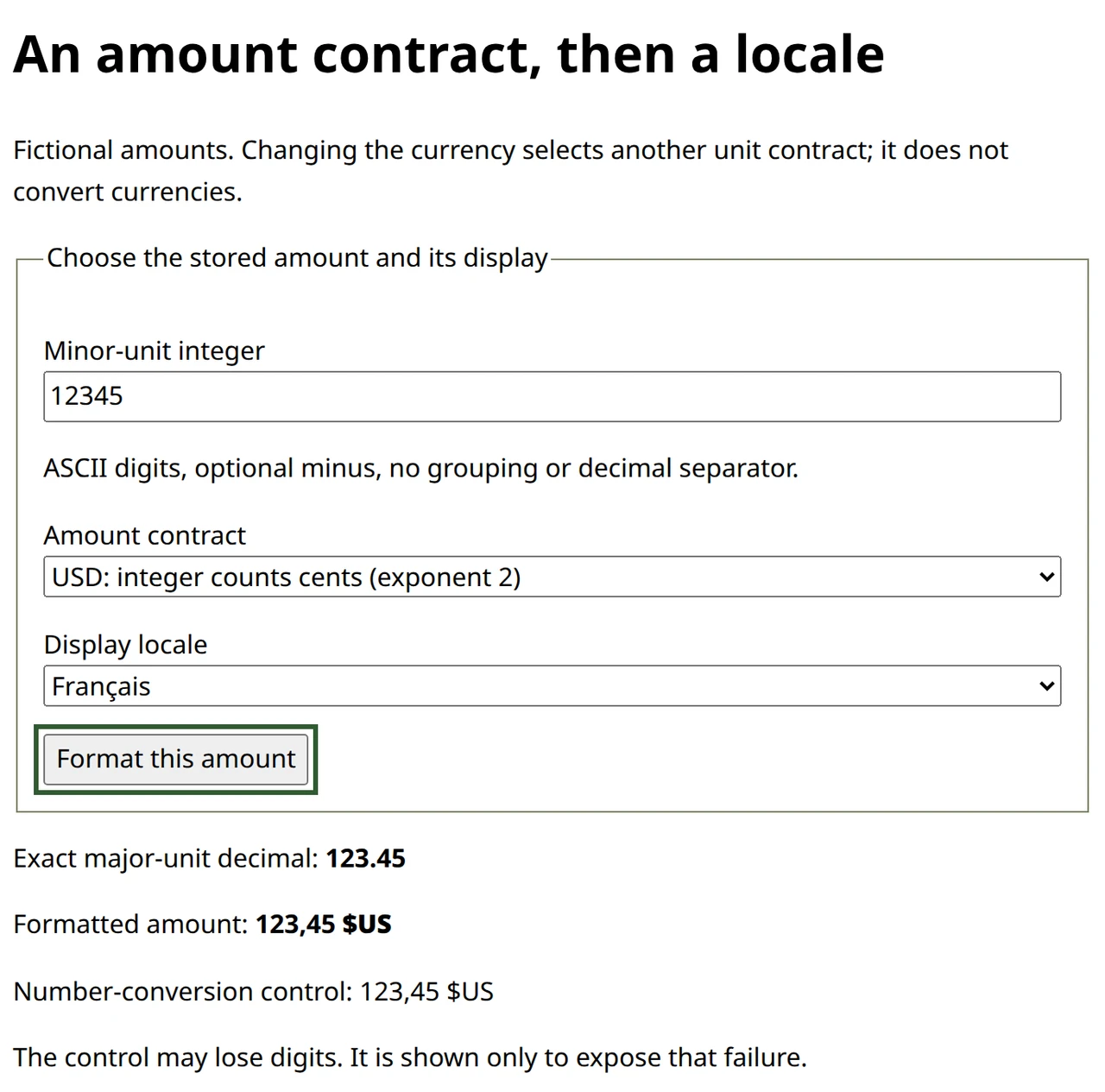
This actual capture follows keyboard selection of fr-FR. The English or Vietnamese interface language does not restrict the display locale. The stored text remains 12345, and the major-unit decimal remains 123.45 for the USD contract.
Observe a precision failure without using it as the result
Run this diagnostic in the page console. The comments record this particular Chrome run, not a promise about every currency symbol spelling.
const record = { amountMinor: "9007199254740993", currency: "USD", exponent: 2 };
const shown = formatMoney(record, "en-US");
console.log(shown.major); // 90071992547409.93
console.log(shown.text); // $90,071,992,547,409.93 in this runtime
console.log(shown.numberControl); // $90,071,992,547,409.92 in this runtime
console.log(shown.parts.map(part => part.value).join("") === shown.text); // true
console.log(record.amountMinor); // unchanged: 9007199254740993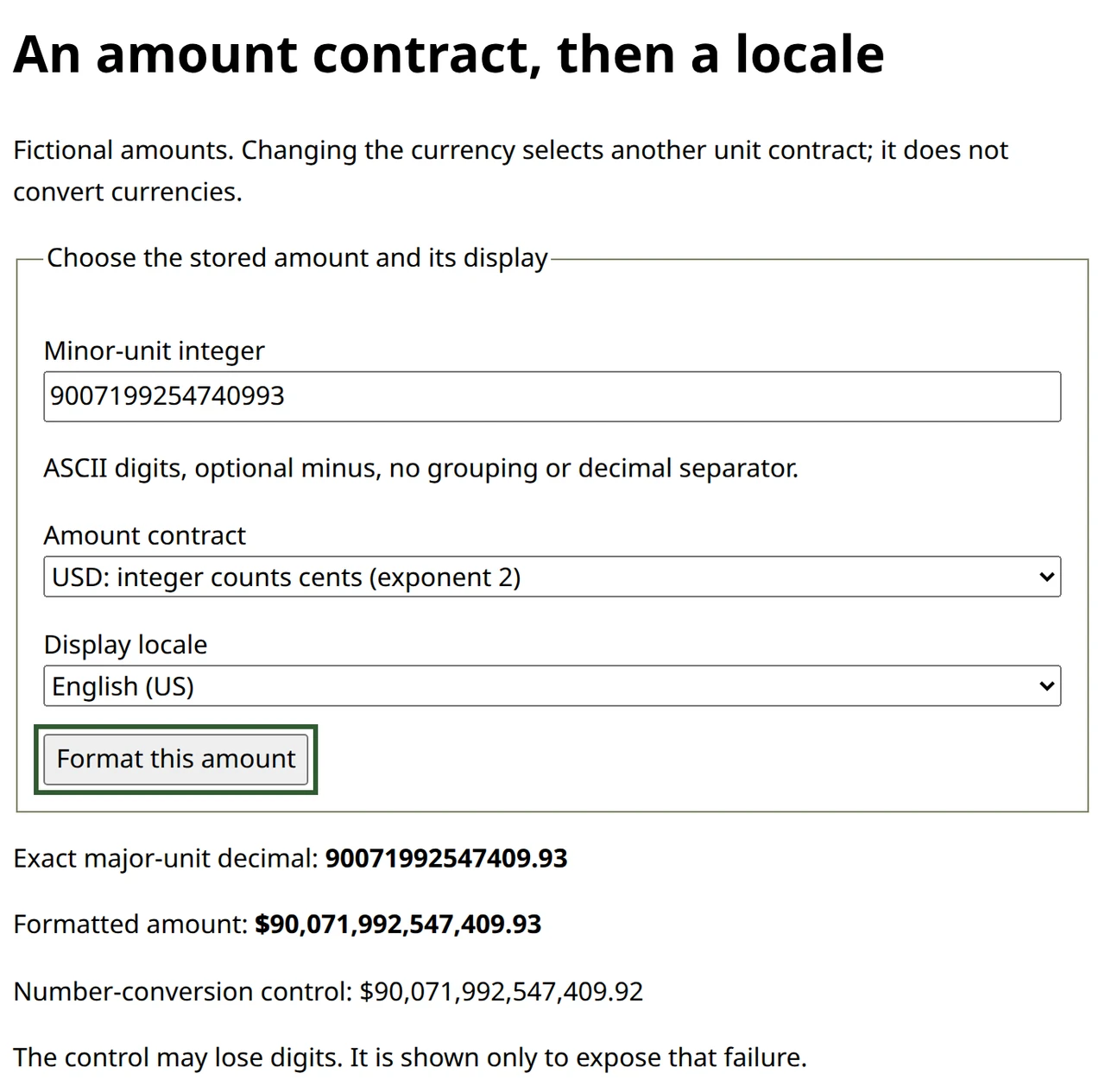
The integer string ends in 993. Converting it to Number loses information before the division by one hundred, and this runtime’s control ends in .92 instead of .93. Formatting cannot recover the discarded digit. The interface labels that path as a failure demonstration; only the exact-string path supplies the displayed amount.
Even successful formatting does not establish correct financial arithmetic. Allocation remainders, tax rounding and cash increments need explicit domain rules. BigInt division truncates, and a decimal library still needs a rounding policy. Our accepted values already align with the chosen display scale, so this example does not exercise a business-rounding algorithm.
A localized string is not an input contract
Type 123,45 into the amount field. It is rejected even when the display locale is French or Vietnamese. That field asks for integer minor units, not a human-formatted major-unit price; 12345 is the corresponding accepted cents input. Replacing commas with periods would silently change the field’s contract and still fail for other grouping characters or digit systems.
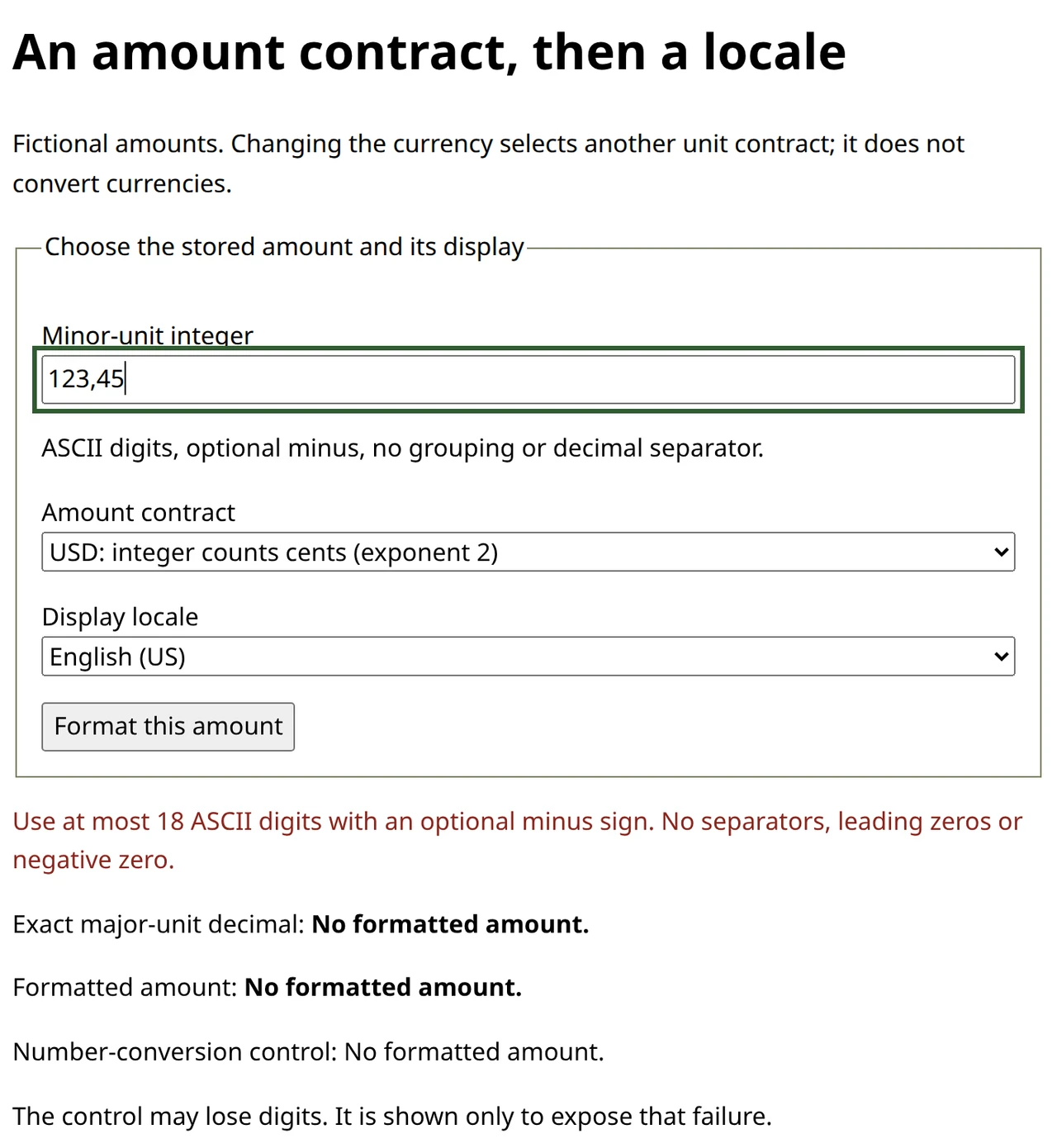
For a customer-facing price editor, choose and explain an appropriate input grammar or a dedicated localized parser. This diagnostic interface uses a normalized protocol value to make the storage boundary visible. Server validation remains necessary, and formatted output should not be sent back as authoritative money data.
As an exercise, enter 0, -5 and 999999999999999999 under each contract and locale. Predict the exact major-unit decimal before submitting, then inspect the parts without deleting literals. The author checks compared 3,516 amount/contract records with a separate Decimal oracle, producing 10,548 locale observations per edition. Native keyboard, invalid-input, capability-failure and cleanup controls also passed. Enlarged 320px layouts kept the full result available, although long labels in a closed native select can be partially visible. These are bounded browser checks, not cross-browser or screen-reader speech certification.