Local storage can fail and can contain old data
Read versioned preferences without startup rewrites, expose failed saves, preserve observed unknown records and test what storage events do across real tabs.

A theme picker can work perfectly until the next deployment. Yesterday’s browser saved { "version": 1, "dark": true }; today’s code expects a string named theme. The stored text is valid JSON, but it no longer matches the reader. Treating a successful parse as a successful migration can leave the interface in an accidental state.
If you know basic JavaScript objects and DOM events, this lesson builds a small preference reader that handles both schema changes and storage failures. The example is deliberately cosmetic: losing a theme choice may be acceptable, while silently replacing an unsaved document would not be. We will distinguish the current preview, the text actually stored, and what a save attempt can promise.
Read one documented record
localStorage stores strings in an origin’s storage area. A missing key returns null; that differs from the stored string "null", which parses to a JSON value that our schema rejects. Arrays, numbers and malformed objects also need explicit handling.
Here the old schema has integer version 1 and a Boolean dark field. The current schema has version 2 and a theme drawn from three values. Reading version 1 converts its meaning in memory without rewriting storage. An unrecognized integer version produces a default preview and an unsupported result. Extra properties are ignored rather than copied into application state.
const KEY = "article:theme-preferences";
const THEMES = ["system", "light", "dark"];

function decodePreferences(raw) {
  const result = (kind, theme = "system") => ({ kind, theme, raw });
  if (raw === null) return result("missing");
  if (typeof raw !== "string") return result("invalid");
  let value;
  try { value = JSON.parse(raw); } catch { return result("invalid"); }
  if (!value || typeof value !== "object" || Array.isArray(value)) return result("invalid");
  if (!Number.isInteger(value.version)) return result("invalid");
  if (value.version === 1) {
    return typeof value.dark === "boolean"
      ? result("migrated", value.dark ? "dark" : "light")
      : result("invalid");
  }
  if (value.version === 2) {
    return THEMES.includes(value.theme) ? result("current", value.theme) : result("invalid");
  }
  return result("unsupported");
}

function createPreferences(getStorage = () => window.localStorage) {
  return {
    read() {
      try { return decodePreferences(getStorage().getItem(KEY)); }
      catch { return { kind: "unavailable", theme: "system", raw: null }; }
    },
    save(theme) {
      if (!THEMES.includes(theme)) return { ok: false, kind: "invalidChoice" };
      try {
        const storage = getStorage();
        const observed = decodePreferences(storage.getItem(KEY));
        if (observed.kind === "unsupported") return { ok: false, kind: "unsupported" };
        storage.setItem(KEY, JSON.stringify({ version: 2, theme }));
        return { ok: true, kind: "saved" };
      } catch {
        return { ok: false, kind: "unavailable" };
      }
    },
  };
}
The decoder returns a status as well as a theme. A default caused by an absent preference is different from a default caused by an unreadable storage area. That distinction lets the interface remain usable while reporting a useful reason. Each read creates a new result; changing that result does not edit the stored string.
The getter is a function so obtaining window.localStorage happens inside the try. Access itself can throw, for example under a storage policy or an opaque origin. Catching only getItem after obtaining the object outside the protected block misses that failure. MDN’s availability guidance also distinguishes API support from availability. Even an earlier successful probe cannot guarantee every later write.
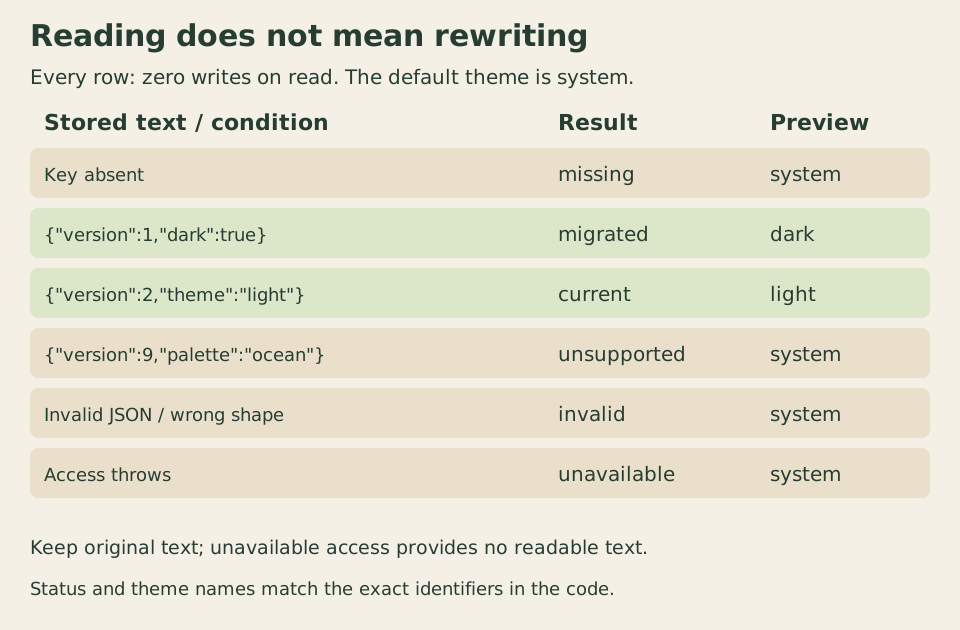
The fallback serves the local preview. The original text remains untouched by reading, including when the decoder cannot use it.
Save only after an explicit choice
The writer projects a validated selection into exactly { version: 2, theme }. It does not serialize the whole component or merge arbitrary stored properties. Missing, malformed and known old records can be replaced by that explicit user action. A version the reader does not recognize blocks the write it is about to make, preserving the record it observed.
That last sentence is deliberately limited. The check and write are two operations. Another document can change storage between them. The HTML storage specification tells authors to assume no locking mechanism across relevant agent clusters. This function is not compare-and-swap: if it reads version 2 and another tab then writes version 9 before its setItem, it can overwrite that newer record. Coordinated schema upgrades need a stronger ownership or transaction design.
setItem can throw when the value cannot be stored, including a quota failure. Here a caught failure returns an unsuccessful result; the local preview can still show the selected theme. A successful result means the browser accepted this write. It is not a backup, a physical crash-durability test or a guarantee against user clearing, later replacement or browser policy changes.
Run the complete comparison on a disposable origin
Create a new HTML document with this markup and CSS. Place the preceding core functions and the mounting code below in a script after the markup, then serve the file over local HTTP. The key is specific to this article, but keys do not create security boundaries inside an origin. Use a disposable example origin, rather than pasting storage experiments into a valuable application’s console.
<section id="storage-demo" aria-labelledby="demo-title"
  data-unsaved="Preview only; press Save to request storage."
  data-missing="No saved record; using the system preference."
  data-current="Read version 2."
  data-migrated="Read version 1 as a current theme; storage is unchanged."
  data-unsupported="Unsupported version; the observed record is kept."
  data-invalid="Invalid record; using the system preference."
  data-unavailable="Storage unavailable; the preview still works."
  data-saved="The browser accepted the write."
  data-invalid-choice="Invalid theme choice."
  data-external="Another document changed storage; the current record replaced the local choice."
  data-empty="No record.">
  <h1 id="demo-title">A theme preview with honest save results</h1>
  <p>This disposable example uses only the article:theme-preferences key. It does not store documents or credentials.</p>
  <fieldset disabled>
    <legend>Choose a cosmetic preference</legend>
    <label for="theme-choice">Preview theme</label>
    <select id="theme-choice">
      <option value="system">System</option>
      <option value="light">Light</option>
      <option value="dark">Dark</option>
    </select>
    <button id="save-theme" type="button">Save this choice</button>
  </fieldset>
  <p class="preview" data-theme="system">Local preview: <output id="preview-name" for="theme-choice"></output></p>
  <p id="read-status">JavaScript is required for this example.</p>
  <p id="save-status" role="status"></p>
  <h2>Current stored text</h2>
  <pre id="stored-record">Not read yet.</pre>
</section>
* { box-sizing: border-box; }
body { margin: 1rem; font: 1rem/1.6 system-ui, sans-serif; }
#storage-demo { max-inline-size: 42rem; overflow-wrap: anywhere; }
fieldset { min-inline-size: 0; margin: 0; }
label { display: block; }
select, button { font: inherit; max-inline-size: 100%; }
button { margin-block: .75rem; white-space: normal; }
pre { white-space: pre-wrap; overflow-wrap: anywhere; font-size: 1rem; }
.preview { padding: 1rem; border: 2px solid #56704b; background: #fff; color: #172b3a; }
.preview[data-theme="dark"] { background: #172b3a; color: #fff; }
@media (prefers-color-scheme: dark) {
.preview[data-theme="system"] { background: #172b3a; color: #fff; }
}
:focus-visible { outline: 3px solid #315b32; outline-offset: 3px; }function mountPreferenceDemo(getStorage = () => window.localStorage) {
const root = document.querySelector("#storage-demo");
const fields = root.querySelector("fieldset");
const choice = root.querySelector("#theme-choice");
const save = root.querySelector("#save-theme");
const message = root.querySelector("#save-status");
const api = createPreferences(getStorage);
function preview() {
root.querySelector(".preview").dataset.theme = choice.value;
root.querySelector("#preview-name").textContent = choice.selectedOptions[0].textContent;
}
function showRecord(read) {
root.querySelector("#read-status").textContent = root.dataset[read.kind];
root.querySelector("#stored-record").textContent = read.raw === null
? root.dataset[read.kind === "unavailable" ? "unavailable" : "empty"]
: read.raw;
}
function load() {
const read = api.read();
choice.value = read.theme;
preview();
showRecord(read);
}
function choiceChanged() {
preview();
message.textContent = root.dataset.unsaved;
}
function saveChoice() {
preview();
const result = api.save(choice.value);
message.textContent = root.dataset[result.kind];
showRecord(api.read()); // keep the local choice even when writing fails
}
function storageChanged(event) {
if (event.key !== KEY && event.key !== null) return;
try { if (event.storageArea !== getStorage()) return; } catch { return; }
load(); // cosmetic policy: replace any unsaved choice with the current record
message.textContent = root.dataset.external;
}
choice.addEventListener("change", choiceChanged);
save.addEventListener("click", saveChoice);
window.addEventListener("storage", storageChanged);
fields.disabled = false;
load();
return () => {
choice.removeEventListener("change", choiceChanged);
save.removeEventListener("click", saveChoice);
window.removeEventListener("storage", storageChanged);
fields.disabled = true;
};
}
const disposePreferenceDemo = mountPreferenceDemo();Selecting a theme changes the preview and replaces any previous save message with a preview-only notice; pressing Save attempts persistence. The writer updates its own view directly. After a failed save, showRecord refreshes the stored-text display without replacing the local selection. Thus the preview can be light while the stored record still belongs to a newer schema. The interface reports that distinction rather than saying the choice was saved.
The controls start disabled until initialization runs, and the disposer removes the exact three listeners before disabling them again. Existing select and button elements remain in place. Stored text is rendered through textContent, so JSON containing markup is displayed as text. That is a rendering decision, not proof that every use of stored data elsewhere is safe.
To inspect the migration, execute only the first seed line below and reload. For the unsupported case, execute only the second line and reload. The last line removes this example’s key when you are finished; do not run all three as one setup script.
// Run one line in the console, then reload this disposable example page.
localStorage.setItem(KEY, JSON.stringify({ version: 1, dark: true }));
// Or test a record this reader does not understand:
localStorage.setItem(KEY, JSON.stringify({ version: 9, palette: "ocean" }));
// Remove only this example's record when finished:
localStorage.removeItem(KEY);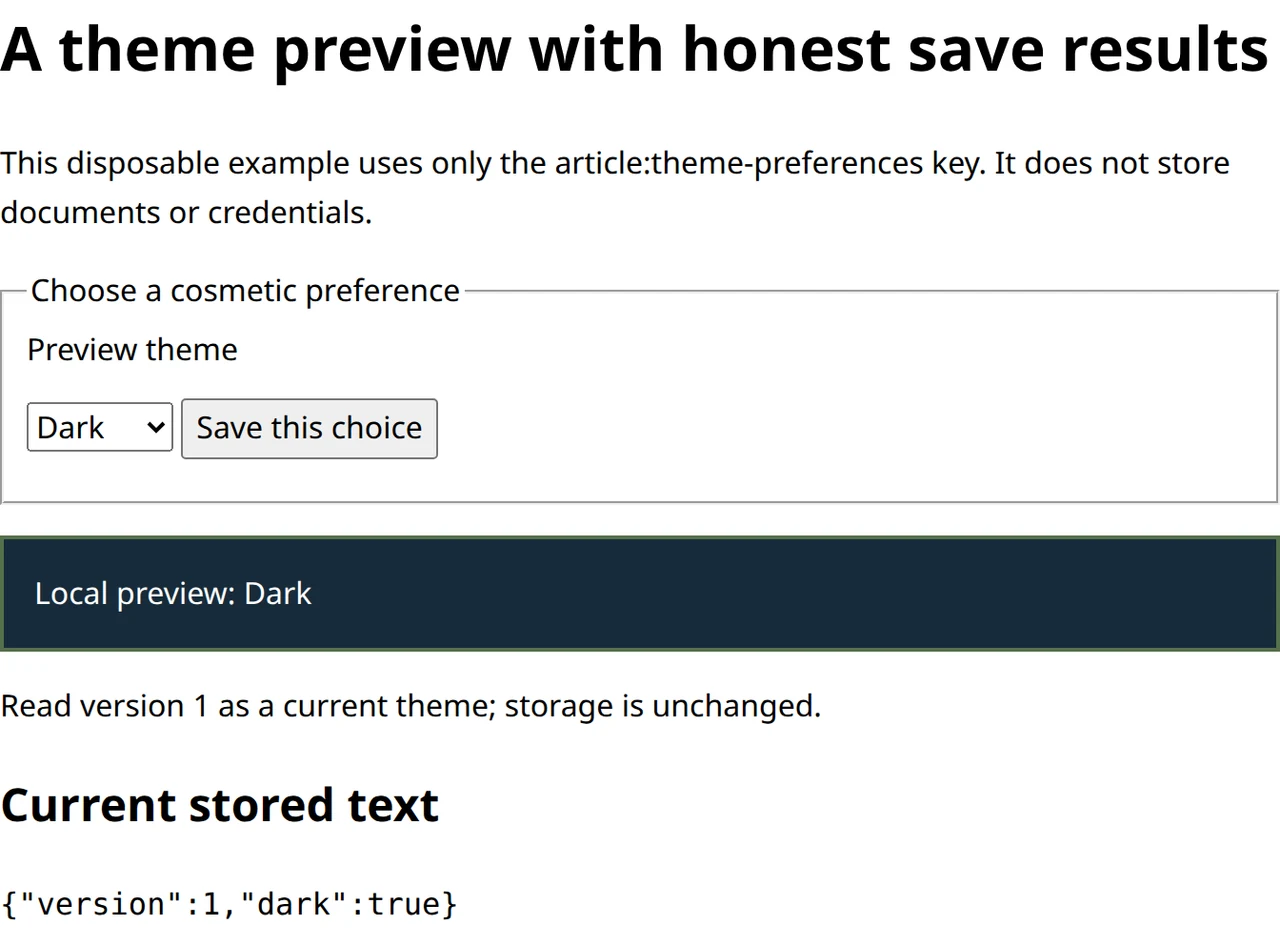
The old Boolean has a defined meaning. No startup write was needed to display it, and the original version-one record remains visible.
Now seed version 9, choose Light and press Save. The preview changes, but the unsupported record remains. Reloading uses the default preview again because the reader still cannot interpret version 9. This is an explicit compatibility policy for a preference, not a generic migration engine.
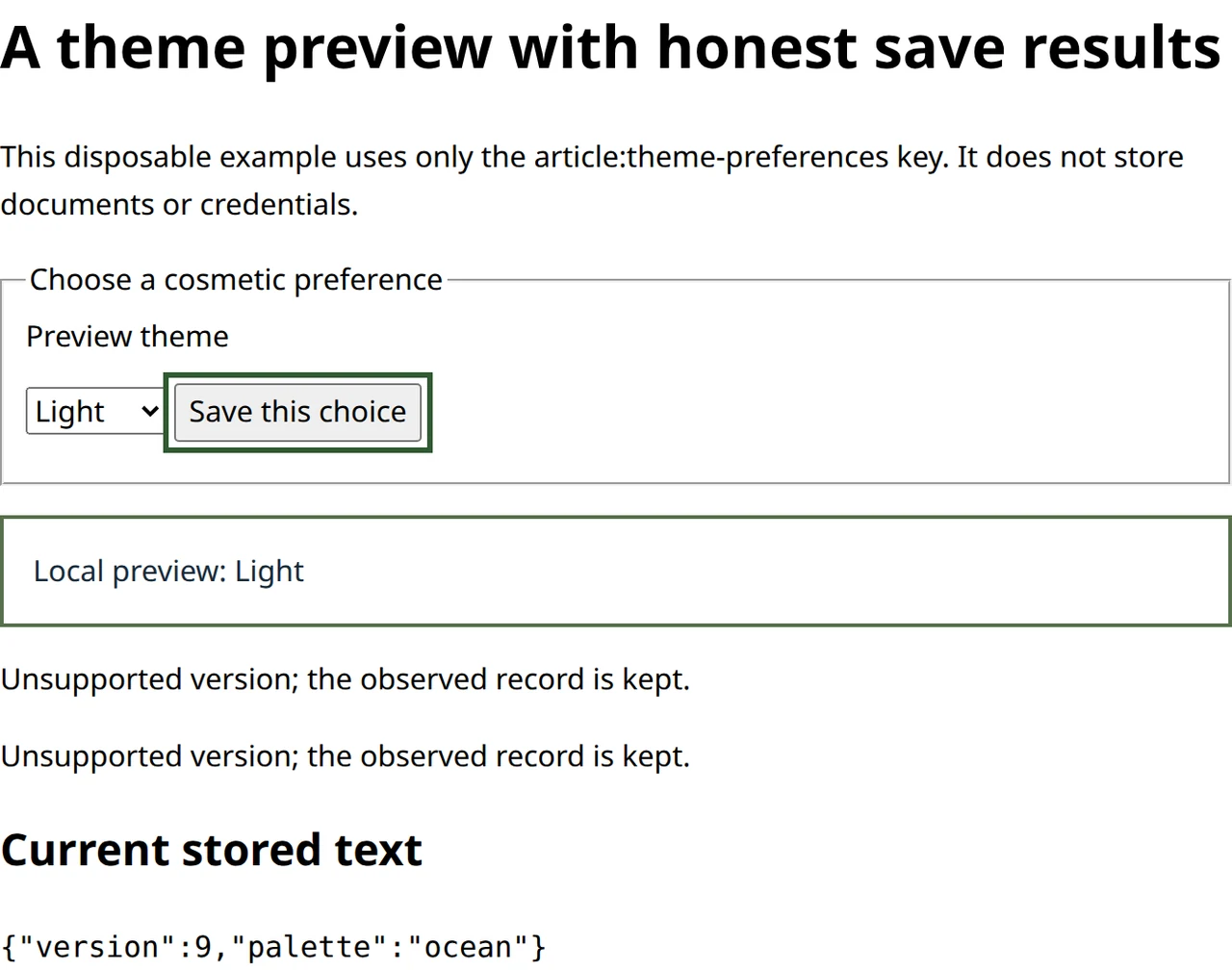
The selected value and the persisted value can differ. A visible write result prevents the preview from making a false persistence promise.
Other tabs deliver notifications, not transactions
Open the example in two tabs at the same origin. A changed localStorage record triggers a storage event in the other document, not the writer itself. Writing the identical string is a no-op in the specification; do not depend on it as a message broadcast.
The handler checks both storage area and key, including a null key for clear. It rereads the current record instead of installing event.newValue blindly: an event describes a change, while a later write may already have replaced that value. Parsing and migration still apply to every relevant refresh. Events do not make the preceding read and write atomic.
This example intentionally replaces an unsaved cosmetic choice when another document’s change is handled. The existing select can keep focus while its selected value changes. For document editing, that would usually require a different conflict policy and an explicit account of local unsaved work. The example’s simplicity comes from its preference contract, not from universal safety of last-writer behavior.
Keep persistence proportionate to the data
Local storage is scoped by origin, including scheme and port, and is not isolated by path. A different development port does not share these records. File-URL behavior is not a dependable substitute for a served test. Scripts running with the origin’s authority can access the area, so this example stores neither credentials nor valuable documents.
The Web Storage overview describes synchronous access and points to asynchronous alternatives such as IndexedDB for larger datasets. This tiny preference makes no throughput claim. Large serialization, frequent writes and complex migrations need a separate performance and recovery design; changing APIs alone does not establish that design.
For a final exercise, inject a getter that throws and then a storage object whose getItem works but setItem throws. Confirm that reads and writes report different outcomes while the preview remains usable. Next simulate a version-nine write between the writer’s read and write to expose the missing atomic comparison. In real tabs, verify the writer’s direct update, the other tab’s notification, removal of the key and an unrelated-key change. Keep those distinct checks: successful rendering does not prove successful storage, and a successful notification does not prove conflict-free persistence.