Design tokens with CSS custom properties
Build a scoped CSS theme, trace inherited token aliases, and test why var fallbacks and registered types do not validate every consumer.

Design tokens name decisions that several components should share. CSS custom properties can carry those decisions, but they still obey the cascade, inheritance and value-processing rules. A useful token name does not turn its value into a globally reevaluated setting or a validated input.
If you already know basic CSS declarations, this article will help you build a small theme and diagnose two confusing failures: a palette override that does not change a derived role, and a fallback that does not rescue an invalid padding value. The olive and beige preview is a proposed example, not a claim about how every component in this portfolio is implemented.
Let components ask for a role
A palette name such as --olive-900 describes a color choice. A role such as --text-primary describes why a component needs a value. They can resolve to the same color today while changing independently during a redesign. A component asking for primary text should not need to know whether that text is olive, charcoal or another tested color.
Use this small document for the examples. The button changes only this preview; it does not save a preference, follow the operating system or theme the whole application. The notes link has an actual local fragment target so it also provides a native focusable consumer to inspect.
<section class="preview" id="token-preview" data-theme="light"
         aria-labelledby="preview-title">
  <h2 id="preview-title">Card theme preview</h2>
  <button id="theme-toggle" type="button" aria-pressed="false"
          aria-controls="token-preview">Dark preview</button>
  <article class="article-card">
    <h3>A note about form labels</h3>
    <p>Names help readers connect a control with its purpose.</p>
    <a href="#token-notes">Read the example notes</a>
  </article>
  <p class="probe">Spacing probe</p>
  <p id="token-notes">This is sample content for checking the theme.</p>
</section>
:root {
--olive-900: #303326;
--olive-700: #696d45;
--beige-100: #f4f0e6;
--beige-200: #e7e3d7;
--surface-page: var(--beige-100);
--surface-card: var(--beige-200);
--text-primary: var(--olive-900);
--border-muted: var(--olive-700);
--focus-ring: var(--olive-700);
--space-card: 1.5rem;
}
.preview[data-theme="dark"] {
--surface-page: var(--olive-900);
--surface-card: var(--olive-900);
--text-primary: var(--beige-100);
--border-muted: var(--beige-200);
--focus-ring: var(--beige-100);
}
.preview {
box-sizing: border-box;
max-inline-size: 40rem;
padding: 1rem;
color: var(--text-primary);
background: var(--surface-page);
overflow-wrap: anywhere;
}
.article-card {
margin-block: 1rem;
padding: var(--space-card);
color: var(--text-primary);
background: var(--surface-card);
border: 1px solid var(--border-muted);
}
.preview a { color: inherit; }
.preview button {
max-inline-size: 100%;
padding: .6rem 1rem;
border: 1px solid currentColor;
font: inherit;
color: inherit;
background: var(--surface-card);
}
.preview :is(a, button):focus-visible {
outline: 3px solid var(--focus-ring);
outline-offset: 3px;
}
.probe {
padding: 2rem;
padding: var(--space-probe, 1rem);
}The MDN custom-properties guide explains why these declarations participate in ordinary CSS inheritance. The root supplies a palette and default roles. The dark preview assigns roles on its own boundary. The card consumes those roles without a selector that identifies either theme.
Attach the following script after the markup. Its stable button label and changing pressed state describe whether the dark preview is selected. Native button activation supplies both pointer and keyboard operation; no custom key handler is needed.
const preview = document.querySelector('#token-preview');
const toggle = document.querySelector('#theme-toggle');
toggle.addEventListener('click', () => {
  const dark = toggle.getAttribute('aria-pressed') !== 'true';
  toggle.setAttribute('aria-pressed', String(dark));
  preview.dataset.theme = dark ? 'dark' : 'light';
});
Keep related colors together when defining a theme. A background change can make unchanged text or a focus ring difficult to see. This example changes the text, surfaces, border and focus roles together, but the names alone do not establish accessible contrast. Inspect their rendered combinations, including focus, and test any new palette before accepting it.
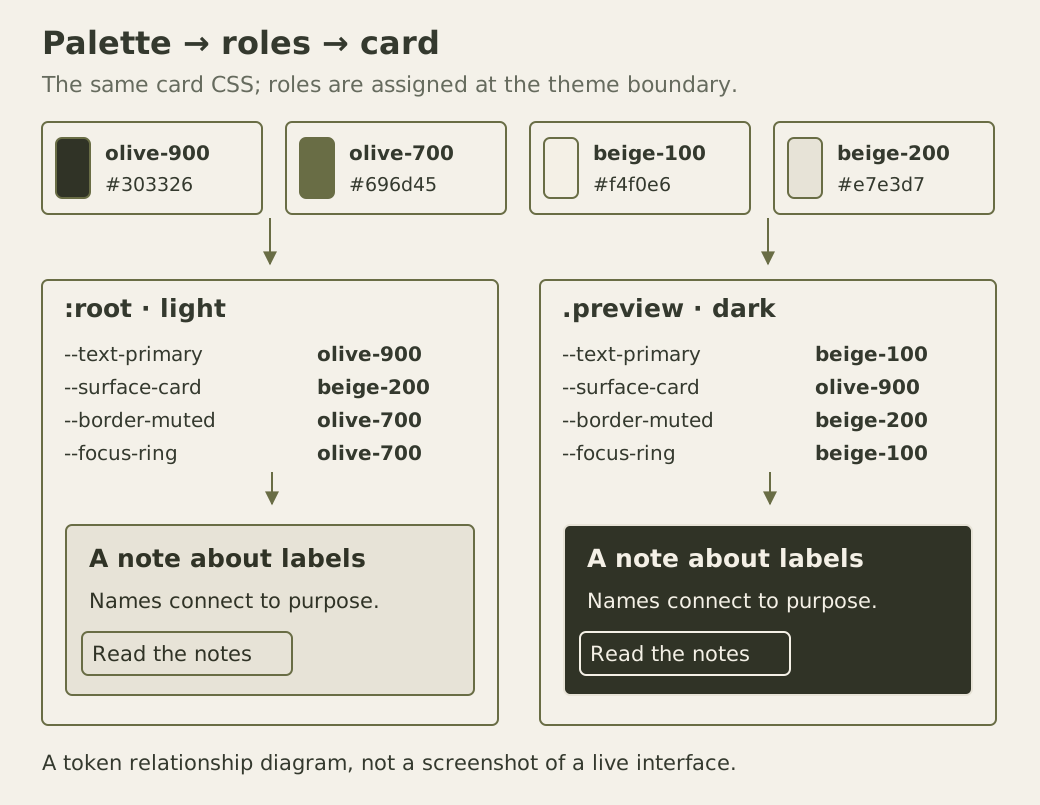
The extra role layer pays for itself when it captures a real relationship. A tiny component does not need a separate token for every pixel of decoration. Begin with repeated decisions, then add distinctions when two consumers need to change independently.
An inherited alias has already been resolved
An alias here is a custom property whose value refers to another custom property. There is a subtle difference between overriding a role and overriding the primitive from which that role was derived. In the light preview, set --beige-200: pink directly on the preview element. The card does not become pink. Its inherited --surface-card value was computed on the root, where the beige primitive still had its original value.
The custom-properties specification states that variable references resolve at computed-value time, before inheritance. The descendant receives the resolved alias, not an instruction to look up every dependency again using the descendant’s palette. This is why the dark selector above assigns semantic roles at the intended theme boundary.
Now also set --surface-card: var(--beige-200) on the light preview. That alias resolves there, sees the local pink primitive and reaches the card through inheritance. Remove both overrides afterward. Alternatively, changing the primitive on the root itself recomputes the alias at the place where it was declared. Those are different operations with different scopes.
A local card declaration can likewise block an ancestor’s role override. If the card declares its own --text-primary, a page theme cannot replace that value through inheritance alone. Inspect the supplying declaration before adding another competing rule. Descendants inherit from their ancestors, not from a nearby sibling preview.
The fallback is not a validator for padding
The probe has two padding declarations. The first says 2rem; the second consumes --space-probe with a 1rem fallback. In the unchanged document, nobody defines that custom property, so the second declaration uses the fallback.
Run the following console experiment with a 16px computed root font. It changes only the probe’s custom property and restores its original inline style. The example assumes there is no ancestor declaration of that probe-specific property; removing a local declaration would otherwise expose the inherited value.
{
  const probe = document.querySelector('.probe');
  const originalStyle = probe.getAttribute('style');
  const rows = [];
  try {
    for (const [name, value] of [
      ['missing', null], ['length', '24px'],
      ['wrong type', 'red'], ['initial', 'initial']
    ]) {
      if (value === null) probe.style.removeProperty('--space-probe');
      else probe.style.setProperty('--space-probe', value);
      rows.push({name, padding: getComputedStyle(probe).paddingTop});
    }
    console.table(rows);
  } finally {
    if (originalStyle === null) probe.removeAttribute('style');
    else probe.setAttribute('style', originalStyle);
  }
}
The expected paddings are 16px, 24px, 0px and 16px. The surprising zero belongs to the red case. An unregistered custom property may contain that token, so substitution succeeds. The resulting padding value is invalid, however: a color is not a padding length. The fallback inside var is not selected because the custom property itself was available.
Nor does the browser return to the earlier 2rem declaration. The invalid-variable rules distinguish a syntax error rejected early from a value that becomes invalid after substitution. At this later stage, padding, a non-inherited property, takes its initial value of zero. An inherited property such as color instead takes its inherited value in the equivalent failure case.
For this unregistered property, the CSS-wide keyword initial restores its guaranteed-invalid initial value, allowing the var fallback to run. A declared empty token value is different from that special invalid value; do not treat every empty serialization in developer tools as proof that a property is missing. Case also matters: --Space-probe and --space-probe are separate names.
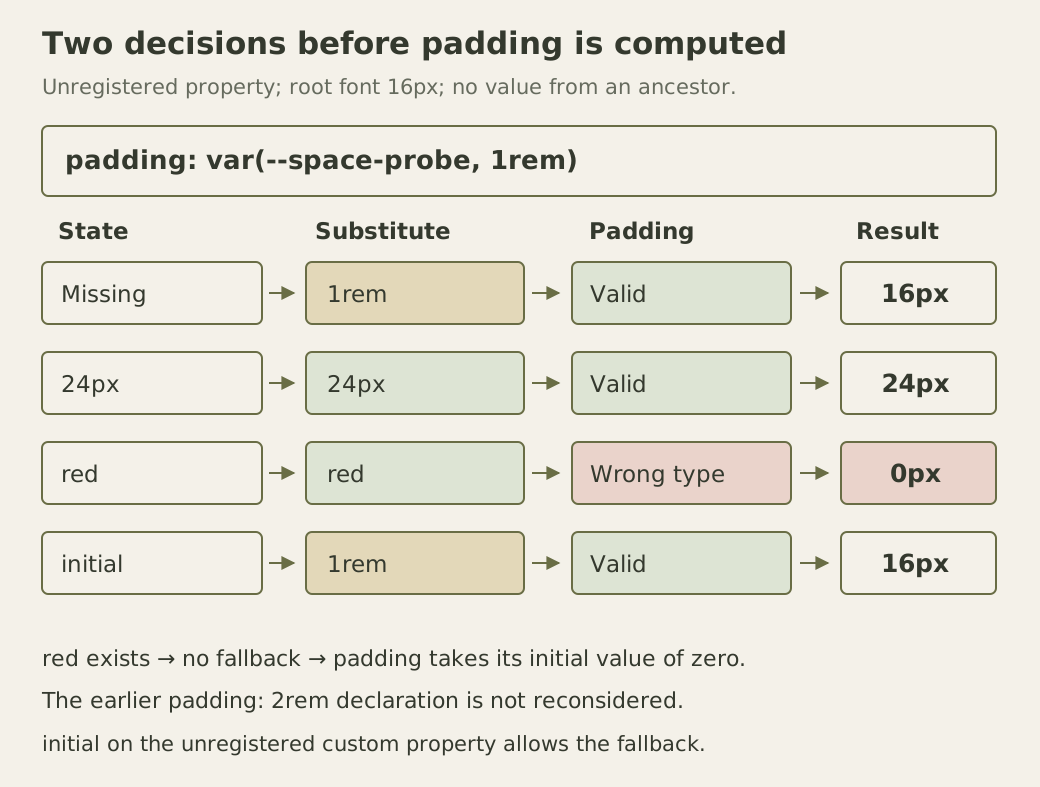
The diagram separates the two decisions: whether substitution has a usable custom-property value, then whether the consuming property accepts the substituted tokens. That separation is more reliable than remembering that a variable has a fallback and assuming every failure ends there.
Registration adds a different contract
After recording the four-state result, append this CSS for a separate experiment. It makes the probe consume a registered property instead. While this rule applies, changing --space-probe no longer controls its padding. Remove the added rule before rerunning the earlier table.
@property --space-checked {
  syntax: "<length>";
  inherits: false;
  initial-value: 24px;
}
.probe { padding: var(--space-checked, 16px); }
The property at-rule reference describes the syntax, inheritance and initial-value descriptors. With no local value here, the probe gets 24px, not the 16px inside var. The registration already supplies a valid initial value. Because inheritance is disabled, putting a different registered value only on the parent will not theme this probe.
The registration specification requires a computationally independent initial value for this syntax. The fixed 24px example meets that requirement; an initial value dependent on the element’s font does not. Ordinary unregistered spacing roles can still use rem, as the card does. Do not replace all of them with fixed lengths simply to make registration convenient.
The registered example assumes a browser implementing @property. If that rule is unsupported and ignored, the property retains unregistered behavior; test the browsers your interface supports.
A type contract also has limits. A negative length fits the registered length syntax but is not valid padding. Try --space-checked: -4px on the probe: the consumer can still become invalid and use zero. Validation of external theme settings must account for the destination’s actual constraints, not merely the token’s name or broad type.
Review a token change where it is used
Use Tab and Space on the preview button, then Tab to its link. Check that the focus indicator remains visible through the theme change and that the label does not change meaning. Enlarge the text and confirm that the card grows instead of clipping its longer content. A palette inspection alone cannot reveal those interactions.
Containment is only one part of that review. At a 320px viewport with a 32px root font, the card has 48px of padding on each side in this example. The remaining text column is narrow enough to break ordinary words. Set --space-card: .75rem on the preview and compare the line lengths. That local role override reduces the padding to 24px without shrinking the text. Check both ordinary and enlarged sizes before deciding which spacing feels usable.
As an exercise, rename --text-primary throughout the stylesheet, deliberately leaving the card’s color reference unchanged. Trace the resulting computed color, then repair the consumer. This demonstrates why a rename requires a search through references and a rendered check. A plausible inherited color or fallback can mask an incomplete migration. Keep the token vocabulary small enough that a reviewer can explain which components a change is supposed to affect.