The CSS box model when a card will not fit
Calculate content, padding, borders and margins to diagnose an overflowing card, then distinguish box sizing from minimum sizes and transformed rectangles.

A card can have width: 320px and still occupy 356 pixels across the page. Under content-box, the width names the content area; padding and borders are added outside it. Under border-box, the same declaration normally includes those pieces. Changing the sizing model changes the space left for text, so it can repair a real arithmetic error without removing the intended padding.
If you can write a CSS selector, use this example to trace where an overflowing component gets its width. The worked example uses an ordinary block in horizontal, left-to-right layout. No flex or grid sizing, transforms or scrollbars complicate the card. Those assumptions let us account for each pixel before introducing other layout constraints.
Start with a containing block you can measure
Put this fictional article card in a blank HTML document. The stage is the card’s containing block in this example: its content width supplies the reference for the percentage width.
<div class="stage">
  <article class="card">
    <h2>A small layout experiment</h2>
    <p>Padding should leave room around this text.</p>
  </article>
</div>
.stage {
width: 320px;
max-width: 100%;
outline: 1px dashed #696d45;
}
.card {
box-sizing: content-box;
width: 100%;
padding: 16px;
border: 2px solid #696d45;
}Use a viewport wide enough to leave at least 320 pixels for the stage after the document’s margins. The outline marks the stage without adding a border to its width. The explicit content-box declaration makes the example reproducible even if an existing stylesheet has a reset.
The card’s content width is 320 pixels. Two sides of padding contribute 32 pixels, and two borders contribute four. Its border box is therefore 356 pixels wide. The stage has not become wider; the card extends 36 pixels past its right edge. This overflow exists with one card, so changing a gap between neighboring cards cannot remove its cause.
Replace the card’s sizing model with border-box. Its border box now measures 320 pixels, and its content area measures 284. Padding still occupies 16 pixels on each side. Text may wrap earlier because the available line is shorter. The MDN box-sizing reference defines both interpretations and lists controls that receive border-box sizing from browser styles. A button’s default therefore does not tell you the sizing model of an ordinary article element.
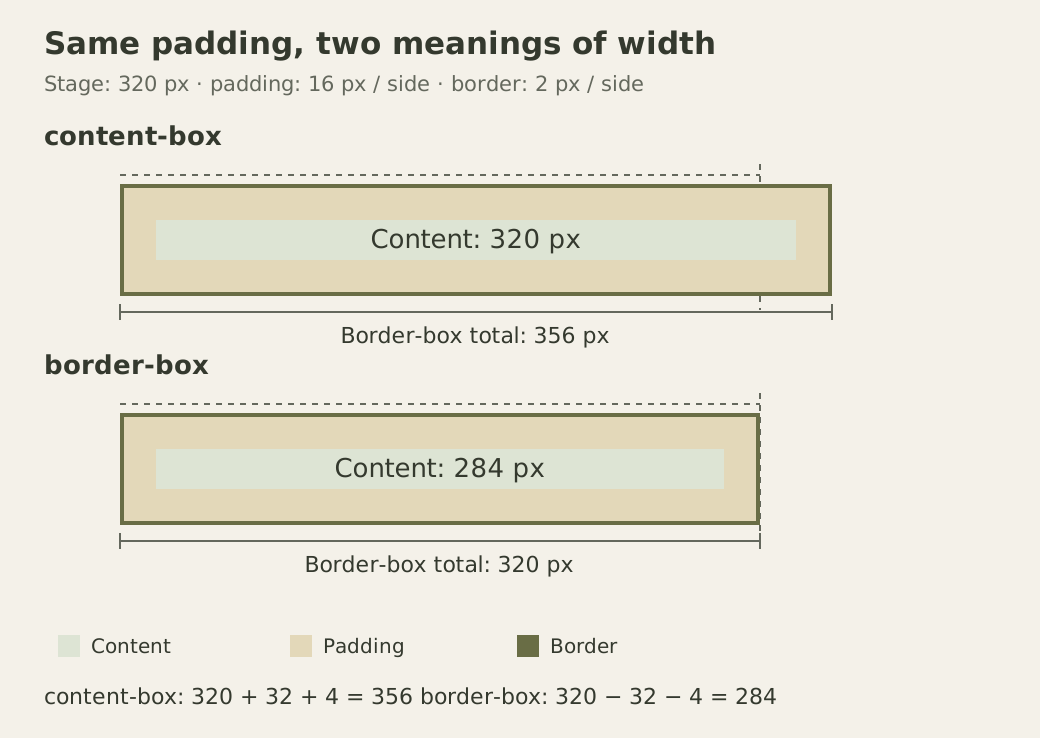
Both rows contain the same padding and border. Only the part constrained by the width declaration changes.
A full percentage leaves no allowance for margins
Keep border-box and add margin-inline: 20px to the card. The width remains 320 pixels; it has not become the remaining space after margins. In this left-to-right normal block layout, the left border starts at coordinate 20 relative to the stage and the right border reaches 340. The card consequently extends 20 pixels beyond the stage.
There is a subtle reason not to describe this as two extra visible 20-pixel gutters. A full width plus both requested margins overconstrains the block. The CSS normal-flow width rules resolve that conflict by recalculating the used right margin in a left-to-right containing block. The requested right gutter is not preserved. Right-to-left layout resolves the opposite side; flex and grid use different algorithms.
If the intention is a block with 20 pixels of space on both sides, change its width to auto. The browser can now solve for the width after accounting for those margins. The card’s border box becomes 280 pixels, spanning coordinates 20 through 300. Its content area is 244 pixels after subtracting padding and borders. Moving the spacing to a parent’s padding is another option, but it affects the parent’s other children and changes the containing block you must inspect.
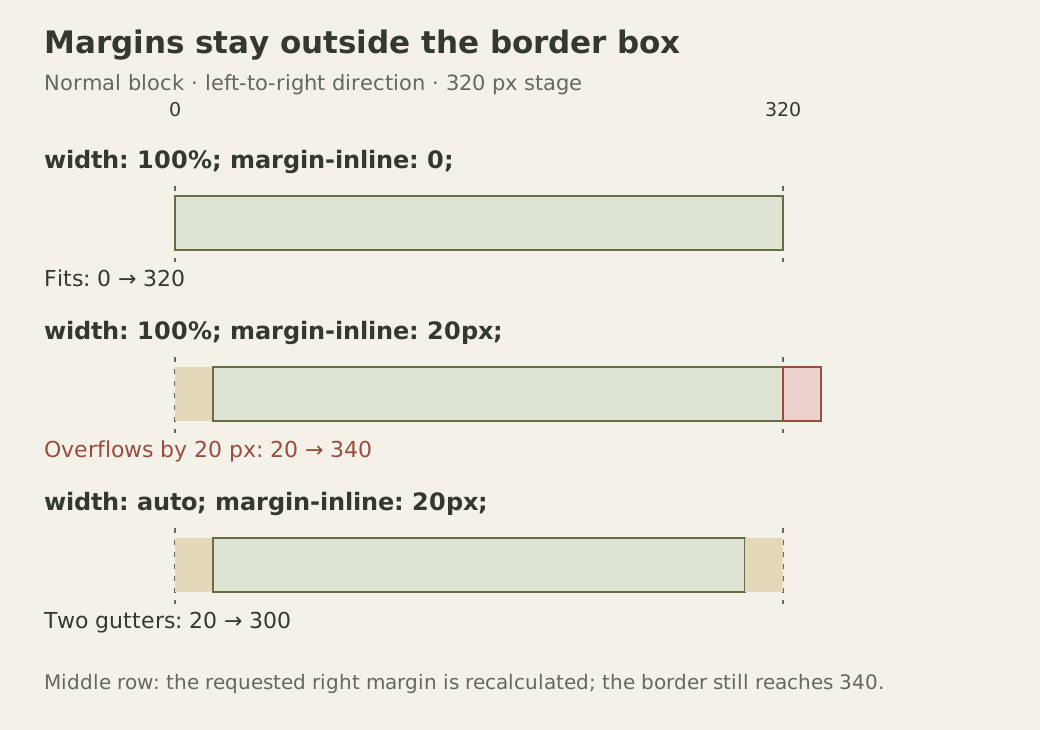
The second row shows the actual border position, not an assumed pair of preserved margins. The third row expresses two usable gutters.
Check the four states in the console
Run this after the HTML and CSS above. It temporarily changes the same card, records each border rectangle relative to the stage, and restores the original inline styles. The names and dimensions are diagnostic data; there is no network request or application state involved.
const card = document.querySelector(".card");
const stage = document.querySelector(".stage");
const originalStyle = card.style.cssText;
const cases = [
  ["content", "content-box", "100%", "0"],
  ["border", "border-box", "100%", "0"],
  ["full-with-margins", "border-box", "100%", "20px"],
  ["auto-with-margins", "border-box", "auto", "20px"],
];

const rows = cases.map(([name, sizing, width, margin]) => {
  card.style.boxSizing = sizing;
  card.style.width = width;
  card.style.marginInline = margin;
  const parent = stage.getBoundingClientRect();
  const box = card.getBoundingClientRect();
  return {
    name,
    width: box.width,
    left: box.left - parent.left,
    right: box.right - parent.left,
  };
});

card.style.cssText = originalStyle;
console.table(rows);
At a 320-pixel stage, the widths should be 356, 320, 320 and 280. The left coordinates should be zero, zero, 20 and 20; the right coordinates should be 356, 320, 340 and 300. If the stage is narrower because of its maximum width, substitute its actual content width in the calculations. The constants contributed by padding, borders and margins remain the same here.
MDN’s rectangle reference explains that this API includes padding and borders and reports positions relative to the viewport. Subtracting the stage’s left edge removes the shared viewport offset for this simple untransformed setup. These rectangles are snapshots, so keep reading fresh values after each change.
A transform changes what the rectangle means. Scale the fitted 320-pixel card by 1.1 and its reported width becomes 352, while its untransformed layout width stays 320. The CSSOM View algorithms apply element and ancestor transforms when collecting the rectangles. Remove the transform before using this measurement as evidence for box-model arithmetic. A shadow is different again: it can paint beyond the border without enlarging this border rectangle.
Know where the convenient rule stops
Even border-box cannot make a content area negative. Set the card’s width to 20 pixels while retaining 16-pixel padding and two-pixel borders on both sides. Those fixed pieces already require 36 pixels. The content width bottoms out at zero and the border box measures 36, despite the smaller declaration. CSS Sizing’s box-sizing definition specifies this floor. A narrow component may need smaller spacing, not another sizing keyword.
A correctly sized border also does not guarantee that its contents fit. Insert a long identifier without spaces. Under ordinary wrapping, its characters can extend beyond the card even though the card’s measured border width is still correct. For content where arbitrary wrapping is acceptable, overflow-wrap: anywhere supplies additional break opportunities without modifying the string. The overflow-wrap reference describes that behavior. A screenshot of overflowing letters is not evidence that padding was added twice. Enlarged text can expose the same problem in an ordinary heading word. Apply the chosen wrapping policy to headings too, rather than checking only paragraphs.
Other constraints require their own checks. An image may need a maximum inline size; a flex item may have a content-based minimum size; a grid track may have its own minimum. Hiding overflow can conceal text and focus indicators without resolving any of those constraints. This example establishes the box arithmetic, not a universal repair for all overflow.
Adopt a default, then test its boundary
Projects often choose this inheritance-based reset:
html {
  box-sizing: border-box;
}

*,
*::before,
*::after {
  box-sizing: inherit;
}
The property does not inherit by default, which is why the second rule is needed. Generated pseudo-elements participate too. Remove the demonstration’s explicit .card override before expecting this reset to control it. A legacy component can deliberately set another model at its boundary, and descendants following the inheritance rule will use that choice. Changing an existing application’s default can alter forms and widgets that depended on the old arithmetic; inspect those components rather than assuming the reset is visually neutral.
For a final exercise, increase the card’s padding to 24 pixels and border to three pixels. Predict the measurements before rerunning the four-state console example. At the original stage width, the content-box border should be 374 pixels, the fitted border-box content should be 266, and the auto-width card with margins should retain its 280-pixel border while leaving 226 for content. Then enlarge the text. Its height should grow as lines wrap, while these horizontal measurements stay fixed. If they change, inspect which additional rule entered the calculation.