Focus styles that survive a theme switch
Preserve the focused control across theme changes, retain a pointer fallback, and verify clipping, viewport clearance and forced-color behavior.
Changing a theme should change the colors around the reader’s current task. If the focused button disappears and an identical-looking button replaces it, the colors may be correct while keyboard navigation loses its place. A durable focus treatment therefore needs both a visible indicator and continuity of the element receiving input.
This lesson is for a frontend developer comfortable with selectors, DOM attributes and native controls. We build a local theme switch, compare pointer and keyboard focus, measure a clipped outline, and inspect a forced-color palette. The example is a component exercise. It does not establish that every surface in an application meets WCAG or that every browser uses identical focus heuristics.
Keep a visible baseline and strengthen the indicated state
Three selectors answer different questions. :focus identifies the focused element. :focus-visible matches when the browser determines that focus should be visibly indicated. :focus-within also lets an ancestor respond when a descendant has focus. The Selectors specification deliberately leaves the indication heuristics to the browser; its suggested rules are non-normative.
Those suggestions include keyboard interaction, text fields that expect keyboard input, user preferences and focus moved by scripts. Treating focus-visible as an alias for “the last event was Tab” misses these cases. A clicked text field can match even though the user just used a mouse. A script-driven focus change can depend on the prior focused state.
Our design keeps a two-pixel outline for every focused control and strengthens it to three pixels when focus-visible matches. We do not need to hide pointer focus to use this selector. The WCAG Focus Visible explanation explicitly notes that pointer users can also benefit from an indicator.
Put this markup in a standalone document with a viewport meta tag. The button’s accessible name stays “Dark theme”; its pressed state says whether that option is active. The native text field has a label, and the link goes to a real heading. The theme button starts disabled until the script installs its behavior, so a script-free page still has a usable name field and notes link without an inert enabled action.
<main class="focus-demo" data-theme="light">
  <h1>Keep your place when the theme changes</h1>
  <h2 id="controls-title">Reading preferences</h2>
  <div class="focus-controls" role="group" aria-labelledby="controls-title">
    <button id="theme-button" type="button" aria-pressed="false" disabled>
      Dark theme
    </button>
    <label for="display-name">Display name
      <input id="display-name" name="displayName" type="text"
             autocomplete="name" value="Reader">
    </label>
    <a id="notes-link" href="#reading-notes">Read the focus notes</a>
  </div>
  <h2 id="reading-notes" tabindex="-1">Focus notes</h2>
  <p>The theme changes the colors. The same button, name field and link remain in the document.</p>
</main>
The group border is an extra location cue, while the control outline identifies the precise recipient of input. A highlighted group alone would not tell the reader which of its three controls is active.
.focus-demo {
  --surface: #f4f0e6;
  --ink: #303326;
  --ring: #1c51a0;
  --group: #77824d;
  box-sizing: border-box;
  max-inline-size: 42rem;
  margin-inline: auto;
  padding: 1.5rem;
  color: var(--ink);
  background: var(--surface);
  font: 1rem/1.5 system-ui, sans-serif;
  overflow-wrap: anywhere;
}
.focus-demo[data-theme="dark"] {
  --surface: #303326;
  --ink: #f4f0e6;
  --ring: #f4d77c;
  --group: #b9c99a;
}
.focus-demo *, .focus-demo *::before, .focus-demo *::after {
  box-sizing: inherit;
}
.focus-controls {
  display: grid;
  gap: 1.25rem;
  padding: 1rem;
  border: 2px solid transparent;
}
.focus-controls:focus-within { border-color: var(--group); }
.focus-demo label { display: grid; gap: .5rem; }
.focus-demo :where(button, input) {
  min-inline-size: 0;
  max-inline-size: 100%;
  padding: .5rem .75rem;
  border: 1px solid var(--ink);
  color: inherit;
  background: var(--surface);
  font: inherit;
}
.focus-demo button { justify-self: start; }
.focus-demo input { inline-size: 100%; }
.focus-demo a { color: inherit; text-underline-offset: .18em; }
.focus-demo :where(a, button, input, [tabindex]) { scroll-margin-block: 1rem; }
.focus-demo :where(a, button, input, [tabindex]):focus {
  outline: 2px solid var(--ring);
  outline-offset: 2px;
}
.focus-demo :where(a, button, input, [tabindex]):focus-visible {
  outline-width: 3px;
  outline-offset: 3px;
}
@media (forced-colors: active) {
  .focus-demo, .focus-demo[data-theme="dark"] {
    --surface: Canvas;
    --ink: CanvasText;
    --ring: Highlight;
    --group: Highlight;
  }
}
The two focus rules are separate. If the refinement selector is unsupported, its rule can be ignored while the plain focus rule remains. This is a fallback for that feature, not a promise that every other declaration works in arbitrarily old browsers. If the stylesheet is unavailable entirely, native controls still have the browser’s own presentation.
Change state without replacing the control
Place this script after the markup. It installs one native click listener, which also handles keyboard activation, then enables the button. Space and Enter already belong to the button’s behavior; adding another keydown toggle would risk running the state change twice.
const demo = document.querySelector('.focus-demo');
const themeButton = document.querySelector('#theme-button');

themeButton.addEventListener('click', () => {
  const dark = demo.dataset.theme !== 'dark';
  demo.dataset.theme = dark ? 'dark' : 'light';
  themeButton.setAttribute('aria-pressed', String(dark));
});
themeButton.disabled = false;
Only the theme attribute and pressed attribute change during activation. The button, input and link retain their identities. The input’s edited value remains on the same object, and the focused button remains the target of subsequent keyboard input. No call to focus is needed to repair a node that was never removed.
In the tested browser, Tab reaches the button with a three-pixel blue outline. Space enables the dark palette and changes that outline to pale gold while keeping focus on the same button. Enter returns to the light palette. The controls’ measured border-box positions and sizes do not change through this sequence. The group border was already allocated as a transparent two-pixel border, so making it colored adds no layout width.
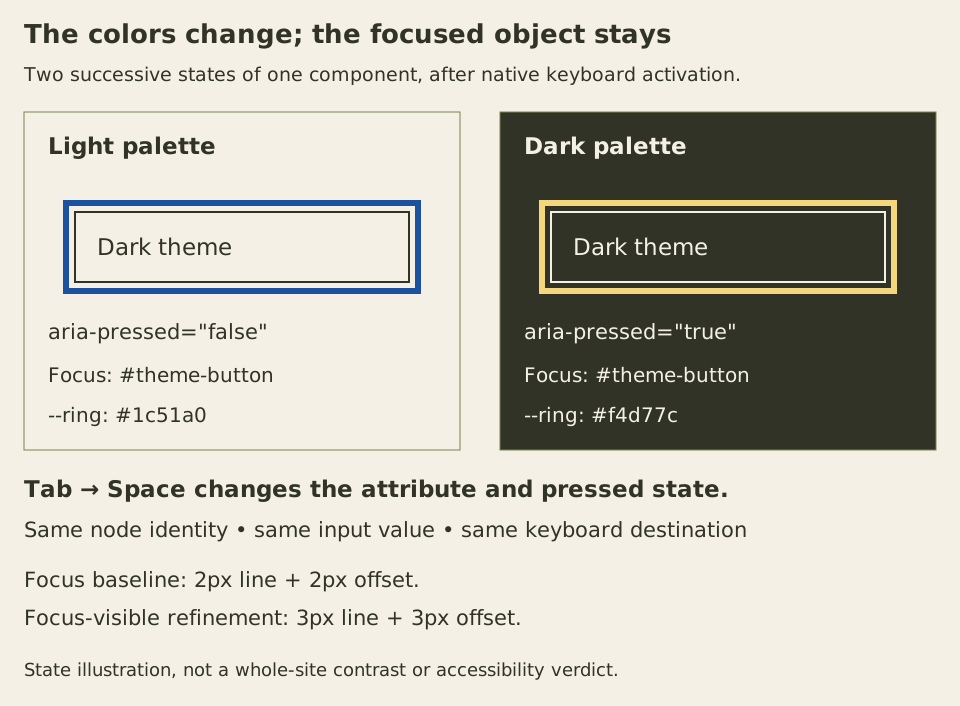
Contrast still depends on the actual adjacent colors. These tokens belong to the two flat surfaces shown here. Moving the control over a photograph, translucent overlay or differently colored card requires checking that placement. A theme name alone is not evidence that an outline can be distinguished from its surroundings.
If a framework recreates the subtree on each theme change, a matching id on the replacement does not preserve browser focus. The old object has been disconnected. Real structural changes sometimes require deliberate focus placement, but a presentation change can usually preserve the existing elements. This example stores no theme preference across page loads; adding persistence is a separate state decision.
Inspect focus state without disturbing it
Run the following diagnostic in the console while the page has focus. It reads the three controls without moving focus or changing attributes. If interacting with developer tools changes the page’s focus state, return to the page and repeat the keyboard sequence before interpreting the result.
(() => {
  const demo = document.querySelector('.focus-demo');
  const supportsVisible = CSS.supports('selector(:focus-visible)');
  const rows = [...demo.querySelectorAll('button, input, a')].map(control => {
    const style = getComputedStyle(control);
    const box = control.getBoundingClientRect();
    return {
      id: control.id,
      active: document.activeElement === control,
      visibleMatch: supportsVisible ? control.matches(':focus-visible') : null,
      theme: demo.dataset.theme,
      outline: style.outlineStyle,
      width: style.outlineWidth,
      offset: style.outlineOffset,
      color: style.outlineColor,
      boxWidth: box.width,
      boxHeight: box.height,
    };
  });
  console.table(rows);
  return rows;
})();
In a fresh pointer sequence in the tested Chrome build, clicking the button leaves focus-visible unmatched and uses the two-pixel baseline. Clicking the text field matches focus-visible and uses the three-pixel refinement. Tabbing onward reaches the link with the stronger indicator. These observations illustrate the browser’s choices; they are not a cross-browser event-to-selector table.
The diagnostic reports computed styles and border boxes, not a screenshot of visible pixels. A computed three-pixel outline can still be clipped, covered, or insufficiently distinct against its background. You need a separate spatial check to answer those questions.
Reproduce a correct outline that the ancestor cuts away
Append this separate probe after the main example. Its buttons have no application action: they are focus targets for comparing two clipping boxes. Use Tab to reach them, or focus each in developer tools while inspecting its pixels.
<section class="clip-lab" aria-labelledby="clip-title">
  <h2 id="clip-title">Outline clearance probe</h2>
  <div class="clip-probe" data-room="no">
    <button class="probe-control" type="button">Clipped outline</button>
  </div>
  <div class="clip-probe" data-room="yes">
    <button class="probe-control" type="button">Eight pixels of room</button>
  </div>
</section>
.clip-lab {
max-inline-size: 42rem;
margin: 2rem auto;
padding: 1.5rem;
font: 1rem/1.5 system-ui, sans-serif;
overflow-wrap: anywhere;
}
.clip-lab, .clip-lab * { box-sizing: border-box; }
.clip-probe {
inline-size: min(100%, 18rem);
margin-block: 1.5rem;
padding: 0;
overflow: hidden;
background: #f4f0e6;
}
.clip-probe[data-room="yes"] { padding: 8px; }
.probe-control {
display: block;
inline-size: 100%;
margin: 0;
padding: .5rem .75rem;
border: 1px solid #303326;
color: #303326;
background: #f4f0e6;
font: inherit;
overflow-wrap: anywhere;
}
.probe-control:focus {
outline: 3px solid #1c51a0;
outline-offset: 3px;
}For this simple rectangular probe, the three-pixel offset leaves a gap outside the button, and the three-pixel line extends the painted region six pixels beyond its border. In the first box, the button touches every clipping edge. Its border remains visible, but the external outline is cut away. The computed outline values are still correct.
The second box reserves eight pixels on each side. Six are occupied by the outline and gap, leaving two before the clipping edge. Adding padding changes the button’s available content width because the outer probe width stays fixed; that is a real layout choice, not a free decoration. The two-pixel baseline in the main example needs four pixels of external room, while its stronger state needs six.
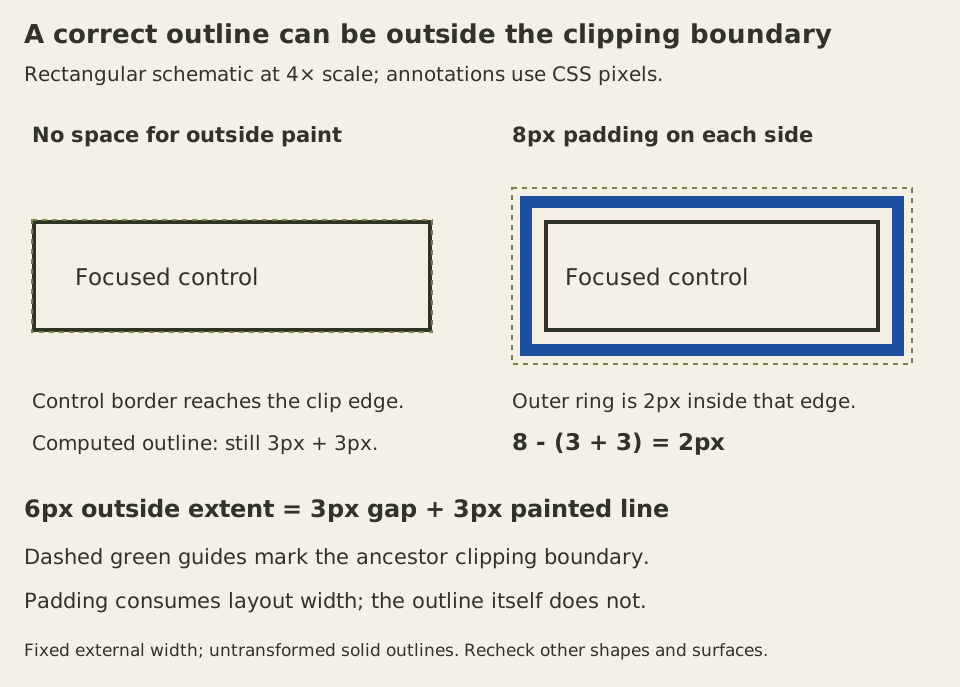
The CSS outline rules state that outlines do not occupy layout space and can have nonrectangular shapes. Our arithmetic concerns untransformed rectangular controls with the stated solid outline. It does not derive every multiline inline outline, platform-specific auto outline or transformed rendering.
An inward outline is another possible repair, but it spends space over the control’s interior and can compete with text or its border. Removing the ancestor’s clipping changes what other content may escape. Choose between spacing, an inward indicator and a different clipping boundary according to the component’s actual job.
Respect a forced palette and keep the component visible
Forced-colors mode can replace author colors with system colors. The CSS Color Adjustment rules also make box-shadow and text-shadow compute to none. A focus treatment made only from a shadow therefore has a different failure mode from an outline.
The main example uses Canvas, CanvasText and Highlight in that mode and leaves forced-color-adjust at auto. Its outline remains a real solid line. Changing the dark-theme pressed state can still change the preference attribute even when the forced palette makes both theme surfaces look alike. The pressed state describes the preference; it should not promise that the system will honor every author color.
Browser media emulation checks the CSS response to forced colors. It is useful evidence, but it does not replace checking a real operating-system contrast theme and the browser combinations your product supports. Do not disable forced adjustment across the component just to preserve its ordinary screenshot.
The one-rem scroll margin on the main focus targets also leaves room when scrolling brings them into view. In the enlarged-text keyboard check, omitting that margin let the browser place the bottom of a link within half a pixel of the viewport edge, cutting its external ring. The final rule preserves clearance in the checked sequence. Scroll margin also affects fragment targeting without enabling snapping; it changes the requested viewing area, not the element’s layout margin. Other focus-scrolling behavior still needs checking in supported browsers.
Finally, an outline cannot rescue a control hidden behind a sticky panel. Focus Not Obscured (Minimum) evaluates whether the component is entirely hidden by author-created content; it is distinct from Focus Visible. In this exercise we check the whole outline as a stronger local design goal, without claiming that the minimum criterion requires every external outline pixel to be unobscured.
Repeat the complete task at 320 CSS pixels with larger default text and additional spacing: reach the theme button, activate it, edit the name, follow the notes link and compare both clipping probes. Verify focus continuity, full control names where they wrap, the indicator’s pixels and the next keyboard destination. Each observation checks a different part of keeping the reader’s place.