Read the cascade before adding important
Trace a link color through layers, inline styles, specificity and scope with six reversible experiments before adding CSS overrides.

If you can read basic CSS selectors, this experiment will help you explain why a link ignores a rule containing an ID. The cascade compares several kinds of priority before specificity. Adding more classes cannot cross an earlier boundary, and adding !important changes which ordering applies.
We will inspect one property, the link’s text color, on an isolated page. The example is a teaching fixture, not a claim about this portfolio’s stylesheet. It keeps transitions, animations, shadow trees and inline styles out of the initial case. Those boundaries matter when applying the result elsewhere.
Make two matching rules disagree
Put this markup and stylesheet in a blank HTML document. The control remains a native link: Tab focuses it and Enter follows its fragment. Looking like a button does not change that behavior or require a button role.
<section class="demo" id="editor" aria-labelledby="demo-title">
  <h2 id="demo-title">A link styled as a button</h2>
  <a class="button text-warning" href="#cascade-notes">Read the notes</a>
  <p id="cascade-notes">The link navigates here. Its color is our test property.</p>
</section>
@layer base, components, utilities;
@layer base {
.demo {
box-sizing: border-box;
max-inline-size: 40rem;
padding: 1rem;
color: #303326;
background: #f4f0e6;
overflow-wrap: anywhere;
}
.button {
display: inline-block;
box-sizing: border-box;
max-inline-size: 100%;
padding: .6rem 1rem;
border: 1px solid currentColor;
font: inherit;
}
.button:focus-visible {
outline: 3px solid currentColor;
outline-offset: 3px;
}
}
@layer components {
#editor .button { color: darkolivegreen; }
}
@layer utilities {
.text-warning { color: maroon; }
}The link is maroon. Both color rules match, but normal declarations in the later utilities layer outrank normal declarations in components. The ID never gets a chance to decide this contest. Layer order is established when the layers are first declared; reopening components later in the file adds rules without moving that layer after utilities.
For these ordinary author rules, an unlayered normal declaration has higher precedence than every layered normal declaration. This is a migration trap: placing your new component rules in a layer while leaving old rules unlayered can strengthen the old rules relative to the new ones. A later import or a longer selector does not automatically repair the relationship.
The layer reference explains both the first-declaration ordering and the different treatment of important declarations. Establish named layers deliberately before loading the rules that use them. Moving third-party CSS into a chosen layer can be useful, but doing that changes precedence and needs regression review.
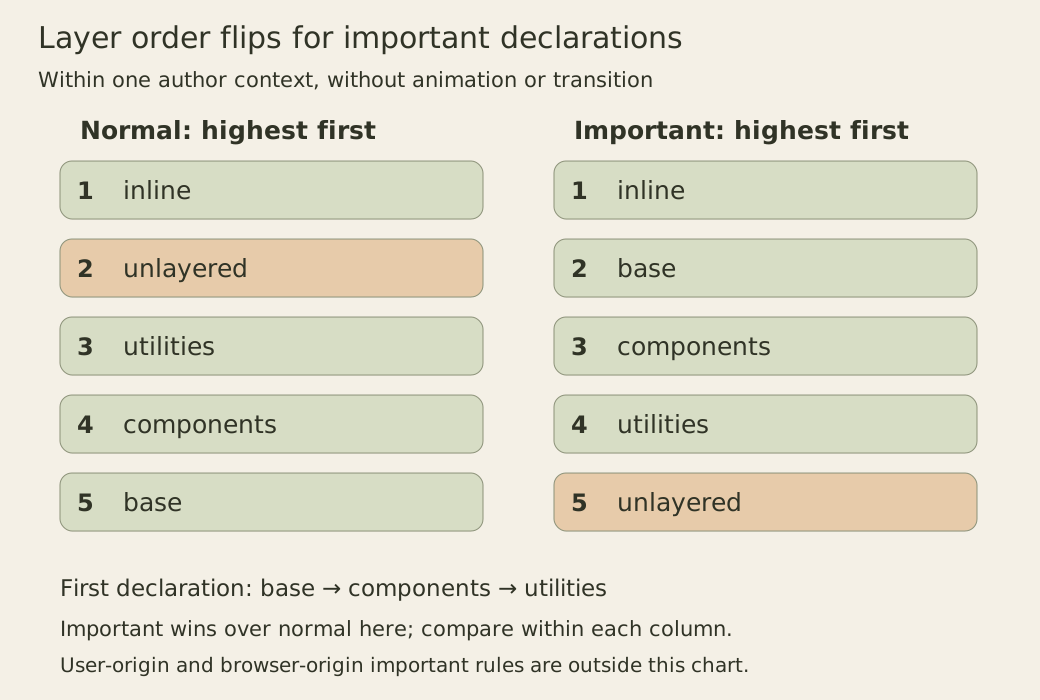
Read each column from highest priority to lowest. The figure compares declarations from the same author origin in this document context. It does not place author CSS above user preferences or active transitions.
Run six controlled changes
In the page’s console, run the following block after the link exists. It temporarily inserts one stylesheet and changes only the link’s inline color. Its finally block restores the original style attribute and removes the temporary sheet, including if collecting a row throws. Use the isolated fixture: unrelated selectors or active motion would introduce more contestants.
{
  const link = document.querySelector('#editor .button');
  const originalStyle = link.getAttribute('style');
  const probe = document.createElement('style');
  const importantRules = `
    @layer components {
      #editor .button { color: darkolivegreen !important; }
    }
    @layer utilities {
      .text-warning { color: maroon !important; }
    }
    .text-warning { color: navy !important; }
  `;
  const rows = [];
  document.head.append(probe);
  try {
    for (const [name, rules, inlinePriority] of [
      ['normal layers', '', null],
      ['unlayered normal', '.text-warning { color: navy; }', null],
      ['inline normal', '', ''],
      ['component important', `@layer components {
        #editor .button { color: darkolivegreen !important; }
      }`, null],
      ['three important rules', importantRules, null],
      ['inline important', importantRules, 'important'],
    ]) {
      probe.textContent = rules;
      link.style.removeProperty('color');
      if (inlinePriority !== null) {
        link.style.setProperty('color', 'teal', inlinePriority);
      }
      rows.push({ name, color: getComputedStyle(link).color });
    }
    console.table(rows);
  } finally {
    probe.remove();
    link.setAttribute('style', originalStyle ?? '');
    if (originalStyle === null) link.removeAttribute('style');
  }
}
The expected rows are:
| Case | Computed color | Winning reason |
|---|---|---|
| normal layers | rgb(128, 0, 0) | later utilities layer |
| unlayered normal | rgb(0, 0, 128) | unlayered normal rule |
| inline normal | rgb(0, 128, 128) | normal inline declaration |
| component important | rgb(85, 107, 47) | important beats normal here |
| three important rules | rgb(85, 107, 47) | earlier important layer |
| inline important | rgb(0, 128, 128) | important inline declaration |
In the fifth row, the component rule beats both the later utility layer and the unlayered important rule. Layer priority reverses for important declarations. An important rule in base would outrank the component rule. Inline important styles still outrank stylesheet important declarations from this same author context; treating inline styles as merely another ID score would obscure that boundary.
These are static computed-color observations, not measurements of paint timing. The cascade sorting specification covers origins, importance, element-attached styles and layers. Important user-origin and user-agent declarations can outrank important author declarations. Regular site styles cannot claim the highest priority just by accumulating important flags.
Specificity compares the rules that remain
Move both original color rules into components and the ID selector wins. Now they share the relevant origin, importance and layer. If instead two matching class selectors have equal specificity in that same context, later source order wins, provided no scoping-proximity distinction intervenes.
Specificity is a tuple compared from left to right, not a decimal score. An ID component beats any number of class components. Class selectors, attributes and most pseudo-classes share the next component; type selectors and pseudo-elements use the last. The following examples use the three-component notation from the Selectors specification.
| Selector | Specificity |
|---|---|
| #editor .button | (1, 1, 0) |
| .text-warning | (0, 1, 0) |
| :where(#editor) .button | (0, 1, 0) |
| :is(#missing, .text-warning) | (1, 0, 0) |
The last selector matches through the class, but its most specific argument contains an ID. The argument does not need to be the matching branch to contribute that weight. The :is, :not and :has functions use their most specific argument under these rules; :where and its arguments contribute zero. These distinctions help explain why a short-looking selector can defeat a longer one.
Use the browser’s matched-rules panel to identify the winning declaration and its layer. A computed color alone does not tell you which rule supplied it, especially when two candidates happen to use the same value. Change one candidate temporarily or inspect its source instead of inferring precedence from an unchanged pixel.
A nearer scope can beat later source order
This separate example needs a browser supporting @scope. Add the following markup and CSS outside the earlier fixture. Both rules are unlayered, normal author declarations with equal specificity. The inner rule appears first, but its scope root is nearer the paragraph.
<div class="outer">
  <div class="inner">
    <p class="note">A note inside two scope roots.</p>
  </div>
</div>
@scope (.inner) {
.note { color: darkolivegreen; }
}
@scope (.outer) {
.note { color: maroon; }
}The paragraph is dark olive green: its inner scope root is one ancestor hop away, while the outer root is two. Scoping proximity breaks this tie before source order. Change only the outer rule’s selector to .note.note and maroon wins instead. Specificity is considered before proximity, so a nearby root does not create a universal shield against stronger selectors.
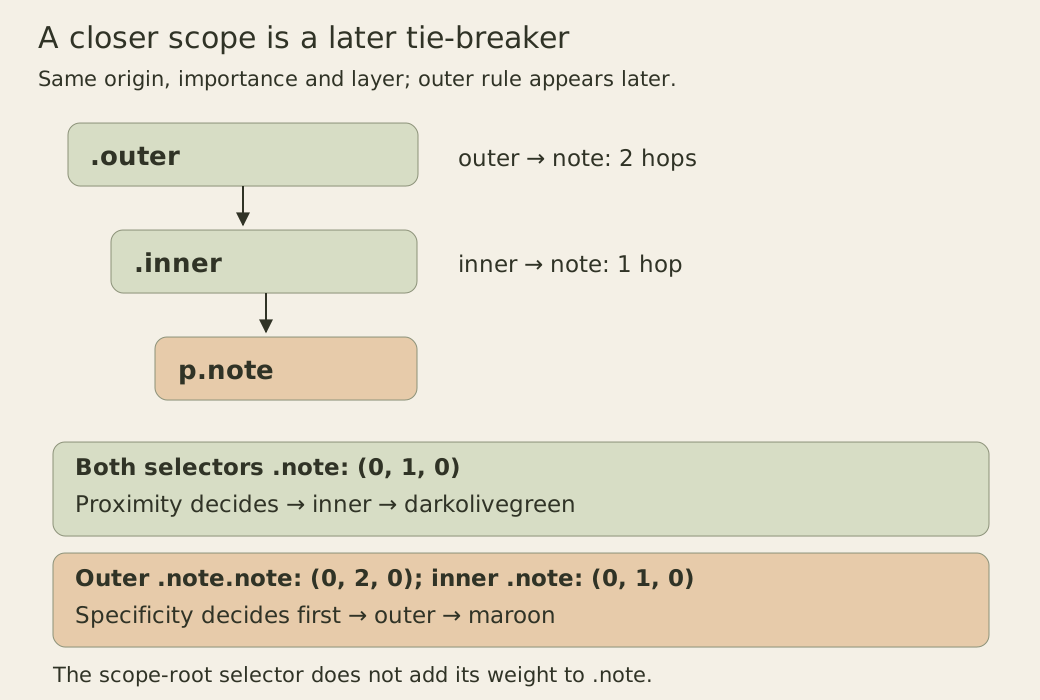
The scope-root selectors themselves do not add specificity to the enclosed rule. An explicit :scope in that rule would contribute pseudo-class specificity. The scope reference explains this distinction and the proximity comparison. In a browser that does not parse these scope blocks, their declarations are ignored; a default text color is not a contradictory cascade result. Check the parsed rules and your supported-browser requirements before adopting this feature.
Inheritance and motion require a different question
A parent declaration does not compete in the child’s cascade simply because its selector is stronger. Give the section an important purple color: the link still has its own maroon declaration. Setting the link’s winning color explicitly to inherit would instead request its parent’s computed color. First identify the exact element whose property you are investigating.
Custom properties introduce another trace. Their winning values and the declaration consuming them must both be correct. A padding declaration that wins the cascade can still become invalid when its variable is substituted. Adding specificity to the consumer does not repair an invalid value.
Motion also changes the comparison. CSS animations outrank normal declarations but lose to important declarations; a value generated by an active transition outranks even important declarations during that transition. The cascade overview places these effects in the ordering. Inspect active animations and transitions rather than treating an intermediate color as evidence that the static rule lost.
To practice, predict the result before making each edit: reopen components after utilities, place two equal class rules in utilities, then move the unlayered override into base. Record the winning rule and the first criterion that separates it from the loser. Finally check the link by keyboard and with enlarged text. A clean precedence explanation should accompany a usable control, not replace that check.