Watch a Deployment replace a Pod without changing its intent
Run a local Kubernetes deletion experiment and compare owner UIDs, desired replicas, Ready status and minReadySeconds before deleting the test cluster.
Deleting one Pod does not change a Deployment’s request for three replicas. The missing Pod is replaced because the controller still has work to do. The replacement has a new identity, and its existence does not mean it is ready to serve traffic.
This article is for a developer learning to operate workloads in Kubernetes. It assumes basic container and command-line knowledge. We run a real single-node local cluster, delete one controlled Pod, inspect its replacement and then change the desired replica count. The experiment deliberately separates created, ready and available replicas using a file-based readiness probe. It is a control-plane exercise, not an application load test or a cloud availability measurement.
Follow the owner chain
A Deployment manages ReplicaSets. A ReplicaSet creates or deletes Pods to approach its requested count, using a selector and a Pod template. The kubelet on a node manages containers inside each Pod. Those responsibilities explain why deleting a Pod and restarting a container are different events.
Look at the actual owner references rather than inferring ownership from a similar name. A controlled Pod points to a ReplicaSet UID; that ReplicaSet points to the Deployment UID. The local experiment checks both links. It also checks that the ReplicaSet UID remains unchanged after deletion. No new application template is introduced, so this replacement is not an application rollout.
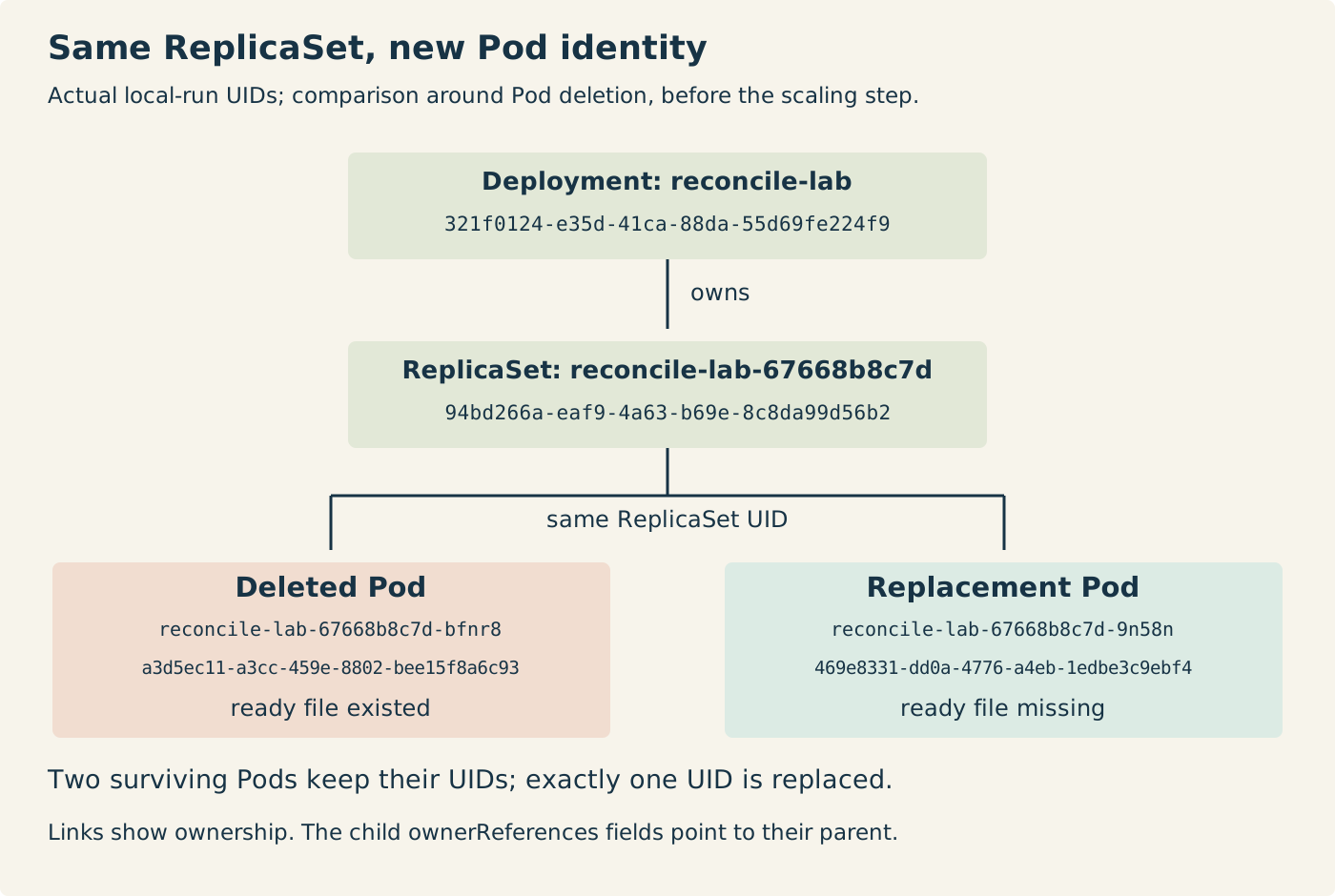
Kubernetes defines a Pod’s identity by its UID. A replacement is a different Pod, even if a workload can reuse a name. Here the names differ too, but the proof uses UIDs. The replacement’s container filesystem does not inherit the readiness marker written into the deleted container. This observation concerns that temporary file; it says nothing about recovery from a separately provisioned persistent volume.
Ask four different questions
The desired count comes from the Deployment specification. The other counts are controller-reported status. For the tested Kubernetes 1.34 API, the versioned field definitions distinguish targeted non-terminating Pods, those with a Ready condition, and those ready long enough to be available.
Current replicas therefore do not mean healthy application workers. A Pod can exist while waiting for scheduling or startup. This experiment additionally waits for its selected Pods to reach the Running phase so that the executable probe can be controlled. That extra condition is a property of the test, not the definition of the Deployment replica count.
Ready and available differ because the manifest sets fifteen minimum ready seconds. A newly ready Pod must satisfy that interval without a container crash before it counts as available. The default is zero, which can hide the distinction in a quick demonstration. Neither count establishes successful business transactions; this probe only checks for a file.
Create a deliberately gated workload
Save this as deployment.yaml. It requests three sleeping containers and marks each unready until /tmp/ready exists. There is no liveness probe. A failed readiness check therefore does not instruct the kubelet to restart the container. The memory limit and small request keep this local example bounded; they are not production sizing advice.
apiVersion: apps/v1
kind: Deployment
metadata:
  name: reconcile-lab
spec:
  replicas: 3
  minReadySeconds: 15
  selector:
    matchLabels:
      app: reconcile-lab
  template:
    metadata:
      labels:
        app: reconcile-lab
    spec:
      terminationGracePeriodSeconds: 1
      containers:
        - name: sleeper
          image: busybox:1.37.0
          imagePullPolicy: Never
          command: ["sleep", "3600"]
          readinessProbe:
            exec:
              command: ["test", "-f", "/tmp/ready"]
            periodSeconds: 1
            failureThreshold: 1
          resources:
            requests:
              cpu: 10m
              memory: 8Mi
            limits:
              memory: 32Mi
The label in the selector matches the label in the Pod template. Keep this experiment’s selector separate from other controllers. Kubernetes documentation warns that overlapping controller selectors can produce conflicts; a matching label alone is not a reason to attach an unrelated Pod to this workload.
The example uses Docker, kind 0.30.0 and kubectl 1.34.1 on Linux. The kind release supplies the pinned Kubernetes 1.34.0 node image used by the script. Install those tools, then prepare the exact BusyBox image and run the experiment in a directory containing the two files:
docker pull busybox:1.37.0@sha256:9db7b59979c38555a39def84a31fb98b5296952f9e3afd4f6f11f05b07adfab0
docker tag busybox@sha256:9db7b59979c38555a39def84a31fb98b5296952f9e3afd4f6f11f05b07adfab0 busybox:1.37.0
python3 -I experiment.py
The tag is used only after verifying its expected repository digest. The workload sets image pulling to Never because the script explicitly loads the image into the local node. An omitted load should fail visibly; it should not silently fetch a different image during the observation.
Run the controlled sequence
Save the following as experiment.py. It creates a uniquely named kind cluster and an isolated kubeconfig. Every kubectl command names that file and the generated context. The cleanup uses the same kubeconfig and removes the owned cluster even when an assertion fails. The only local output file is observations.json, containing the raw status records and identities.
import json
import os
from pathlib import Path
import subprocess
import tempfile
import time
import uuid

NODE = 'kindest/node:v1.34.0@sha256:7416a61b42b1662ca6ca89f02028ac133a309a2a30ba309614e8ec94d976dc5a'
BUSYBOX_DIGEST = 'busybox@sha256:9db7b59979c38555a39def84a31fb98b5296952f9e3afd4f6f11f05b07adfab0'
kind = os.environ.get('DEVOPS_KIND', 'kind')
cluster = 'reconcile-' + uuid.uuid4().hex[:10]
manifest = Path(__file__).with_name('deployment.yaml')
output = Path(__file__).with_name('observations.json')
records = []

def run(args, timeout=45):
    result = subprocess.run(args, text=True, capture_output=True, timeout=timeout)
    if result.returncode:
        raise RuntimeError(f'{args!r}\n{result.stdout}\n{result.stderr}')
    return result.stdout

image = json.loads(run(['docker', 'image', 'inspect', 'busybox:1.37.0']))[0]
assert BUSYBOX_DIGEST in image['RepoDigests'], 'Pull the stated BusyBox image first'
with tempfile.TemporaryDirectory(prefix='devops-reconcile-') as directory:
    kubeconfig = str(Path(directory) / 'config')
    base = ['kubectl', '--kubeconfig', kubeconfig, '--context', 'kind-' + cluster]
    def k(*args):
        return run(base + list(args))
    def get(*args):
        return json.loads(k('get', *args, '-o', 'json'))
    def wait_state(label, desired, ready, available):
        deadline = time.monotonic() + 120
        while time.monotonic() < deadline:
            d = get('deployment', 'reconcile-lab')
            pods = get('pods', '-l', 'app=reconcile-lab')
            active = [p for p in pods['items'] if not p['metadata'].get('deletionTimestamp')]
            s = d.get('status', {})
            observed = (d['spec']['replicas'], s.get('replicas', 0), s.get('readyReplicas', 0), s.get('availableReplicas', 0))
            running = all(p.get('status', {}).get('phase') == 'Running' for p in active)
            if (observed == (desired, desired, ready, available) and
                    len(active) == desired and running and
                    s.get('observedGeneration') == d['metadata']['generation']):
                row = {'label': label, 'elapsedSeconds': round(time.monotonic() - observe_start, 3),
                       'counts': observed, 'deployment': d,
                       'pods': pods, 'replicasets': get('replicasets', '-l', 'app=reconcile-lab')}
                records.append(row)
                print(label, 'desired/current/ready/available', *observed, flush=True)
                return row
            time.sleep(0.3)
        raise TimeoutError(f'{label}: expected state not observed')
    try:
        run([kind, 'create', 'cluster', '--name', cluster, '--kubeconfig', kubeconfig,
             '--image', NODE, '--wait', '120s'], timeout=210)
        run([kind, 'load', 'docker-image', 'busybox:1.37.0', '--name', cluster], timeout=90)
        versions = json.loads(k('version', '-o', 'json'))
        observe_start = time.monotonic()
        k('apply', '-f', str(manifest))
        blocked = wait_state('created-not-ready', 3, 0, 0)
        for p in blocked['pods']['items']:
            k('exec', p['metadata']['name'], '--', 'touch', '/tmp/ready')
        before = wait_state('baseline', 3, 3, 3)
        old = before['pods']['items']
        old_uids = {p['metadata']['uid'] for p in old}
        victim = sorted(old, key=lambda p: p['metadata']['name'])[0]
        k('delete', 'pod', victim['metadata']['name'], '--wait=true', '--timeout=45s')
        replaced = wait_state('replacement-not-ready', 3, 2, 2)
        new = [p for p in replaced['pods']['items'] if p['metadata']['uid'] not in old_uids]
        assert len(new) == 1
        replacement = new[0]
        assert victim['metadata']['uid'] not in {p['metadata']['uid'] for p in replaced['pods']['items']}
        old_rs = before['replicasets']['items'][0]
        new_rs = replaced['replicasets']['items'][0]
        assert len(before['replicasets']['items']) == len(replaced['replicasets']['items']) == 1
        assert old_rs['metadata']['uid'] == new_rs['metadata']['uid']
        assert replacement['metadata']['ownerReferences'][0]['uid'] == old_rs['metadata']['uid']
        assert old_rs['metadata']['ownerReferences'][0]['uid'] == before['deployment']['metadata']['uid']
        assert before['deployment']['metadata']['generation'] == replaced['deployment']['metadata']['generation']
        k('exec', replacement['metadata']['name'], '--', 'test', '!', '-e', '/tmp/ready')
        k('exec', replacement['metadata']['name'], '--', 'touch', '/tmp/ready')
        wait_state('ready-before-available', 3, 3, 2)
        wait_state('recovered', 3, 3, 3)
        k('scale', 'deployment/reconcile-lab', '--replicas=0')
        scaled = wait_state('desired-zero', 0, 0, 0)
        assert scaled['deployment']['metadata']['generation'] > before['deployment']['metadata']['generation']
        assert scaled['replicasets']['items'][0]['metadata']['uid'] == old_rs['metadata']['uid']
        evidence = {'scope': 'Actual single-node local kind control-plane experiment; no cloud deployment or service-traffic measurement.',
                    'versions': versions, 'kindVersion': run([kind, 'version']).strip(),
                    'nodeImage': NODE, 'busyboxImageId': image['Id'],
                    'victimUid': victim['metadata']['uid'], 'replacementUid': replacement['metadata']['uid'],
                    'replicaSetUid': old_rs['metadata']['uid'], 'replacementReadyFileMissing': True,
                    'records': records}
    finally:
        run([kind, 'delete', 'cluster', '--name', cluster, '--kubeconfig', kubeconfig], timeout=90)
        remaining = run(['docker', 'ps', '-a', '--filter', 'name=' + cluster, '--format', '{{.ID}}']).strip()
        assert not remaining, 'Owned kind node still exists'
    evidence['ownedClusterDeleted'] = True
    output.write_text(json.dumps(evidence, indent=2) + '\n')
    print('same ReplicaSet; different Pod UID; owned cluster deleted', flush=True)
The polling limits are test deadlines, not Kubernetes guarantees. The script waits for specific status combinations and checks that the controller has observed the current generation. Deployment, Pod and ReplicaSet reads are separate API calls, so the stored records are not one atomic snapshot across resources. The stable, deliberately gated stages make these checks inspectable without claiming to record every transient state.
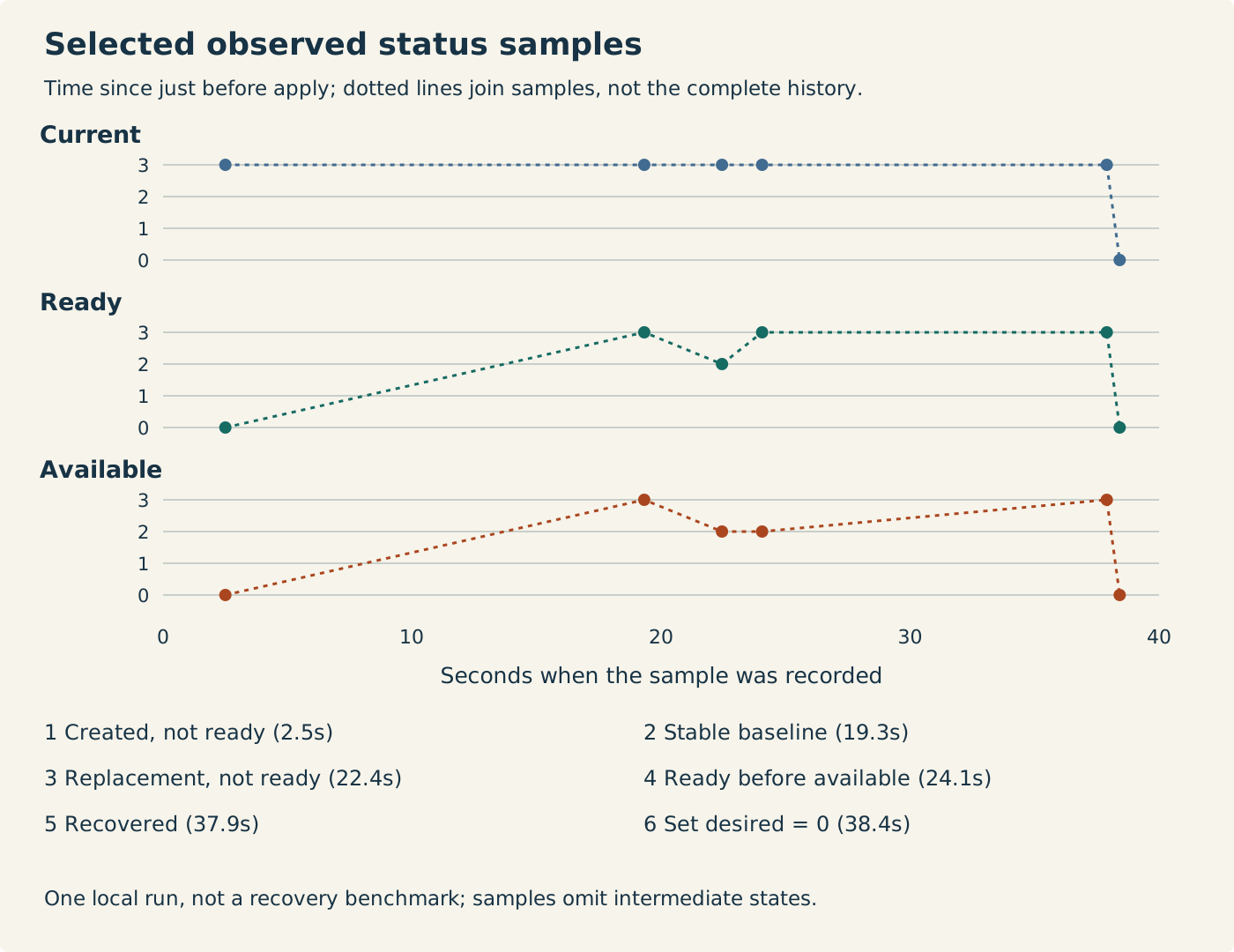
After initial creation, all three Pods exist and run, but none is ready. Touching each marker allows the probe to succeed; after the minimum interval, all three become available. The script then deletes exactly one Pod from the owned workload. It does not lower the desired count or change the template.
At the next selected stage, three Pods again exist, while only the two surviving Pods are ready and available. The controller may replace the object quickly enough that polling never records a current count of two. The experiment does not invent that missing observation. The replacement has a new UID and no marker, while the Deployment generation and ReplicaSet UID stay the same.
Creating the replacement’s marker produces a stage with three ready replicas but only two available. The following stage returns to three available. The plotted times include local startup, probe and API polling effects; they are observations from one run, not a recovery-time benchmark or a promise that another machine reaches each stage at the same second.
Change intent when you want a different steady state
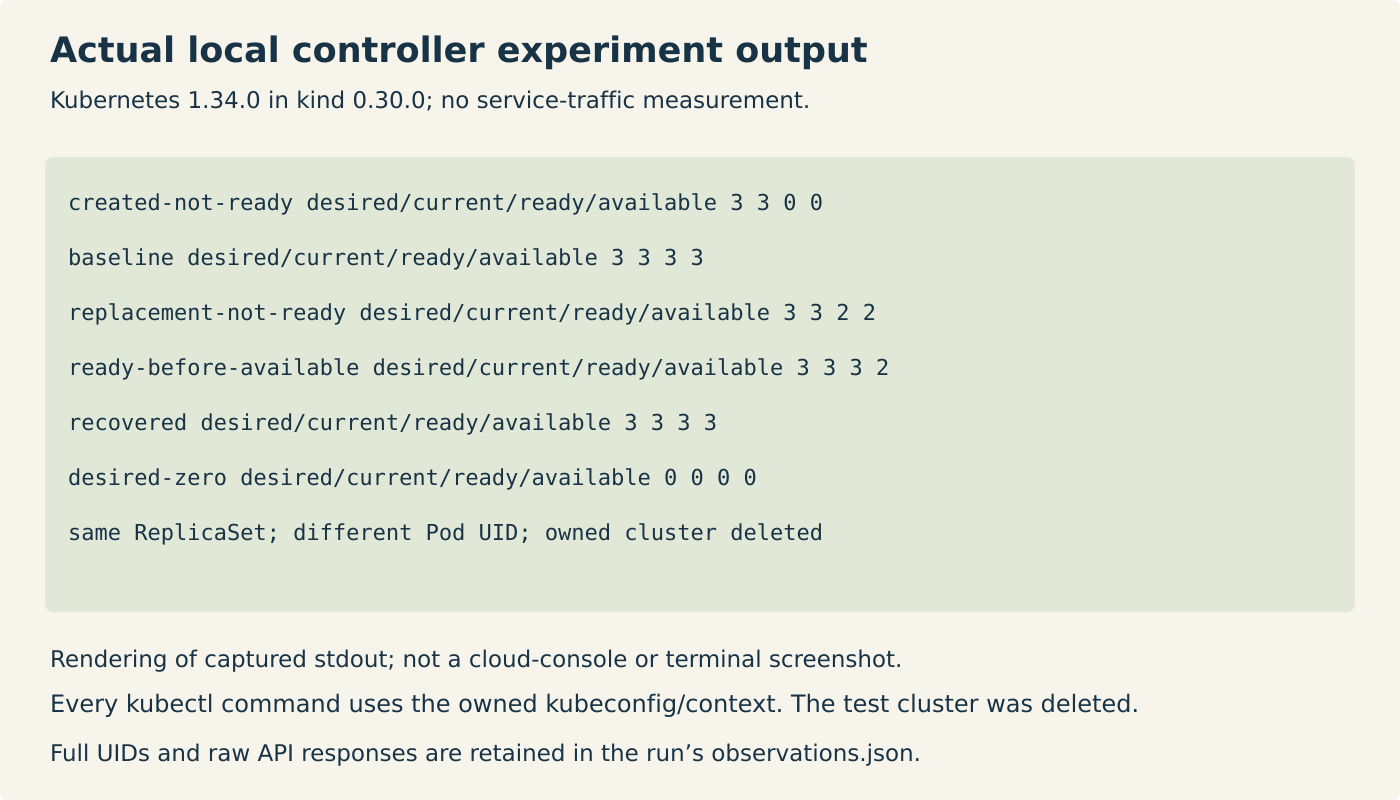
Deleting a controlled Pod is useful here as a bounded experiment, but it is not a way to permanently reduce replica count. The final command changes the Deployment specification to zero replicas. The controller then converges toward zero instead of creating another replacement. The generation increases, while the same ReplicaSet is retained in this unchanged-template example. In both recorded runs, the zero-count sample still listed three Pods with deletion timestamps. They were terminating, so the current count excluded them. A zero status count was not evidence that every old process had already exited.
A rollout has a different trigger: changing the Deployment’s Pod template creates a new rollout. Scaling alone does not. Conversely, the selected rollout strategy is not an “at most three processes” lock during arbitrary Pod deletion. Kubernetes documents that replacement can start while the old Pod is still terminating. Our one-second termination grace and selected samples do not establish a universal ordering of old-process exit and new-process start.
Reconciliation also has prerequisites. A missing image, insufficient scheduling capacity, denied API operation or unavailable node can keep current, ready and available counts below the request. A controller can retry without making the application healthy. For that reason, a desired count is a target to diagnose against, not evidence that all replicas exist or that users are receiving service.
For a small follow-up, change minReadySeconds to zero and run a fresh local cluster. Adapt the harness to wait for three ready and three available together instead of requiring the intermediate three-ready/two-available sample; at zero, that sample is no longer a required state. Keep the UID and owner-reference checks unchanged. A second exercise is to remove the marker-creation action and observe the failed readiness condition until a bounded timeout. Explain why the three unready Pods do not, by themselves, request three additional replicas. Stop the owned cluster after either test, just as the supplied harness does.