Grid columns that fit the content
Calculate responsive Grid thresholds, distinguish empty columns from last-row cells, and test auto-fit, auto-fill and content overflow.

A responsive card list does not need a breakpoint for every column count. If you know the minimum useful width of a card and the space between cards, Grid can calculate how many columns fit. The difficult part is deciding which requirement may yield when the container becomes narrower than a single card.
This example is for readers who can style a block and want to predict what an automatic Grid expression will do. We will use an ordinary horizontal, left-to-right block with an available content width, four nonspanning cards, and no extra placement rules. Intrinsic sizing of a shrink-to-fit ancestor needs a separate analysis; a percentage minimum is not independent of its container.
Start with four ordinary cards
The links below are fictional example destinations. Replace them with actual note routes when using the component. The list has one link per card, meaningful headings, and no scripted click area surrounding the text. The explicit list role preserves that intended relationship when list markers are removed; MDN documents why this matters in Safari.
<ul class="cards" role="list">
  <li><h2><a href="https://example.com/notes/forms">Form labels</a></h2>
    <p>Connect a field with the name readers use.</p></li>
  <li><h2><a href="https://example.com/notes/images">Image choices</a></h2>
    <p>Choose an alternative from the image's purpose.</p></li>
  <li><h2><a href="https://example.com/notes/keyboard">Keyboard paths</a></h2>
    <p>Follow the useful controls in document order.</p></li>
  <li><h2><a href="https://example.com/notes/tables">Table headings</a></h2>
    <p>Keep each value connected to its row and column.</p></li>
</ul>
.cards {
display: grid;
grid-template-columns:
repeat(auto-fit, minmax(min(100%, 16rem), 1fr));
gap: 1.5rem;
margin: 0;
padding: 0;
list-style: none;
}
.cards > li {
box-sizing: border-box;
padding: 1rem;
border: 1px solid #777;
overflow-wrap: anywhere;
}
.cards h2 { margin: 0 0 .75rem; font-size: 1.25rem; }
.cards p { margin: 0; }
.cards a { color: inherit; }
.cards a:focus-visible { outline: 3px solid #526b32; outline-offset: 3px; }Read the track expression from the inside outward. The min function chooses the smaller of the available width and sixteen root-font units. That value becomes the lower track bound. minmax allows growth from that lower bound, and 1fr shares the available space between equivalent flexible tracks. repeat asks for as many repetitions as fit under the specified sizing rules.
With a computed root font size of 16px, the preferred minimum is 256px. A 220px container chooses 220px for the inner minimum, so one track can fit. Replace that inner expression with a rigid 16rem, and the track still needs 256px. The card now overflows before its text or image has had any opportunity to cause trouble.
The sixteen units are a design choice, not a browser judgment about readability. Try representative titles and descriptions to choose them. Card padding and borders occupy space inside the measured card here; the grid itself has neither. Our arithmetic refers to the grid’s content width, not the outer width of an enclosing panel.
Derive the threshold, then measure it
At that root font size, a gap of 1.5rem is 24px. Three preferred-minimum tracks require three times 256 plus two gaps: 816px. Four require 1096px. The gap count is one less than the number of columns; adding a gap at both edges would calculate a different layout.
At 1000px, three columns fit. Subtract 48px for the two gaps and divide the remaining 952px by three: approximately 317.33px per track. At 800px, only two columns fit, each 388px wide. The Grid concepts guide explains why fractional units divide available space; 1fr is not one third of the container before subtracting gaps.
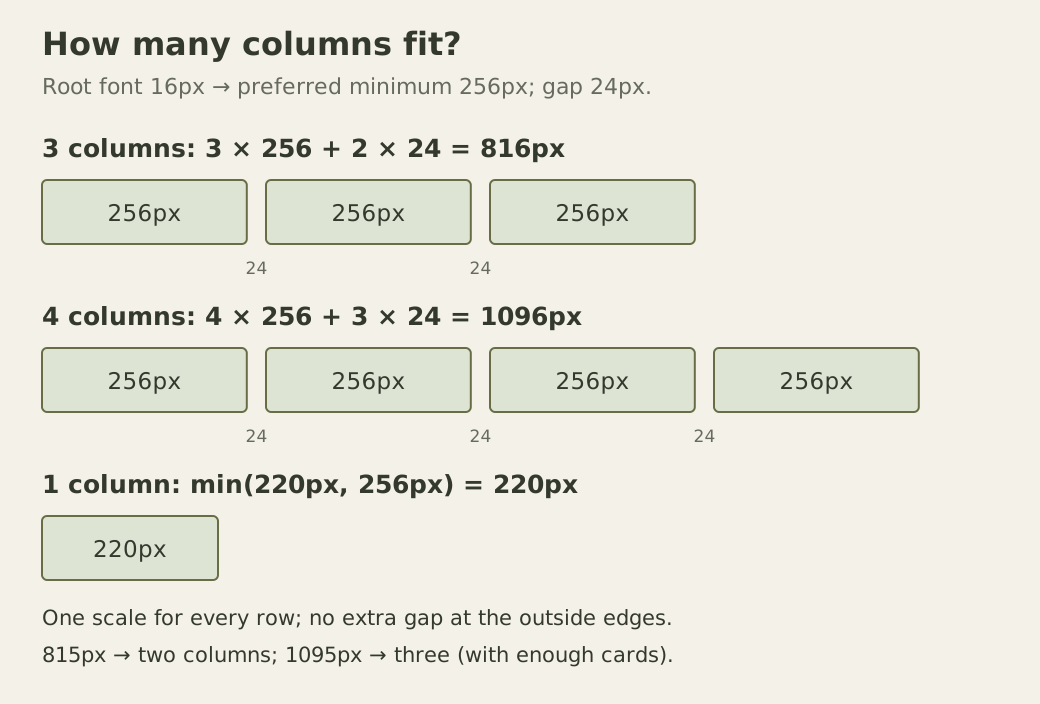
The diagram uses the same scale for each row, so the added fourth column and its gap have a visible cost. At the threshold, the columns are exactly at their preferred minimum. Immediately below it, the layout changes column count instead of squeezing every column a little further.
These numbers depend on the computed root font, not a permanent viewport breakpoint. If the root font becomes 32px, the preferred minimum becomes 512px and the gap becomes 48px. Two columns now need 1072px. A 1000px grid therefore has one column, even on a wide screen. A sidebar can similarly reduce the available width without changing the viewport at all.
An empty column is different from an empty cell
The repeat reference and Grid specification distinguish auto-fill from auto-fit. Both first determine the repetitions that fit. After item placement, auto-fit collapses an empty repeated track to zero, including its adjacent gutters. A track is empty when no in-flow item occupies or spans it anywhere in the grid.
With only two cards at 1000px, auto-fill retains three columns of about 317.33px. Its third column stays empty. auto-fit collapses that column, leaving one gap and two 488px cards. Choosing between them is a design decision: should a small result set expand into the available space, or keep the width it would have in a fuller grid?
Put all four cards back. The first row occupies all three columns, and the fourth card starts the second row. No column is empty across the entire grid, so neither keyword collapses one. The last card remains about 317.33px wide. auto-fit does not mean that each row gets its own independent distribution of space.
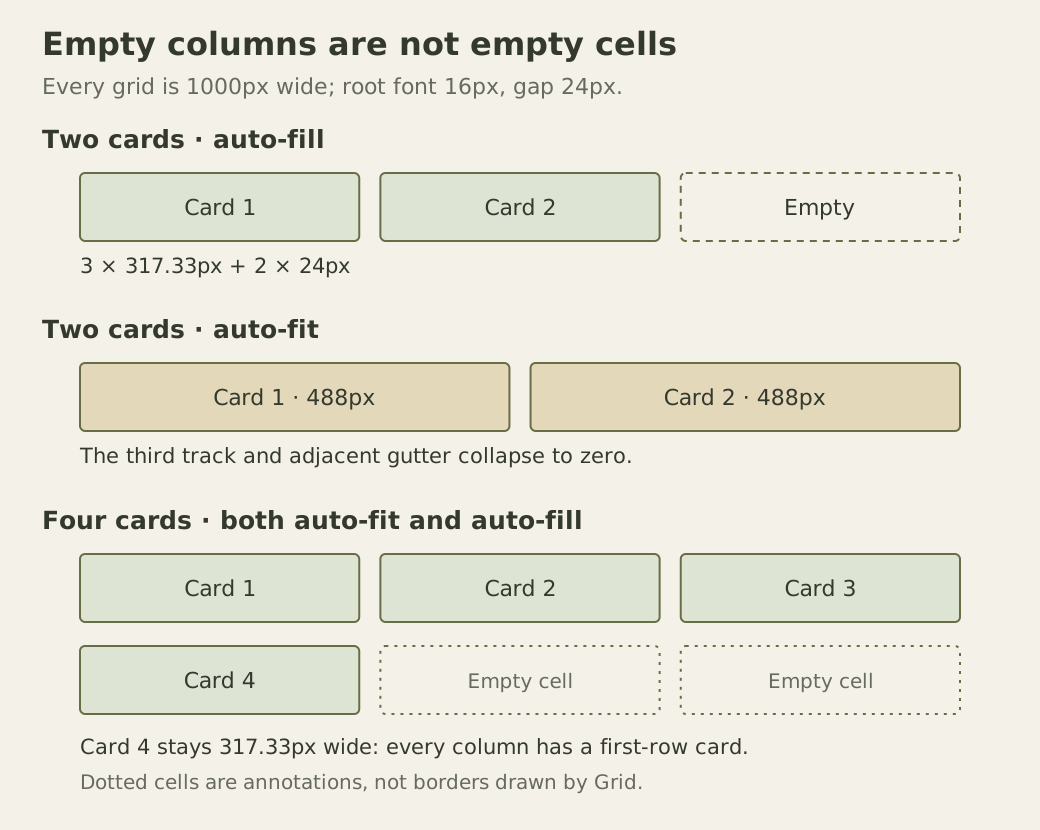
The empty cells beside the fourth card are not empty columns. If the actual requirement is to expand every incomplete row independently, consider a wrapping Flexbox layout. It makes a different promise about alignment between rows; that tradeoff is more useful than treating one layout system as universally superior.
Run this diagnostic in the console of the four-card example with a 16px root font. It temporarily gives the grid a 1000px width, compares both keywords, then restores the original child nodes and inline style. It is an experiment for this isolated document, not application rendering code or a general Grid inspector.
{
  const grid = document.querySelector('.cards');
  const originalNodes = [...grid.childNodes];
  const items = [...grid.children];
  const originalStyle = grid.getAttribute('style');
  const rows = [];
  try {
    grid.style.inlineSize = '1000px';
    for (const count of [2, 4]) {
      grid.replaceChildren(...items.slice(0, count));
      for (const mode of ['auto-fit', 'auto-fill']) {
        grid.style.gridTemplateColumns =
          `repeat(${mode}, minmax(min(100%, 16rem), 1fr))`;
        const first = grid.firstElementChild.getBoundingClientRect();
        const last = grid.lastElementChild.getBoundingClientRect();
        rows.push({
          count, mode,
          firstWidth: Number(first.width.toFixed(2)),
          lastWidth: Number(last.width.toFixed(2)),
          lastOnAnotherRow: last.top > first.top
        });
      }
    }
    console.table(rows);
  } finally {
    grid.replaceChildren(...originalNodes);
    if (originalStyle === null) grid.removeAttribute('style');
    else grid.setAttribute('style', originalStyle);
  }
}
The two-card rows should show 488px for auto-fit and about 317.33px for auto-fill. Both four-card rows should show about 317.33px and report that the last card starts another row. Small fractional differences are normal in layout measurements. The program reads border boxes; because the cards stretch to their tracks in this example, those widths reveal the track widths too.
Test the content that resists the layout
The inner min removes one cause of overflow. It does not make arbitrary descendants responsive. Add a 500px-wide image to the 220px case and it can extend outside an otherwise correctly sized card. For an ordinary image, max-inline-size: 100%; block-size: auto constrains it while preserving its aspect ratio. A preformatted example may instead need its own horizontal scroll region.
The card rule uses overflow-wrap: anywhere so a long uninterrupted title can wrap. It does not truncate the underlying text. Remove that rule and paste a long identifier to see the difference between the card’s boundary and its content’s painted extent. Do not lower every track minimum to disguise one incompatible descendant.
Leave card heights content-driven. Equal columns do not require identical amounts of text, and longer translations should make rows taller rather than disappear behind fixed heights. If footer alignment matters, give the inside of each card its own layout instead of assuming the outer Grid solves that problem.
Keep the useful sequence in the source
Ordinary row placement follows this list’s source order. Explicit placement, order, or dense packing can change visual positions without changing the default sequential navigation order. The specification’s accessibility section makes that distinction explicit. Dense packing fills placement holes; it is not a general masonry solution for arbitrary short and tall cards.
Tab through the four links, then remove the styling and read the list. Both should tell the same useful story. Also try zero cards, one card, two cards and four cards. With auto-fit, an entirely empty repeated grid can collapse all those tracks; the application still needs its own understandable empty-result message.
For a final exercise, change the gap to 2rem at a 16px root font. Three columns now require 832px, and four require 1120px. At an 820px content width, predict two 394px columns and check the browser. Then enlarge the root font, use a narrow embedded container, and add a much longer title. Keep the automatic expression only if those cases still meet the reading and navigation requirements that motivated it.