Logical properties for layouts that change direction
Trace a profile through LTR and RTL, resolve physical/logical padding conflicts, and fix an inset that still uses a physical transform.

A gap between an avatar and a name belongs between those items. It does not inherently belong on the left. CSS logical properties let a component describe relationships to text flow, while physical properties keep their meanings of top, right, bottom and left. Choosing correctly starts with the relationship the design needs.
This example is for a frontend developer who knows Flexbox and basic spacing. We will switch a fictional profile between horizontal left-to-right and right-to-left layouts, inspect competing padding declarations, and repair an absolute-positioning mistake. The preview changes direction only. English remains English, Vietnamese remains Vietnamese, and neither preview claims to represent a complete localized product.
Build the direction preview with native controls
Put this HTML and CSS in a standalone page with the usual responsive viewport declaration, <meta name="viewport" content="width=device-width, initial-scale=1">. The select controls only the example region. The two link destinations are real fragments in the same document.
<main class="logical-demo">
  <h1>Spacing that follows the reading direction</h1>
  <label for="direction-choice">Preview direction</label>
  <select id="direction-choice">
    <option value="ltr">Left to right</option>
    <option value="rtl">Right to left</option>
  </select>
  <div id="profile-preview" dir="ltr">
    <article class="profile-row">
      <span class="profile-mark" aria-hidden="true">SE</span>
      <div class="profile-copy">
        <h2><bdi>Sample editor</bdi></h2>
        <p>A fictional profile for checking spacing and keyboard order.</p>
        <nav aria-label="Sample editor">
          <a href="#profile-notes">Read notes</a>
          <a href="#profile-details">See details</a>
        </nav>
      </div>
    </article>
  </div>
  <p id="profile-notes">The first link stays first in source order.</p>
  <p id="profile-details">A direction preview does not translate the text.</p>
</main>
The initials are decorative and hidden from the accessibility tree; the heading supplies the profile’s name. The bdi element isolates that name’s text direction without changing the direction of the surrounding profile layout. The links have ordinary navigation behavior, so their source order and keyboard operation can be inspected directly.
body { margin: 0; }
.logical-demo {
  max-inline-size: 42rem;
  margin-inline: auto;
  padding: 1rem;
  color: #303326;
  background: #f4f0e6;
  font-family: system-ui, sans-serif;
  line-height: 1.5;
  overflow-wrap: anywhere;
}
select { font: inherit; max-inline-size: 100%; }
#profile-preview { margin-block: 1.5rem; }
.profile-row {
  box-sizing: border-box;
  inline-size: min(100%, 28rem);
  display: flex;
  flex-wrap: wrap;
  align-items: start;
  gap: 1rem;
  border-inline-start: 4px solid #77824d;
  padding-block: 1rem;
  padding-inline: 1.5rem .75rem;
}
.profile-mark {
  flex: 0 0 auto;
  inline-size: 3rem;
  block-size: 3rem;
  display: grid;
  place-items: center;
  background: #d5dcc1;
}
.profile-copy { flex: 1 1 12rem; min-inline-size: 0; text-align: start; }
.profile-copy h2, .profile-copy p { margin-block: 0; }
.profile-copy p { margin-block: .75rem; }
.profile-copy nav { display: flex; flex-wrap: wrap; gap: .5rem 1rem; }
a { color: inherit; text-underline-offset: .15em; }
a:focus-visible, select:focus-visible {
  outline: 3px solid currentColor;
  outline-offset: 3px;
}
Place this script after the markup. It sets the HTML direction attribute and runs once initially so the preview agrees with the selected value. It does not save a preference, change the document’s language, or rewrite any text. With JavaScript unavailable, the initial left-to-right card and both links still exist.
const directionChoice = document.querySelector('#direction-choice');
const profilePreview = document.querySelector('#profile-preview');
function updateDirection() {
  profilePreview.dir = directionChoice.value;
}
directionChoice.addEventListener('change', updateDirection);
updateDirection();
The Writing Modes specification recommends HTML direction markup rather than relying on the CSS direction property for HTML content. Here the preview’s attribute makes the intended test boundary explicit. A real translation still needs appropriate language, bidirectional text handling and locale-specific content decisions.
Separate an axis from a physical side
Inline and block dimensions describe text flow. In horizontal writing, the inline axis is horizontal and the block axis is vertical. Direction chooses which end of the inline axis starts; changing to a vertical writing mode also changes which physical dimension is inline.
For the ordinary cases below, using the default mixed text orientation, the mapping is:
| Writing mode and direction | Inline start | Block start | Inline size |
|---|---|---|---|
| horizontal-tb, ltr | left | top | width |
| horizontal-tb, rtl | right | top | width |
| vertical-rl, ltr | top | right | height |
The third row is an axis check, not a recommendation to turn this English or Vietnamese profile vertically. Other writing modes and text orientations deserve their own checks. In particular, logical width is not a permanent synonym for physical width.
At a sixteen-pixel root, our card’s start padding is 24 pixels, its end padding twelve, and its start border four. In LTR, the border and larger padding are on the left; in RTL, they move to the right. The block padding remains sixteen above and below. At the full 448-pixel card width, the inner width is 408; a 48-pixel mark and sixteen-pixel gap leave 344 for the copy.
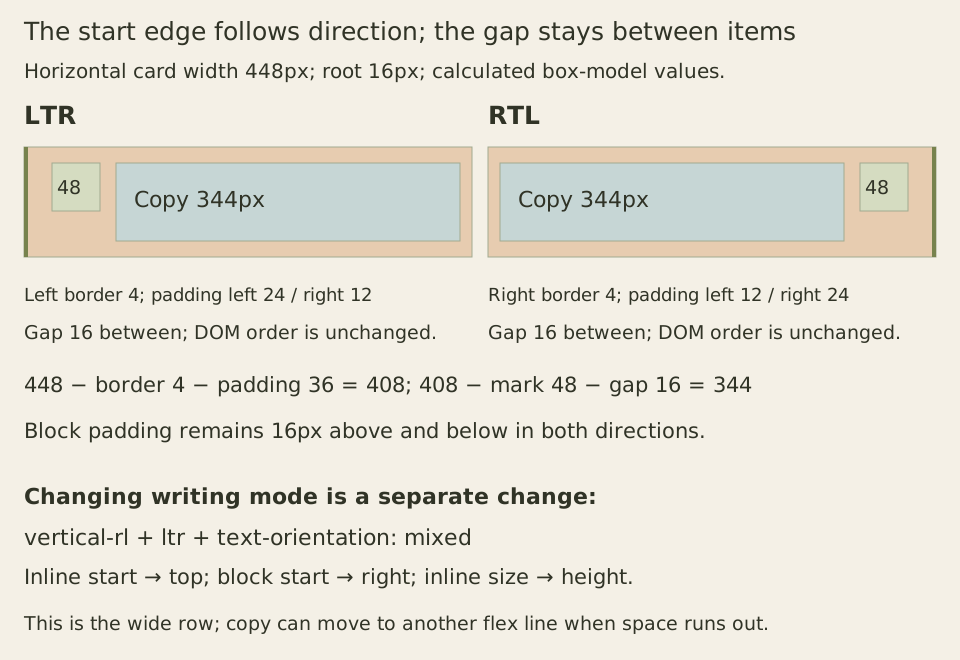
The Flexbox row definition follows the current inline axis. We do not need to add row-reverse for RTL. Doing so would reverse that already directional flow a second time. Gap expresses the space between items without assigning a margin to either physical side.
The copy has a twelve-rem flex basis and can wrap onto another flex line when it cannot share a useful row with the mark. That is a separate content decision. Logical spacing alone would not stop an inflexible avatar from squeezing large text into a very narrow column.
Watch physical and logical declarations share a side
Logical properties do not outrank physical ones. The logical box-model rules map corresponding properties using the element’s own writing mode, then cascade their declarations together. At equal priority, their declaration order can decide which value wins.
Try this class on two otherwise unstyled divs, one with dir="ltr" and one with dir="rtl":
.padding-probe {
  padding: 0;
  padding-inline-start: 24px;
  padding-left: 8px;
}
For LTR, inline-start maps to left, so the later physical declaration wins: left padding is eight and right padding zero. For RTL, inline-start maps to right. The two declarations now affect different sides: left is eight and right is twenty-four. Nothing mysteriously ignored the logical rule; its mapped side changed.
Reverse only the last two declarations. LTR now gets twenty-four pixels on the left because the logical declaration comes last. RTL still gets eight on the left and twenty-four on the right. Keep specificity, layers and importance equal for this comparison; declaration order is not the whole cascade.
The owning element also matters. A locally left-to-right code token inside an RTL row maps its own logical spacing from its own direction. That may differ from the parent’s inline-start edge. Our profile uses gap on the parent and puts isolation on the name’s inner text, avoiding a margin whose intended relationship and owning direction disagree.
A logical inset does not make translateX logical
Consider a decorative twenty-pixel square that should straddle the start edge of a 160-pixel horizontal probe. These two boxes deliberately demonstrate a partial conversion:
<div class="edge-probe" dir="ltr"><span class="dot" aria-hidden="true"></span></div>
<div class="edge-probe" dir="rtl"><span class="dot" aria-hidden="true"></span></div>
.edge-probe {
position: relative;
inline-size: 160px;
block-size: 80px;
outline: 1px solid #77824d;
margin: 2rem;
}
.dot {
position: absolute;
inline-size: 20px;
block-size: 20px;
inset-inline-start: 0;
inset-block-start: 30px;
background: #77824d;
transform: translateX(-50%);
}Horizontal translation percentages use the width of the element’s transform reference box. This square has no border or padding, so minus fifty percent moves it ten pixels in the negative X direction. That movement remains physically leftward when the text direction changes.
In LTR, the initial left edge is zero and translation produces an interval from minus ten to plus ten. Its center is correctly on the left boundary. In RTL, the inset positions the square from 140 to 160 before translation; shifting left produces 130 through 150. Its center is now twenty pixels inside the intended right boundary.
For this fixed-size decorative square, we can express the intended offset entirely along the inline axis:
.dot {
  inset-inline-start: -10px;
  transform: none;
}
With the transform removed, LTR again spans minus ten through plus ten. RTL now spans 150 through 170, centered on the right boundary. The negative logical inset is half the known inline size. If the square’s size changes, that relationship must change too; this is not an automatic centering rule for arbitrary content.
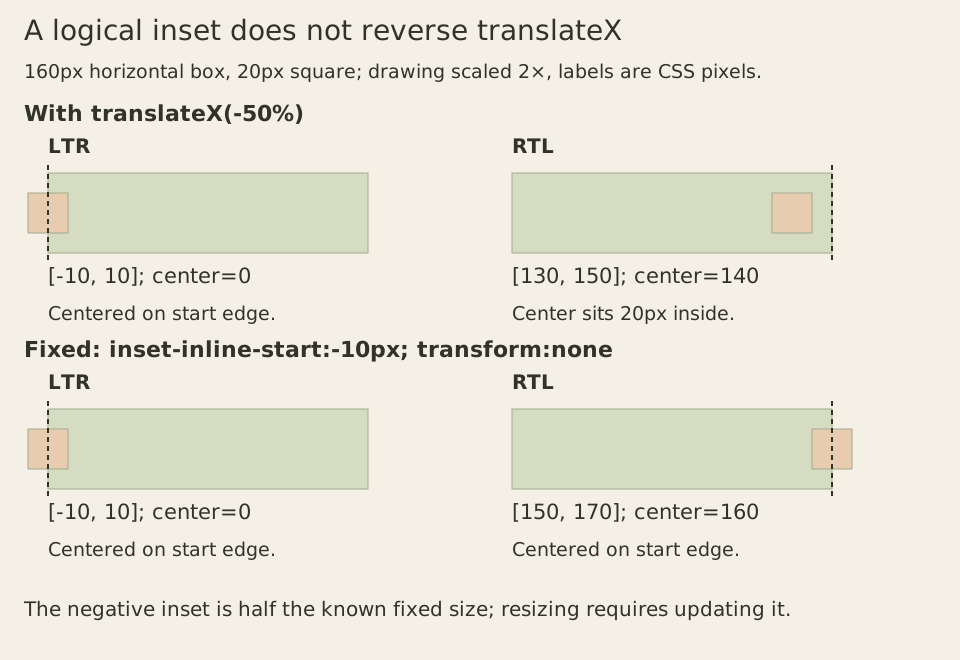
These coordinates refer to the simple unbordered horizontal probe, without ancestor transforms. The same logical offset can be checked in a separate vertical probe, where inline-start becomes top under vertical-rl with LTR direction. Do not infer that converting one inset repairs unrelated rotations, transform origins or every positioned element in a product.
Preserve information order while checking visual order
The profile’s first link remains first in the DOM under both directions. In a wide RTL navigation row it appears to the right of the second link, matching inline progression. Tab should still reach the first link before the second. The Flexbox specification explicitly separates reversed visual flow from sequential navigation order; using row-reverse does not rewrite the document sequence.
A physical edge can still be correct when the requirement is physical, such as aligning an annotation with the left edge of an unchanged plot. Likewise, CSS mirroring should not be applied indiscriminately to logos, photographs or familiar media symbols. Logical layout does not replace a decision about what the content means.
For a reproducible exercise, use the native select to switch direction, inspect the four physical padding and border values, and follow both links with Tab and Enter. Repeat at 320 CSS pixels with enlarged text and wider text spacing. Check the wrapped copy and focus outline, not merely whether the outer card fits. Then reproduce both padding declaration orders and both positioning results. Those observations separate a mapping error, a cascade conflict, an inflexible layout and a physical transform that was never converted.